EasyManua.ls Logo

Primada PC-5610 - Start; Unlock; Language Setting

Primada PC-5610
8 pages
Print Icon
To Next Page IconTo Next Page
To Previous Page IconTo Previous Page
Loading...
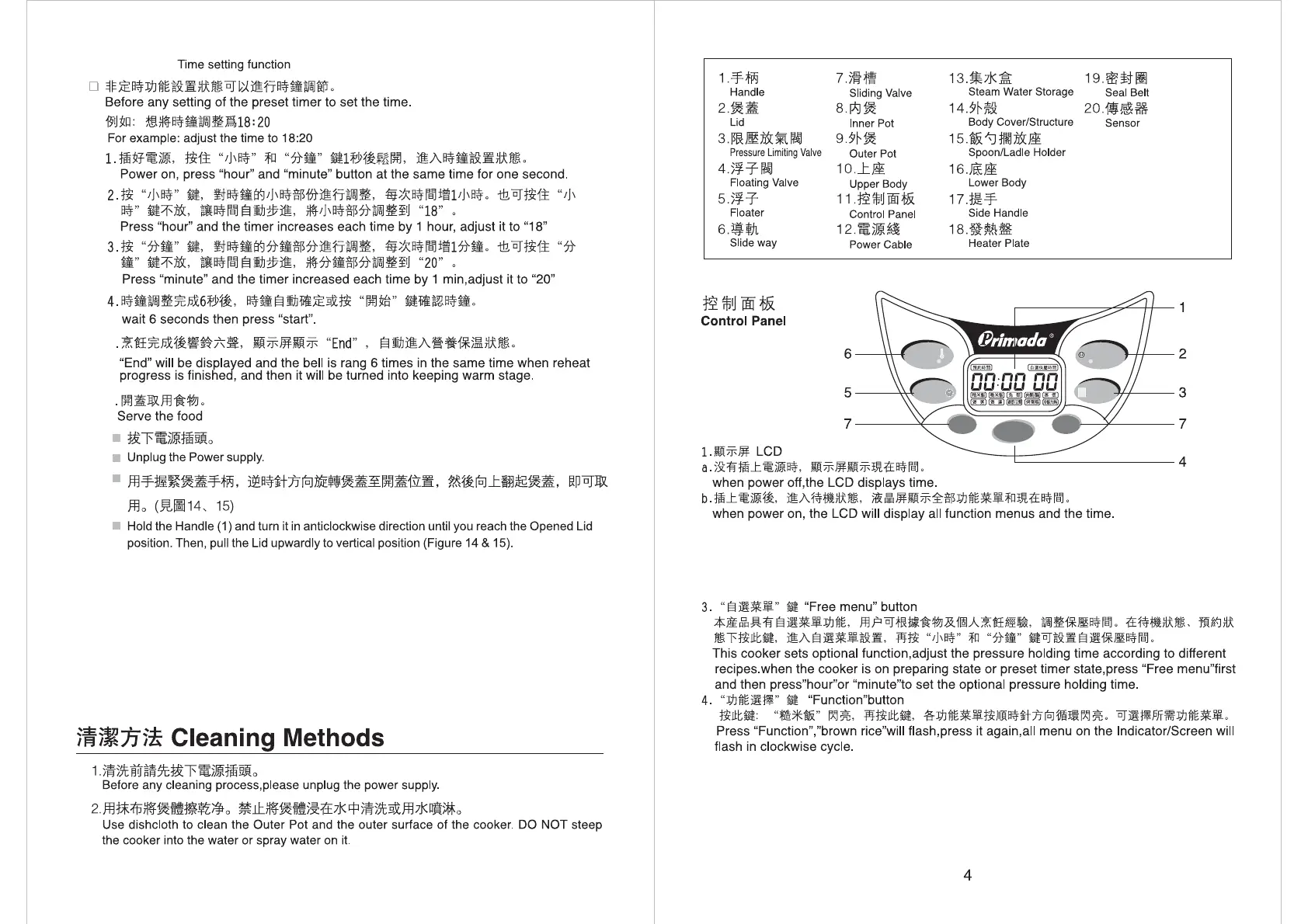
Hour
Function
Minute
๎˜ ๎˜ƒ/๎˜„ ๎˜…
Keep Warm / Cancel
๎˜†๎˜‡๎˜ˆ๎˜‰
Preset Timer
๎˜Š๎˜‰
๎˜‹๎˜Œ๎˜๎˜Ž
๎˜๎˜
๎˜‘๎˜’/๎˜“๎˜Œ๎˜”๎˜•
Start / Unlock
๎˜–๎˜๎˜—๎˜˜
Free Menu
2.โ€œ๎˜‚๎˜ƒ/๎˜„๎˜…๎˜†๎˜‡โ€๎˜ˆ
โ€œStart/Unlockโ€ button
๎™‚๎™ƒ๎™„๎™…๏ผŒ๎™†๎˜™๎™‡๎™€๎™๎˜‘๏ผŒ๎™ˆโ€œ๎˜ซ๎™‰/๎˜†๎™๎˜ˆ๎˜‰โ€๎™‹๏ผŒ๎™Œ๎˜ซ๎™‰๎™๎˜ฟ๎™Ž๎™๏ผŒ๎™๎™‘๎™†๎˜™๎˜”๎™€๎™ใ€‚๎™’๎™ˆ
โ€œ๎˜ซ๎™‰/๎˜†๎™๎˜ˆ๎˜‰โ€๎™‹๎™Œ๎™“๎™”๎™•๎˜Ÿ๎™–๎™—ใ€‚
Power on, press โ€œStart/Unlockโ€ button, it will flash and start heating progress, by pressing
โ€œStart/Unlockโ€ again, the cooker will be on preparing state.
10.๎˜‰๎˜Š๎˜‹๎˜Œ
Language Setting
1. ๎˜ฃ๎˜ค๎˜ฅ๎˜ฆ๏ผŒ๎˜ง๎˜Ž๎˜จ๎˜ฉโ€œ๎˜๎˜๎˜‘๎˜Žโ€๎˜ชโ€œ๎˜š๎˜ซ๎˜ฌ๎˜ญโ€๎˜ฎ๏ผŒ๎˜ฏ๎˜ต๎˜ถ๎˜บ๎˜‹๎˜ปใ€‚
Power on, press โ€œPreset timerโ€ and โ€œFree Menuโ€ button.
๎˜จโ€œ๎˜๎˜Žโ€๎˜ฎ๎˜ฏ๎˜ผ๎˜ถ๎˜บ๎˜ซ๎˜ฝใ€‚
Press โ€œHourโ€ button for choosing language.
๎˜จโ€œ๎˜œ๎˜/๎˜ฟ๎˜“๎™€๎™โ€๎˜ฎ๎˜ฏ๎˜ผ๎™‚๎™ƒใ€‚
Press โ€œStart/Unlockโ€ button to confirm setting.
2.
2.
๎˜๎˜ƒ๎˜„๎˜…๎˜†๎˜‡๎˜ˆ๎˜‰๏ผŒ๎˜‹๎˜Œ๎˜๎˜Ž๎˜๎˜๎˜‘๎˜’๎˜“๏ผŒ๎˜”๎˜•๎˜‘๎˜–๎˜—๎˜˜๎˜„๎˜™๎˜๎˜Ž๎˜š๎˜›๎˜œ๎˜๎˜ž๎˜Ÿ๎˜ ๎˜š
๎˜›๎˜ก๎˜ข๎˜ฃ๎˜ค๎˜ฅ๎˜ฆ๏ผˆ๎˜จ๎˜”๎˜ฉ๎˜‡๎˜ˆ๎˜ž๏ผŒ๎˜ช๎˜ซ๎˜ฌ๎˜ญ๎˜ฎ ๎˜ฌ๎˜ž๏ผŒ๎˜ฏ๎˜ฐ๎˜ž๎˜๎˜š๎˜ฑ๎˜ฒ๎˜ฎ๎˜ณ๎˜ซ๎˜ด๎˜ต)180
Choose Cake function, put the food inside without additional water, user should set the
cooking time according to the food inside and cancel it by himself(Note: the cooker will
be turned to keep warm stage in 2 hours after the temperature reach 180 celsius degree)
9.๎˜๎˜Ž๎˜‹๎˜Œ๎˜๎˜…
5
6
11