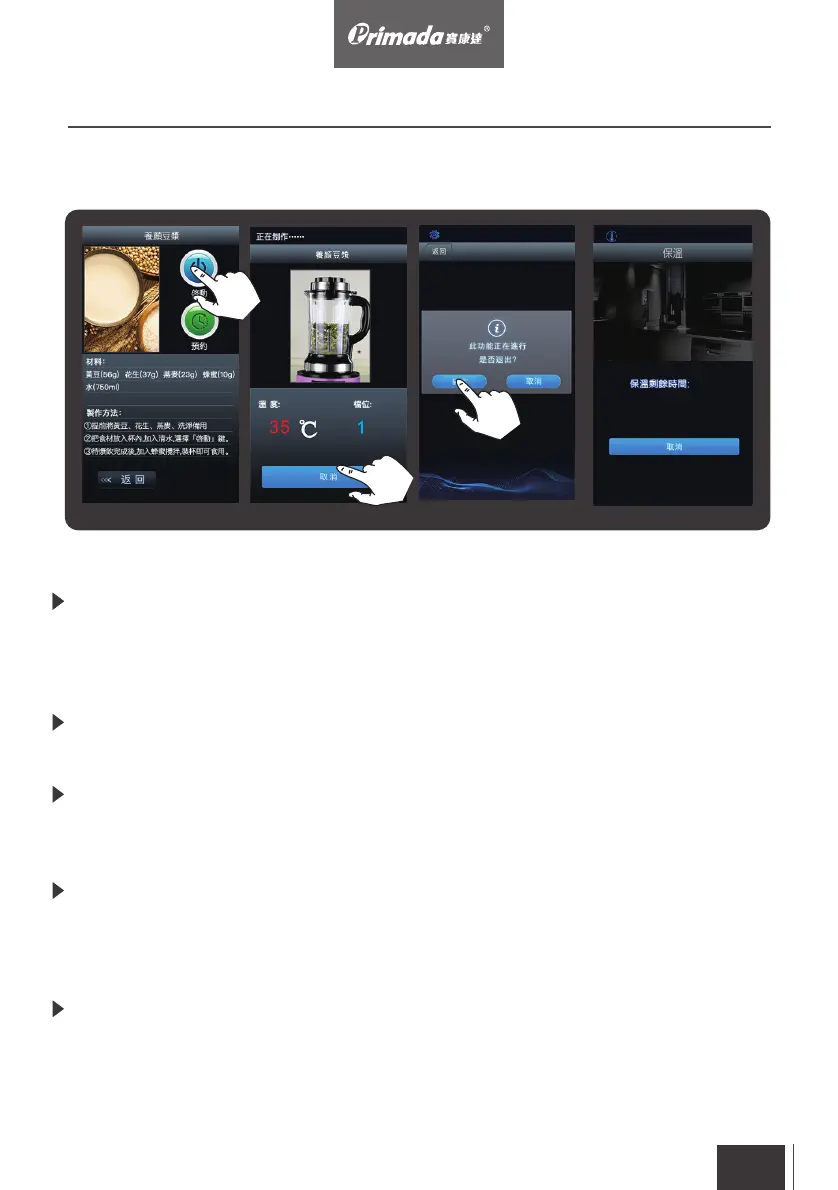
Activate the program: After opening the program, the screen will show the
food ingredients portions. User can follow the instructions to prepare the
ingredient portions and then touch the activate button to start the cooking
process (Pic. 4)
Cancel the program: If the program needs to be stopped, touch the “cancel”
button to stop the program (Pic. 5)
Leave the program menu: The screen will show the reminder dialog box
“this program is running and confirm leaving”. Touch the confirm button to
return to the main control interface (Pic. 6)
Keep Warm: After finishing the cooking, the program will go to keep warm page.
The display will show the 30 minutes keep warm time and count down
automatically. The display will return to the program menu after the count
down. (Pic. 7)
Cancel the keep warm: If keep warm needs to be stopped, touch the “cancel”
button to stop keep warm and go back to the program menu.
Pic. 4
Pic. 5 Pic. 6 Pic. 7
3. Operating
3.3 Activate Program
EN
22


 To Next Page