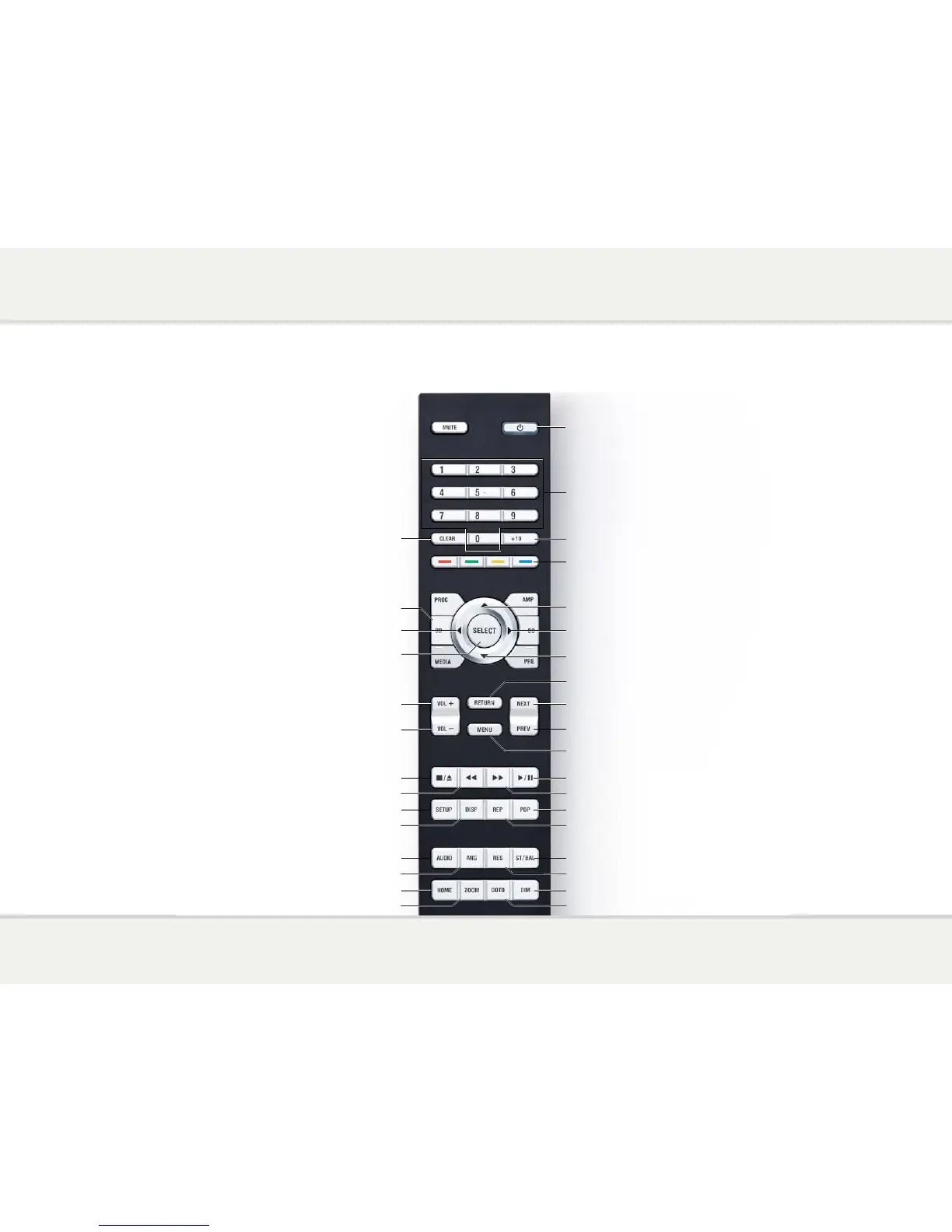
Switch on/off
Play or pause the disc
Press and hold for 6 seconds with the
tray open to reset the remote code
Increase volume of amplifier
Select Blu-ray mode
Press and hold for 1.5 seconds to select a source
Restart the current track,
or skip to the previous track
Repeat the track or disc
Show/hide on-screen display
Skip to the next track
Return from menu
Display Pop-up Menu/DVD Menu
Change the display brightness
Choose audio language/track
Reverse scan
Forward scan
Display Top Menu/Title Menu
Choose camera angle
Choose media source
Choose output resolution
Choose subtitles
Zoom in/out and adjust aspect ratio
Play from specified location
Select SHUFFLE or RANDOM
Open or close the tray, or stop the disc
Decrease volume of amplifier
Clear numeric input
Display the Setup Menu
Move right on menu
Move up on menu
Move down on menu
Select item on menu
Move left on menu
Enter track number


 To Next Page