EasyManua.ls Logo

Primare T23 - Using the Remote Control; Fitting the Batteries

Primare T23
8 pages
Print Icon
To Next Page IconTo Next Page
To Previous Page IconTo Previous Page
Loading...
2
3
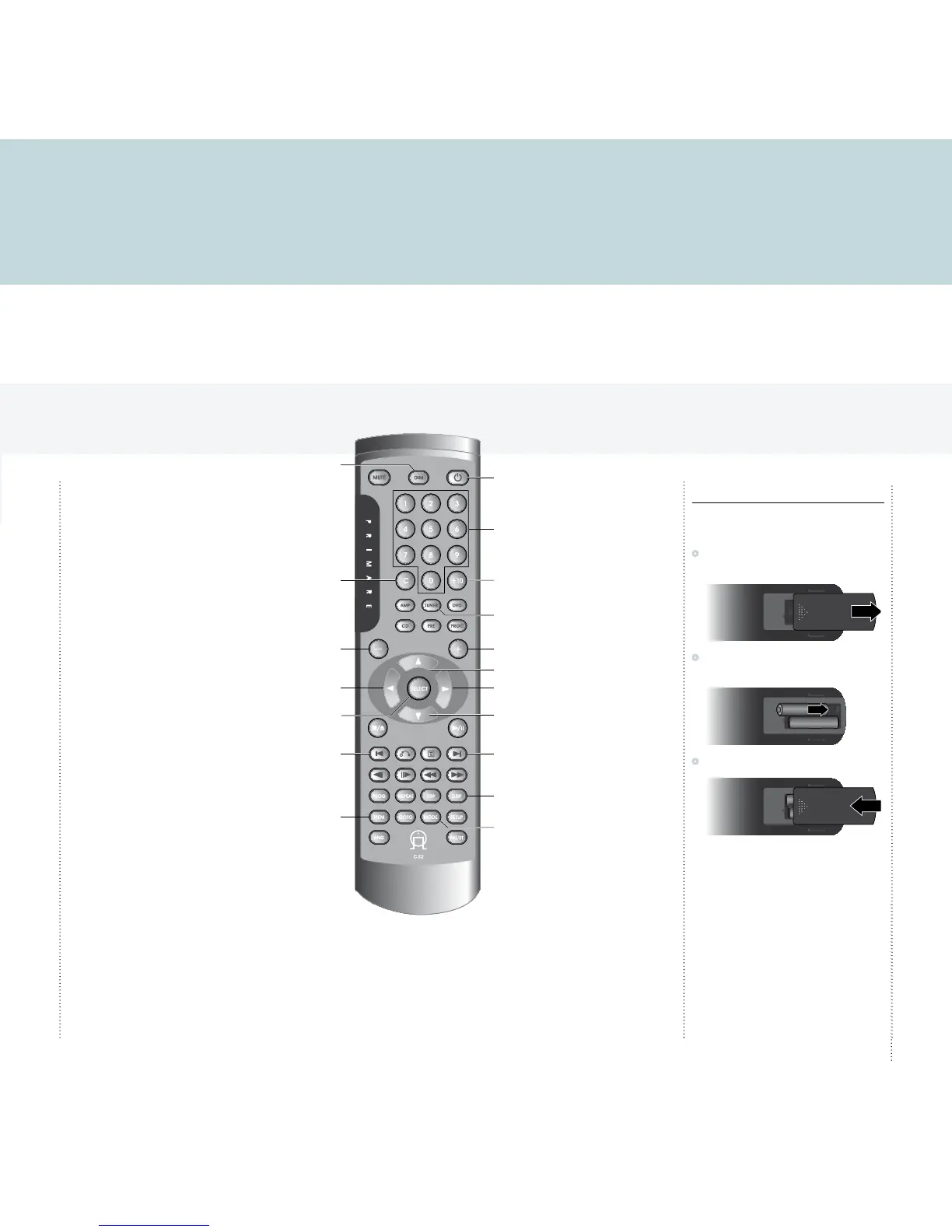
Using the remote control
This page explains how to use the C22 remote control to operate the T23, and how to fit the batteries into the remote control.
Clear number entry
Dim display
Switch on/off
Enter number >10
Enter preset number
Decrease volume of
preamplifier/processor
Previous station (DAB)
Manual tune down (FM)
Search down (FM)
Save preset
Switch between
FM and DAB
Next station (DAB)
Manual tune up (FM)
Increase volume of
preamplifier/processor
Next preset
Previous preset
Select DAB station or
option
Search up (FM)
Display option
Tune mode (DAB),
Auto/Mono (FM)
Fitting the batteries
Before using the remote control you need to insert
the two AAA batteries supplied with the C22.
Gently slide open the cover on the back of the
remote control:
Insert the two batteries, observing the polarity
printed on the bottom of battery compartment:
Slide back the cover until it clips into place:
Note: Replace only with alkaline
batteries type AAA, LR03, or equivalent.
Dispose of old batteries considerately.
You can operate all the functions of the T23 using
the C22 remote control:


Other manuals for Primare T23