38 www.pridemobility.com Artemis
VI. CARE AND MAINTENANCE
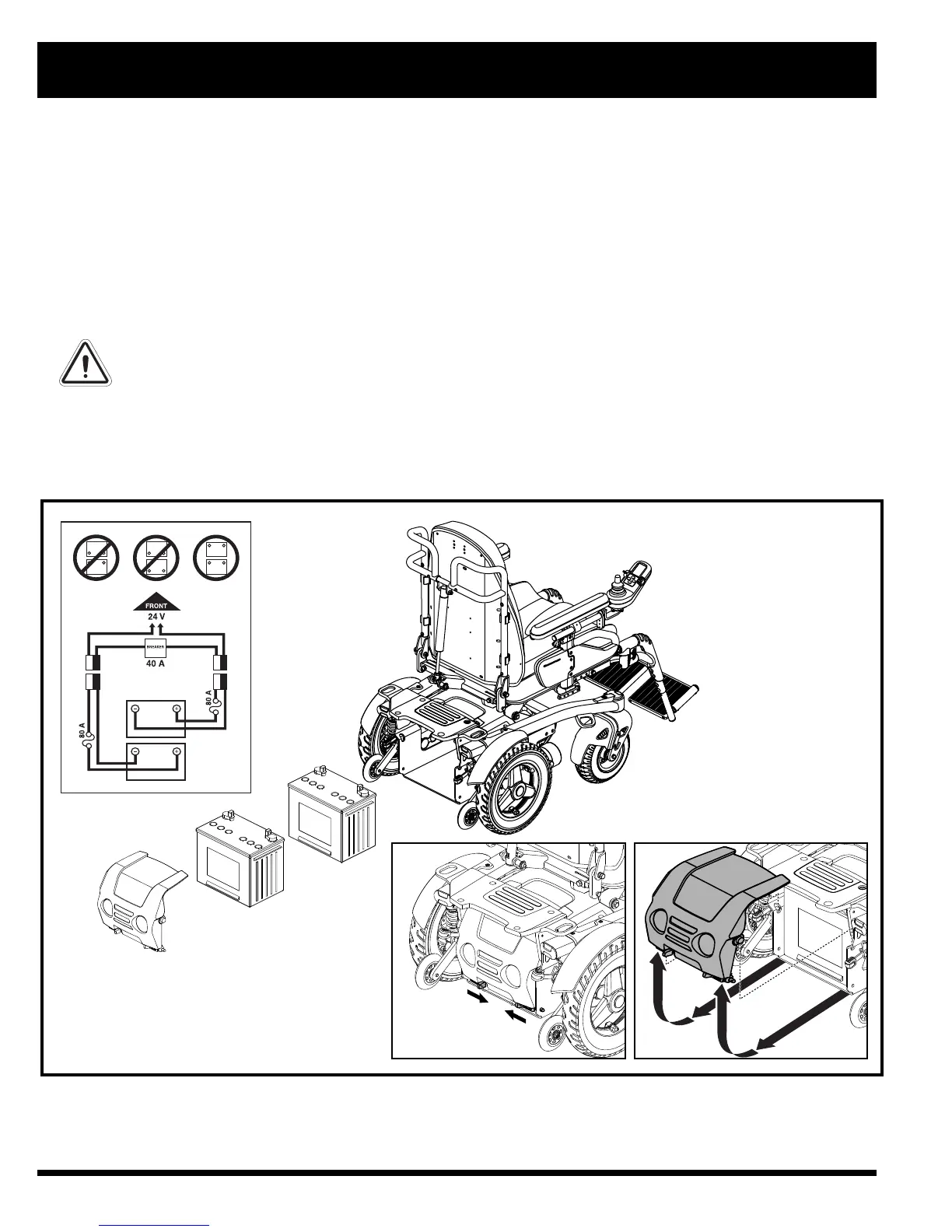
Figure 27. Battery Replacement
To replace the batteries:
1. Turn off the power to the controller.
2. Push the manual freewheel levers down for drive mode.
3. Slide the battery door latches toward the inside of the the power chair. See figure 27.
4. Lift with an upward rotation to remove the battery door. See figure 27.
5. Locate the battery quick disconnects on the frame and disconnect both of them. See figure 27.
6. Remove the batteries from the power base.
7. Disconnect the battery wiring harness from each battery.
8. Reinstall the battery wiring harness on each new battery. Make sure that you connect the red wire to the
positive (+) battery terminal and the black wire to the negative (-) battery terminal.
WARNING! Make sure you tighten the fasteners so that the connections are secure.
9. Place the batteries back into the power base.
10. Connect the battery quick disconnects according to the battery wiring diagram label located on the frame. See
figure 27.
11. Replace the battery door and reconnect the battery door latches.



 To Next Page