Maintenance and
Section 4
Troubleshooting
IMPORTANT!
Be CERTAIN to shut off the Plasma Cutter, and disconnect it from power
and air before adjusting, cleaning, or repairing the unit. A technician should
discharge all capacitors before performing any internal procedures.
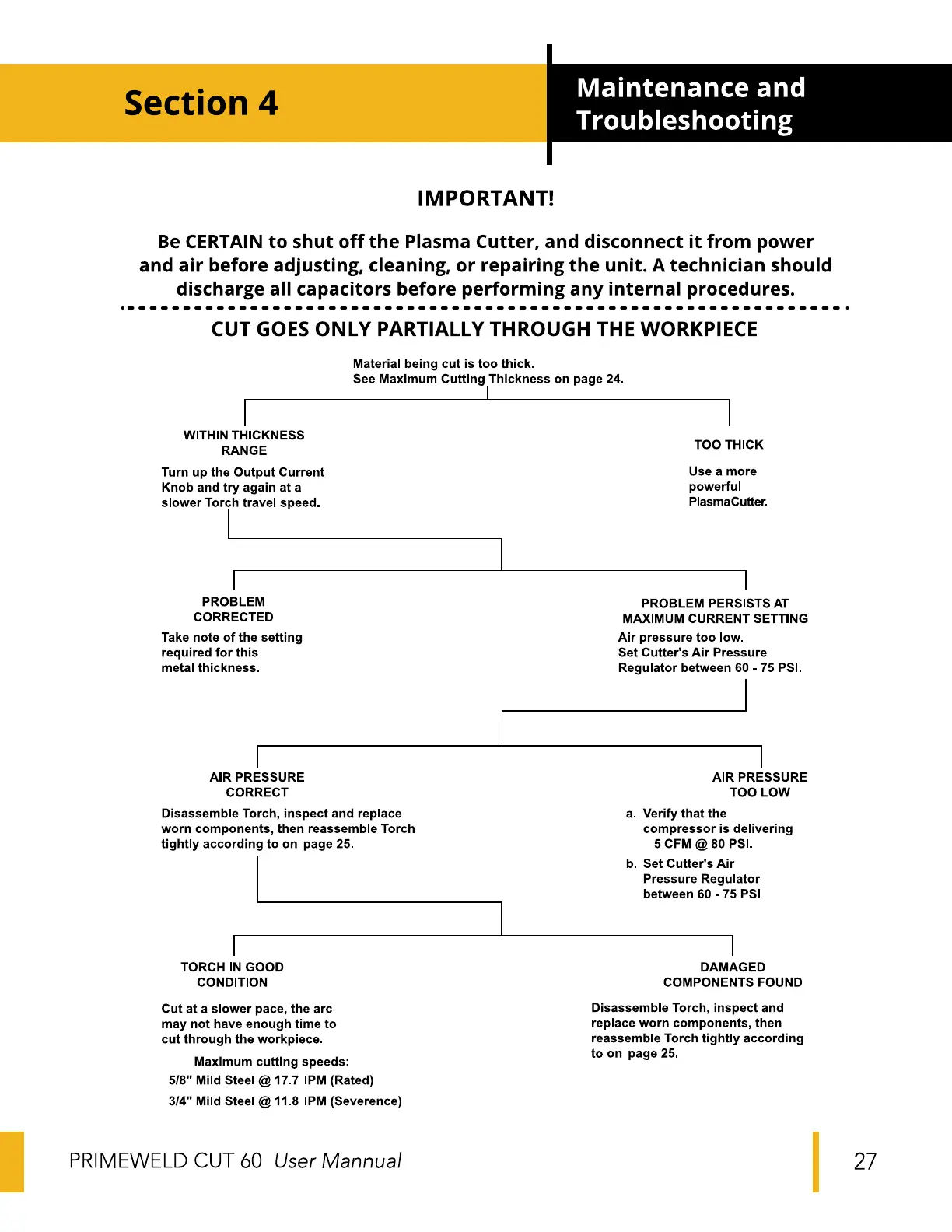
CUT GOES ONLY PARTIALLY THROUGH THE WORKPIECE
Material being cut is too thick.
See Maximum Cutting Thickness on page 24.
WITHIN THICKNESS
RANGE
Turn up the Output Current
Knob and try again at a
slower Torch travel speed.
PROBLEM
CORRECTED
Take note of the setting
required for this
metal thickness.
AIR PRESSURE
CORRECT
Disassemble Torch, inspect and replace
worn components, then reassemble Torch
tightly according to on page 25.
TORCH IN GOOD
CONDITION
Cut at a slower pace, the arc
may not have enough time to
cut through the workpiece.
Maximum cutting speeds:
5/8" Mild Steel @ 17.7 'PM (Rated)
3/4" Mild Steel @ 11.8 'PM (Severence)
PRIME-WELD CUT 60 User Mannual
TOO THICK
Use a more
powerful
PlasmaCutter.
PROBLEM PERSISTS AT
MAXIMUM CURRENT SETTING
Air pressure too low.
Set Cutter's Air Pressure
Regulator between 60 - 75 PS'.
a.
b.
AIR PRESSURE
TOO LOW
Verify that the
compressor is delivering
5 CFM @ 80 PS'.
Set Cutter's Air
Pressure Regulator
between 60 - 75 PSI
DAMAGED
COMPONENTS FOUND
Disassemble Torch, inspect and
replace worn components, then
reassemble Torch tightly according
to on page 25.
27


 To Next Page
 Loading...