
 Need help?
Do you have a question about the Primus CBN8000 and is the answer not in the manual?
Explains that Wi-Fi Pods have two ethernet ports for connecting nearby devices like phones, TVs, consoles, or computers.
Guides users to download the TP-Link Deco app for Wi-Fi customization, parental controls, anti-virus, and guest network setup.
Outlines the sequence for connecting the coax cable, modem, Wi-Fi pod, and powering up the devices for internet service.
Instructs users on how to connect a device to the Wi-Fi network using the provided SSID and password found on the Wi-Fi pod.
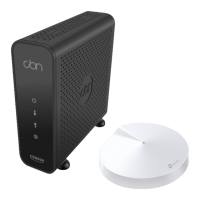
The Primus CBN8000 Modem and Deco Wi-Fi Pod system is designed to provide high-speed internet service and a robust Wi-Fi network for your home or office. This setup guide outlines the steps for installation and offers information on managing your network.
The system comprises two main components: the CBN8000 Modem and the Deco M5 Wi-Fi Pod. The CBN8000 Modem acts as the gateway, connecting your home to the internet service provider's network via a coax cable. It translates the signals from your internet service into a format that your local network can use. The Deco M5 Wi-Fi Pod, on the other hand, is a mesh Wi-Fi system component that creates and manages your wireless network. It broadcasts the Wi-Fi signal throughout your space, allowing multiple devices to connect wirelessly. The Deco M5 Pod is designed to extend Wi-Fi coverage, minimize dead zones, and provide a stable, high-performance wireless experience. Together, these devices ensure both internet connectivity and comprehensive Wi-Fi coverage.

 To Next Page
 General