507 329 PUBLICATION DATE 05/05 USER´S MANUAL 9
SELECT PROGRAM
ABCDEFGHKLMNO PQR
100521
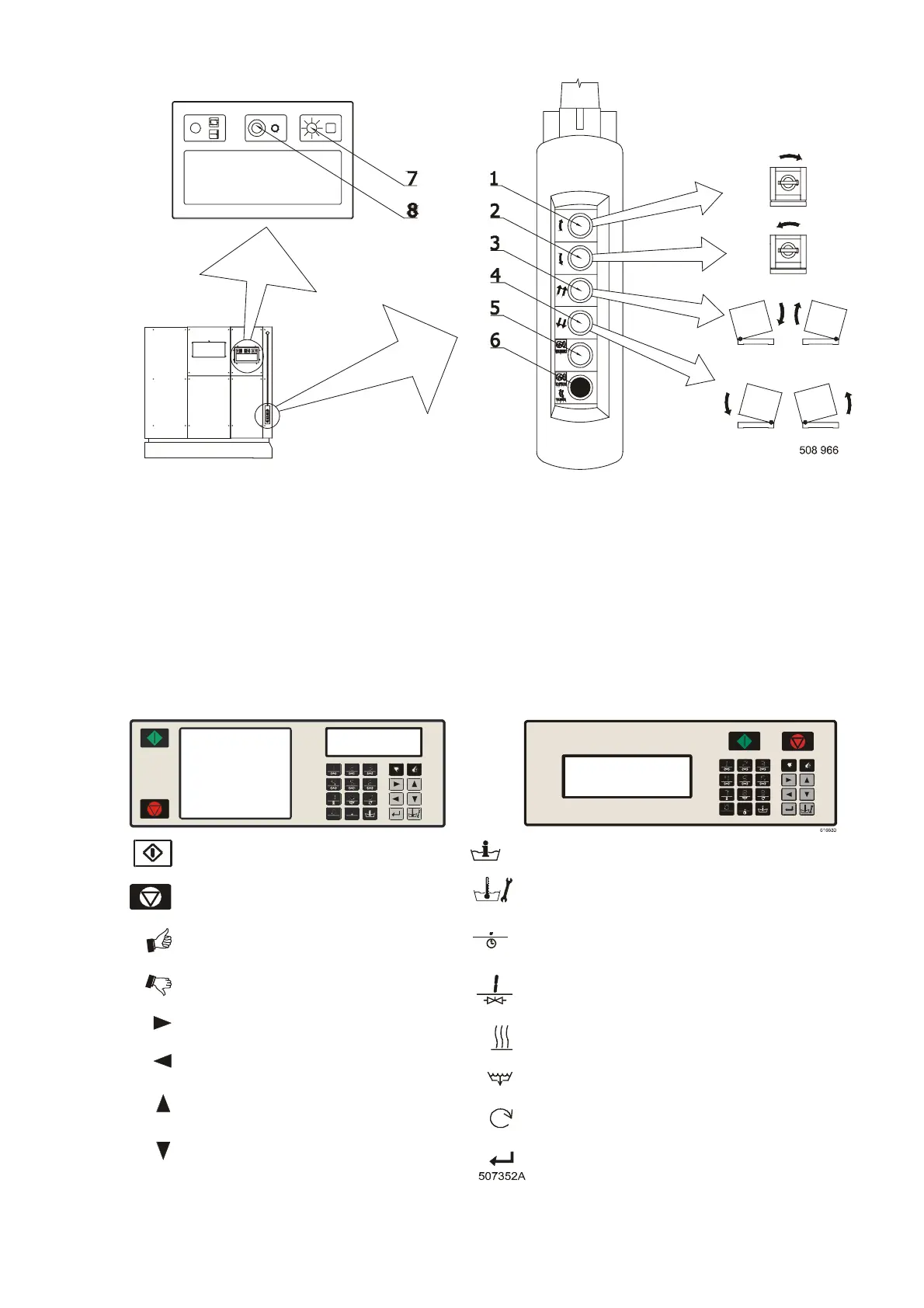
HANGING CONTROL
Fig. 3.B. Tilting control
1. Button for drum rotating, direction of rotating is clockwise from the frontal view.
2. Button for drum rotating, direction of rotating is counter clockwise from the frontal view.
3. Button for tilting, direction of tilting is forward to unload.
4. Button for tilting, direction of tilting is backward to load.
5. Button for closing of the door (only for machines, equipped with automatic door control system).
6. Button for opening of the door, the door lock will be released automatically.
7. Machine with tilting – green pilot light.
Machine without tilting – green light button for opening the door. The door lock will be released automatically.
Button CENTRALSTOP.
FULL CONTROL MICROPROCESSOR
MCB FC MCG FC
START (advancing program)
STOP (interrupting program)
YES SELECTION
NO SELECTION
INCREASING SEQUENCE TIME
DECREASING SEQUENCE TIME
PREVIOUS MENU ITEM
NEXT MENU ITEM
INFO (overview available wash programs
and wash sequence functions)
SERVICE (shows actual water temperature and
level, number of fullfilled cycles and actual states)
ACTIVATES THE TIME DELAY FUNCTION
(delay time will be started by pressing start)
OPENING THE INLET VALVES
ACTIVATE HEATING
OPEN DRAIN VALVE
SPEED ADJUST
ENTER - SELECTION OR CONFIRMATION
Fig. 3.C. Operator panel symbols



 To Next Page