Useful Tips
1. Spray Skin Primer before and after application of image to skin for a better and long-lasting eect.
2. Dry the skin surface where you are going to rub Prinker.
3. Images applied by Prinker are soap washable. Applied images can be also removed by wet wipes or other make-up cleansing cosmetics. When removing avoid rubbing strongly
or scratching the skin as it may cause skin irritation, redness or allergic reaction.
4. If nozzles are dirty or clogged with dried ink, use wet wipes to wipe and clean them. Due to environmental conditions, in some high-altitude regions it may be necessary to
clean nozzles more often.
5. Do not alter the speed of moving Prinker while rubbing. Avoid moving while applying image to skin.
6. In case of strong wind, the image may not be applied correctly. Operating the device under extreme weather conditions (e.g. temperature, humidity) may influence the quality
of image applied to skin.
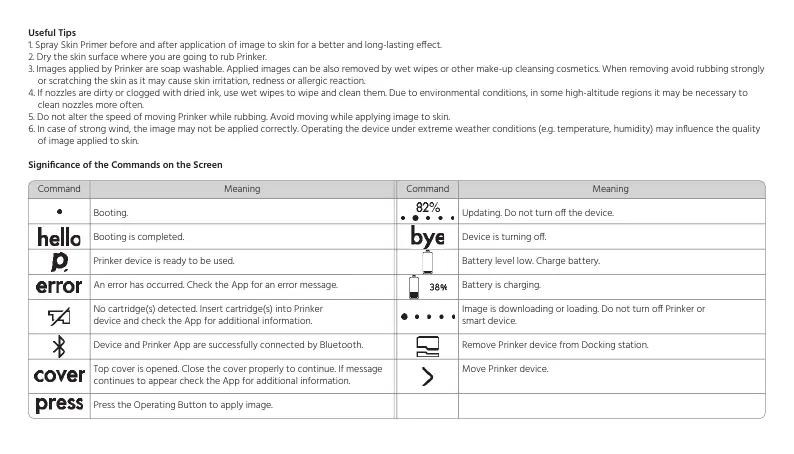
Significance of the Commands on the Screen
Command Meaning
Booting.
Booting is completed.
Prinker device is ready to be used.
An error has occurred. Check the App for an error message.
No cartridge(s) detected. Insert cartridge(s) into Prinker
device and check the App for additional information.
Device and Prinker App are successfully connected by Bluetooth.
Top cover is opened. Close the cover properly to continue. If message
continues to appear check the App for additional information.
Press the Operating Button to apply image.
Command Meaning
Updating. Do not turn o the device.
Device is turning o.
Battery level low. Charge battery.
Battery is charging.
Image is downloading or loading. Do not turn o Prinker or
smart device.
Remove Prinker device from Docking station.
Move Prinker device.


 To Next Page
 Loading...