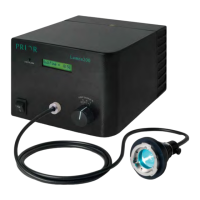
The OptiScan III is a motorized stage system designed for microscopy work, offering precise control over stage movement and focus. It is compatible with a range of Prior Scientific products, including various stepper motor stages, focus motors, and joysticks. The system is designed for ease of use and reliability, with provisions for both standard and advanced operations.
Function Description:
The OptiScan III controller manages the motorized stage (X and Y axes) and the focus motor (Z-axis). It can be controlled via RS232 serial port, USB connection, or a dedicated joystick. The system automatically configures itself upon power-on when components are correctly connected, allowing for immediate operation. It supports both "Standard" and "Compatibility" modes, with Standard mode offering more features like command stacking and macro/soak commands. The stage moves in microns, with a default of 1 micron per supplied number, meaning a command like "G 1000 0" would move the stage by 1mm in the X-axis. The controller provides feedback on its status, connected peripherals, and error codes, facilitating troubleshooting and integration with external software.
Important Technical Specifications:
- Controller: OptiScan III (ES11)
- Stage Types: ESIII Motorised Stage (all variants), ES107 Motorised Stage (all variants), ES111 Stage, ES107A Inverted Stage.
- Focus Motors: PS3H122R, PS3H122AXIO, PS3H122AXIM, PS3H122FS70, PS3H122IRE, PS3H122X200, PS3H122X40, PS3H122LB, PS3H122LS, PS3H122RXA, PS3H122DM4, PS3H122LMZ, PS3H122S15, PS3H122SZX, PS3H122SZX2.
- Motorized Focus Blocks: FB203, FB204 (all variants), FB205 (all variants), FB206 (all variants).
- Joysticks: CS152DP (3-axis joystick with digipot control for focus), CS200XY (XY joystick), CS200Z (focus control).
- Translation Stage: ZDP50T Motorised Translation Stage.
- Z Stands: ZC12 Pro Z stand*, ZC12EL Pro Z stand*.
- Dimensions (L x W x D):
- ES111 Stage: 294 x 193 x 60 mm
- ES107A Inverted Stage: 270 x 284 x 50 mm
- ES11 Controller: 210 x 120 x 55 mm
- CS152DP Joystick: 22 x 120 x 45 mm
- Weight:
- ES111 Stage: 2.2 kg
- ES107A Inverted Stage: 2.7 kg
- ES11 Controller: 0.5 kg
- CS152DP Joystick: 0.5 kg
- Max. Speeds:
- Stage: 8 mm/sec
- Focus Drive: 8 revs/sec
- Stage Travel Ranges:
- ES111: 125mm x 75mm
- ES107A: 115mm x 75mm
- Power: Universal external power supply Input: 100 - 240V AC, 1.5 A 50/60Hz Output: 24V DC 3A.
- Operating Environment: Ambient temperature from 5 to 40°C, relative humidity (RH) up to 80% decreasing linearly to 50% RH (relative at 40°C).
- Communication: RS232 serial port (default baud rate 9600, configurable to 19200, 38400, 115200), USB connection.
- Error Codes: The system provides specific error codes (e.g., "E,n") for issues like "NO STAGE," "NOT IDLE," "NO DRIVE," "COMMAND NOT FOUND," "VALUE OUT OF RANGE," "QUEUE FULL," and "INVALID CHECKSUM."
Usage Features:
- Joystick Control: The CS152DP joystick offers 3-axis control for the stage and focus motor. It provides proportional control, meaning the further the joystick is deflected, the faster the stage moves. "Hot Keys" on the joystick allow for quick adjustment of maximum speed (50%, 25%, 100% cycle). The CS200XY and CS200Z joysticks offer similar proportional control and "Hot Key" functionality for XY and Z axes, respectively. The action of "Hot Keys" can be reprogrammed via RS232 commands.
- RS232 Command Set: A comprehensive command set allows for precise control over all aspects of the system. Commands are terminated with a Carriage Return () and can be separated from arguments by comma, space, tab, semicolon, or colon.
- General Commands: Query status ($), report system information (?), set baud rate (b), set compatibility mode (COMP), report instrument name and version (DATE), set error reporting (ERROR), stop movement (I, K), report limit switch status (LMT), toggle macro mode (MACRO), report serial number (SERIAL), soak test (SOAK), report version (VERSION), insert wait (WAIT).
- Stage Commands: Move by steps (B, F, L, R), set backlash (BLSH), set joystick backlash (BLSJ), set current stage acceleration (SAS), set maximum speed (SMS), report/set step size (X), set index of stage (SIS), restore index of stage (RIS), move at constant velocity (VS), go relative (GR), go absolute (G), report/set position (P, PS, PX, PY).
- Z-Axis Commands: Set Z backlash (BLZH), set joystick Z backlash (BLZJ), report/set step size (C), move down (D), turn off/on joystick (H, J), set Z direction (JZD), stop movement (K), move to zero (M), set focus motor speed (OF), report/set Z position (PZ), set Z acceleration (SAZ), set Z maximum speed (SMZ), move up (U), go absolute (V), move at constant velocity (VZ), set focus motor direction (ZD).
- Pattern Commands: Set origin (E), fix X/Y steps (N), set disc grid origin (Q), move to next position (S), move to nth/mth cell (S), move to next field (T), set diameter (W), set step size (X), move to next position (Y), move to nth/mth cell (Y).
- Software Control: Prior Terminal for Windows allows direct command entry and system monitoring. USB drivers are automatically installed, simplifying connection to a PC. The software provides information on connected peripherals and facilitates troubleshooting.
- Focus Drive Installation: The manual provides detailed instructions for installing the focus drive, including standard split sleeve mounting, and specific procedures for Zeiss Axio, Leica DML, and DMR ranges, as well as direct coupling models.
Maintenance Features:
- Troubleshooting Guide: The manual includes a comprehensive troubleshooting section for common issues such as the stage not responding to joystick/RS232 commands, stage moving in only one direction, or the focus motor not engaging.
- Error Reporting: The system provides error codes and descriptions to help diagnose problems.
- Serviceability: The product does not contain consumer-serviceable components. Service should be performed by Authorized Service Centres.
- Cleaning: Only the exterior of the product should be cleaned using a damp lint-free cloth.
- RMA Process: For returns and repairs, a Return Material Authorisation (RMA) number must be obtained from the appropriate Prior Scientific office.
- Safety Information: Important safety guidelines are provided, including warnings against exposure to water, extreme temperatures, open flames, and disassembling the product. It emphasizes connecting to designated power sources and ensuring the electrical cord is not damaged. The OptiScan III is Class 1 and requires a protective earth (ground) connection.

 Need help?
 General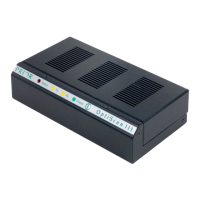

 To Next Page