the current video/photo from the SD Card.
Indicators
BUSY indicator: when the camera is working (e.g. recording, photographing, etc.), the
indicator will light;
Charging indicator:
when power is off, the lightened indicator means the user is
charging the camera.
Photo/recording/vehicle-mounted/mode
It enters automatically into recording mode.
Press shutter to start recording, and press shutter again to stop recording.
Press mode key to photo mode.
Press mode key to movement mode.
Press shutter to start recording, and press shutter again to stop recording.
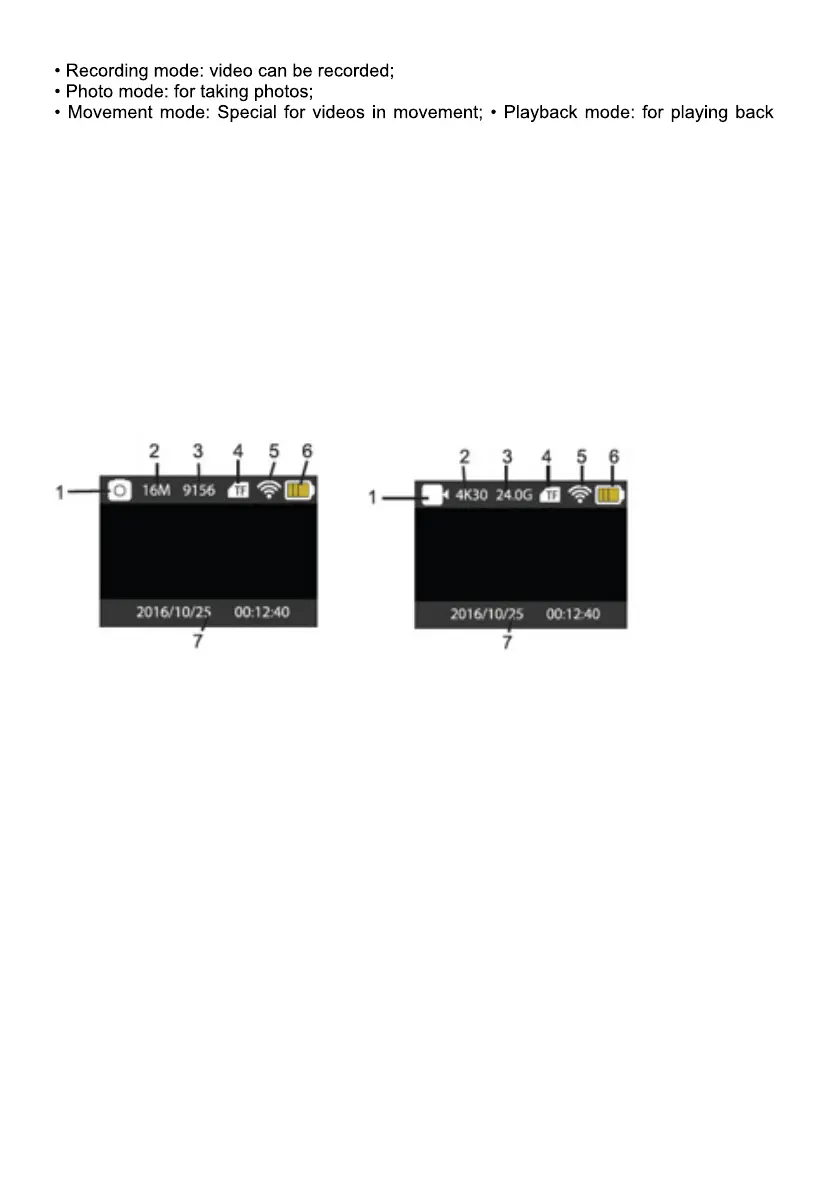
Screen display in photo mode Screen display in recording mode
1.
Photo Mode. 1. Recording mode.
2.
Resolution. 2.Resolution and fps.
3.
Photos available. 3.Storage available.
4.
Micro SD card 4. Micro SD card.
5.
WIFI 5. WIFI.
6.
Battery. 6.Battery
7.
Date and time. 7. Date and time.
Note: when using the 4k, FHD size or HD video, you must use the
MicroSD card at
class 10 or above.


 To Next Page
 Loading...