EN
2
6
6
5
4
11
12
13
14 14
16
1
3
7
8
9
10
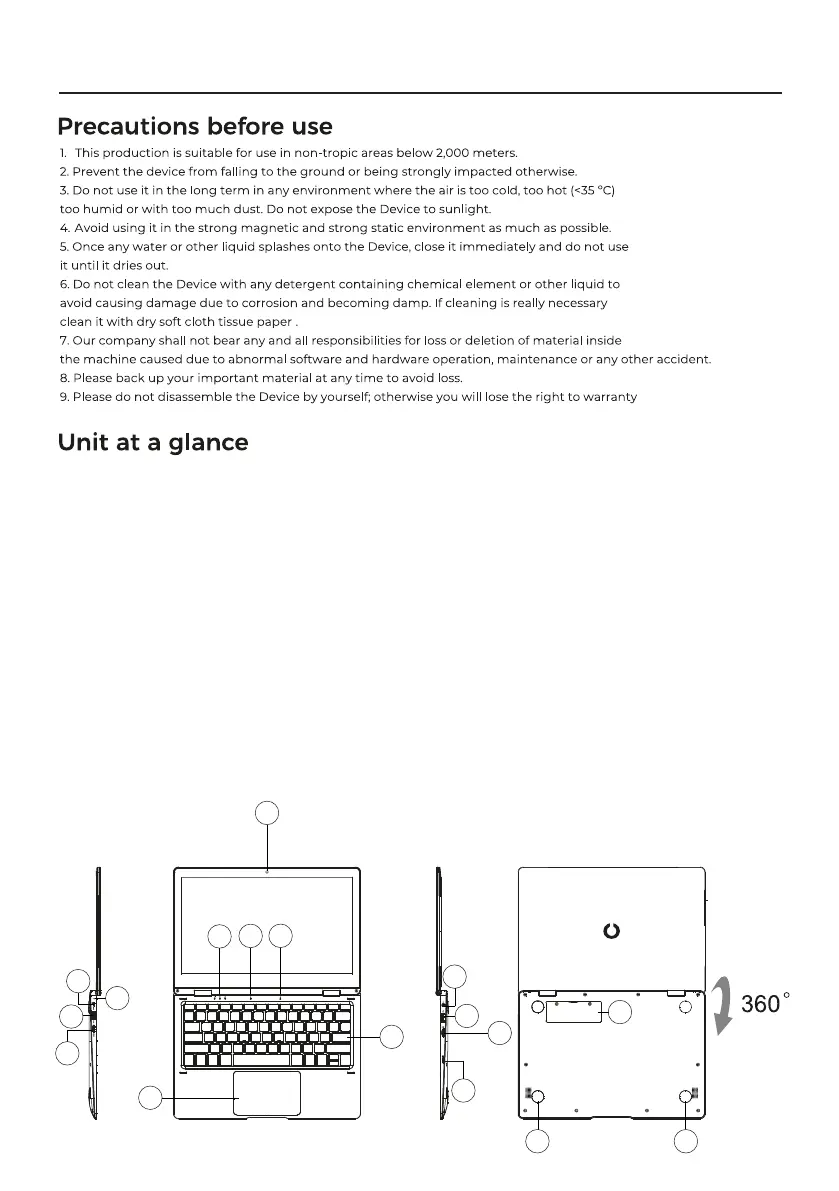
1. Power button
Also allows you to suspend the computer or turn it on after suspension.
2. Front camera: allows you to take pictures/videos and make teleconferences. 3.
3. Touchpad: allows you to interact with the device.
4. Keyboard: allows you to interact with the device.
5. Keyboard LED indicators:
1. Power on: the green light indicates that the computer is turned on.
2. Caps lock: green light indicates that the caps lock is activated. 3.
3. Numeric keypad: green light indicates that the numeric keypad function is activated.
6. Microphone: allows you to record or transmit audio.
7. LED charging indicators:
- Orange color indicates that the battery is charged.
- Green color indicates that the battery is fully charged.
8. DC charger connector: use the included 12V/2A charger.
9. USB 3.0 connector: allows you to connect memory sticks and external devices at a higher speed than USB 2.0.
10. Mini-HDMI interface: can be connected to an external imaging device such as a TV or projector.
11. Headphone jack: This jack allows audio signals to be transmitted to speakers or headphones.
12. USB 2.0 connector: allows you to connect memory sticks and external devices.
13. Micro SD card slot; slot with integrated memory card reader that supports the Micro SD format.
14. Speakers: integrated speaker allows you to listen to the sound without the need to connect an additional device.
15. Power button.
16. M2 SATA SSD Slot: allows you to expand the storage memory with 128GB/256GB/512GB M.2 SATA SSD.



 To Next Page
 Loading...