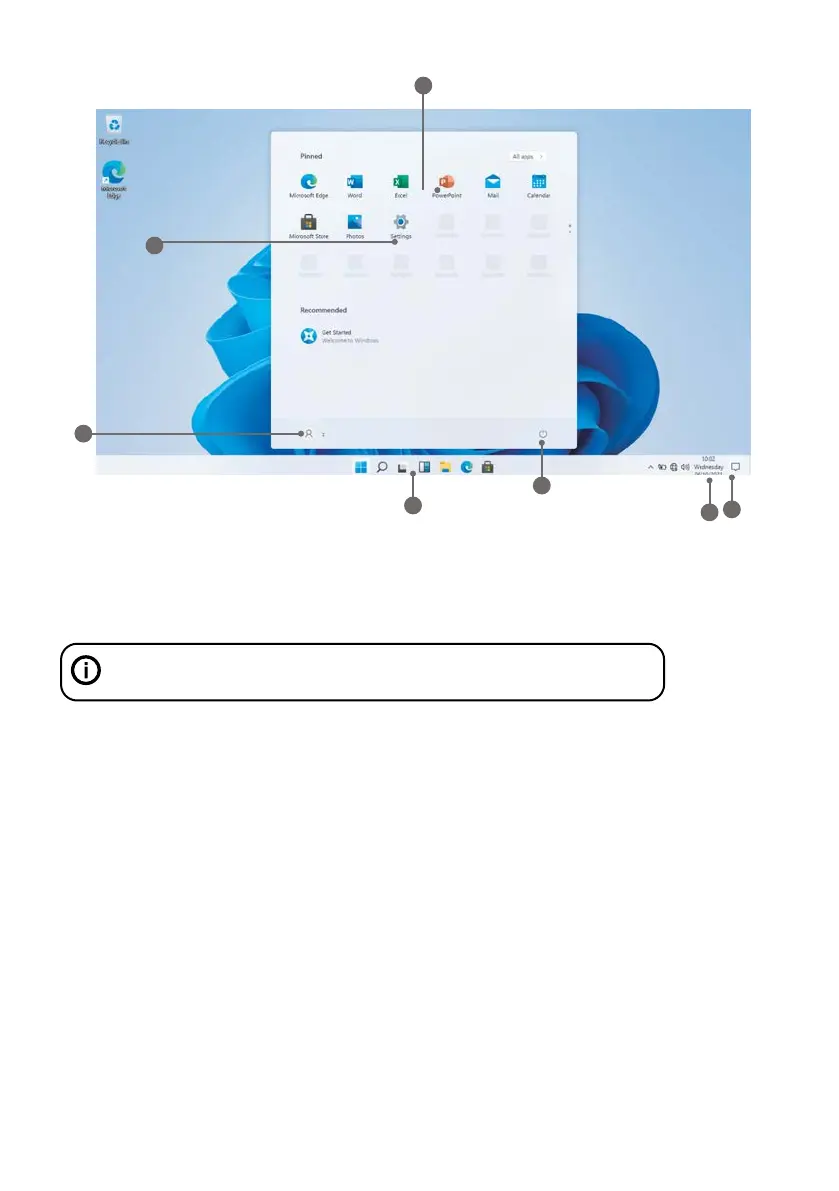
Know your Screen
1. Start Screen - Display useful information at a glance without opening the app.
2. Microsoft™ Account - Change account settings or switch to another user account.
3. Settings - View and change any system settings.
4. Power - Shut Down, Hibernate or put your PC to sleep.
5. Search Bar - Quickly find files, directions, information or the name of a song.
6. Notification Area - View all notifications, date and time.
7. Peek - Quickly show your desktop
• Before first use, please make sure the Laptop is fully charged. If not, connect the power adaptor, so your Laptop can
charge fully.
• Charging time is at least 6 hours the first time, 4 hours there after.
Note: This Laptop contains a Built-in type rechargeable Lithium-ion battery, the charger must be a standard adaptor
(12V/2A plug adaptor), this Laptop includes DC charging.
• Ensure that you have a good Wi-Fi connection, with your network name and password available.
Press and hold the Power key until the screen turns on. Wait until the Desktop screen appears. The computer is now
ready for use.
The first time you use your device, the startup wizard will help you set up your device:
• Language
• Date & Time
• Wi-Fi Connection
• Location service options
• Third-party applications
• Necessary Updates
• Account Synchronization
Using the Laptop
Before First Use
Starting up
You need to log on your Microsoft account before the application program completely runs.
5
7
6
1
2
3
4



 To Next Page