The Secure Touch Lock is a simple, easy-to-use TSA-approved ngerprint padlock. Users can open lock quickly and easily,
without a password.
Before ngerprints are saved, any ngerprint can open the Secure Touch Lock. Please read and follow complete
instructions before using lock.
STARTING
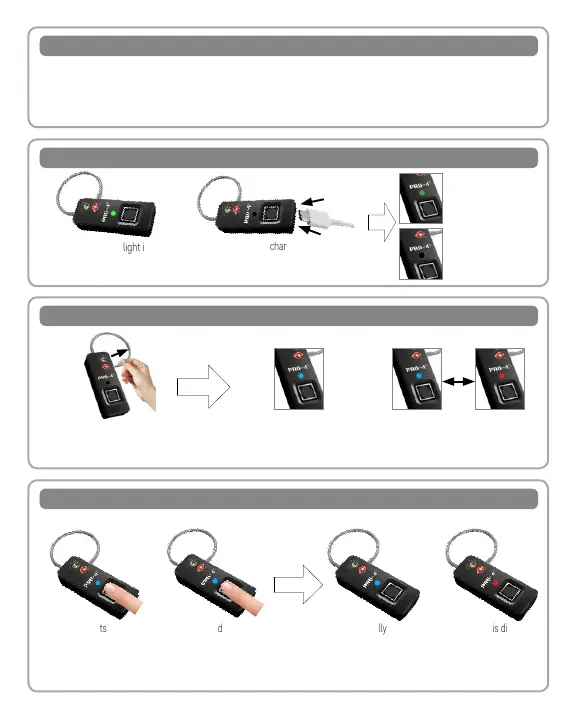
A GREEN ashing light indicates a
low battery; charge the lock.
Open the USB-C charge port cover and
insert the USB-C cable (included). Connect
the USB-C cable to a power source.
CHARGING LOCK BATTERY FULLY CHARGE BEFORE USING
CHECKING THE FINGERPRINT STATUS
REGISTERING ADMINISTRATOR FINGERPRINT
The administrator ngerprint must be used to add or delete ngerprints from the Secure Touch Lock’s memory.
1. Open the lock and press
ngerprint on pad for 3 seconds.
If the lock displays a solid BLUE
light, the lock does not have an
administrator ngerprint stored.
If the lock alternates solid BLUE and
RED light, the lock already has an
administrator ngerprint stored.
Lock shackle
LED instruction
lights
Fingerprint
sensor
TSA007 lock
cylinder
micro-USB
Charging interface
setting button
1.Registered fingerprint
2.Press the setting button after the red light is out.
1. With no lights being
displayed, press
ngerprint on pad. A
BLUE light will display.
2. Place the new administrator’s nger
on the ngerprint pad. The BLUE
light will turn o and the lock will
beep. The BLUE light turn back on.
Repeat this process 9 more times.
After successfully entering
the administrator ngerprint
10 times, the light will
display solid BLUE and the
lock will beep.
If a RED light is displayed
accompanied by 4
beeps, the administrator
registration failed. Please
repeat the steps.
Lock shackle
LED instruction
lights
Fingerprint
sensor
TSA007 lock
cylinder
micro-USB
Charging interface
setting button
1.Registered fingerprint
2.Press the setting button after the red light is out.
Lock shackle
LED instruction
lights
Fingerprint
sensor
TSA007 lock
cylinder
micro-USB
Charging interface
setting button
1.Registered fingerprint
2.Press the setting button after the red light is out.
The light displays solid
GREEN
when
the lock is
charging.
The light will turn OFF
when the lock is done
charging. Full charge
takes up to 1 hour.



 To Next Page
 Loading...