SWITCHING ON
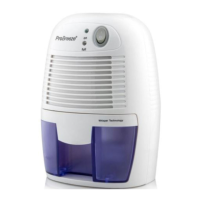
REMOVING THE WATER TANK
Remove the power adapter from the box and attach it to both the
dehumidifier and main wall socket.
Switch the dehumidifier ON using the ON/OFF switch. The green LED will
illuminate and you should feel a light breeze blowing out of the dry air outlet.
To switch OFF, press the ON/OFF switch again.
1.
2.
3.
WARNING
Ensure the dehumidifier's ON/OFF switch is OFF when the unit is not in use.
DO NOT place the Power Adapter in a wet or damp place and ensure it is in a
wellventilated area.
Keep the front air inlets and top air outlets free from being blocked.
ALWAYS keep the dehumidifier in an upright position to avoid leakages.
1.
2.
3.
4.
The dehumidifier can collect up to 250ml (9oz) of water per day and the tank has
a maximum capacity of 500ml (18oz). When the tank is full, the LED will turn
YELLOW and the unit will turn off. When full, turn OFF the dehumidifier and
simply pull the water tank out gently to empty and then carefully slot back in.
CLEANING
Ensure the dehumidifier is OFF and unplugged from the wall socket and use a
soft cloth to gently clean away any dust or debris from the outside of the unit and
air inlets.
English | 2


 To Next Page