20
Y/G Pb/B Pr/R Csync Y/G Pb/B Pr/R Csync Y/G Pb/B Pr/R Y/G Pb/B Pr/R composite s video Y/G Pb/B Pr/R Csync to controller to AVP2
5V DV
1A reg.
WARNING!
Use only with
MADRIGAL
supplied
power supply.
Use only with
MADRIGAL
supplied
power supply.
input 1 input 2 input 3 input 4
input 5 input 6
output
RS-232 control
L
R
R
A1
A2
LR
RR
C
S
L
R
R
PR O C E E D
audio video preamplifier
made in u.s.a. by
b
R L
L
1 2345678 1 23
45
67
C L R L
digital
output
control
control ports
PHASTLink™ compatible
RS-
232
ir
input
1 2
triggers
outputs
12
3
12
3
21
3
21
3
21
3
PUSH
21
3
21
3
12
3
R
L
1
6
2
7
3
5 8
4
L
R
~AC mains
video
inputs
main
video
outputs
remote/record
video outputs
digital inputs
recordremoteanalog outputs
analog inputs
~ ac
mains
CLASS 1
LASER PRODUCT
No User Serviceable Components Inside.
For service, contact Madrigal Audio
Laboratories or an Authorized Dealer.Any modifications to this equipment willvoid all warranties.
Apparatus Claims of U.S. Patent Nos. 4,631,603; 4,577,216;
4,819,098 and 4,907,093 licensed for limited viewing uses only.
S/N
designed and manufactured in USA
www.madrigal.com
modular DVD transport
BEFORE ATTEMPTING TO OPERATE THIS
DEVICE, REFER TO OWNER'S MANUAL FOR PROPER
OPERATING INSTRUCTIONS AND SAFETY PRECAUTIONS.
HAZARDOUS VOLTAGE AVAILABLE INSIDE; DISCONNECT
AC ~ MAINS CABLE BEFORE OPENING UNIT.
WARNING:
232
trigger
in
control ports
PHASTLink
compatable
remote
ir
digital
audio outputs
video
S video composite composite
video
Y/R Pb/G Pr/B
video out
s-video composite
composite
progressive out
Pb Y Pr
composite/S
video inputs
s video
Pr/BPb/GY/R
composite & S-video sources
480/60i or 525/501 component sources
480/60p or 525/50p
to television
PHAST™ communications
RS-232 communications
480/60i or 525/501 YPbPr
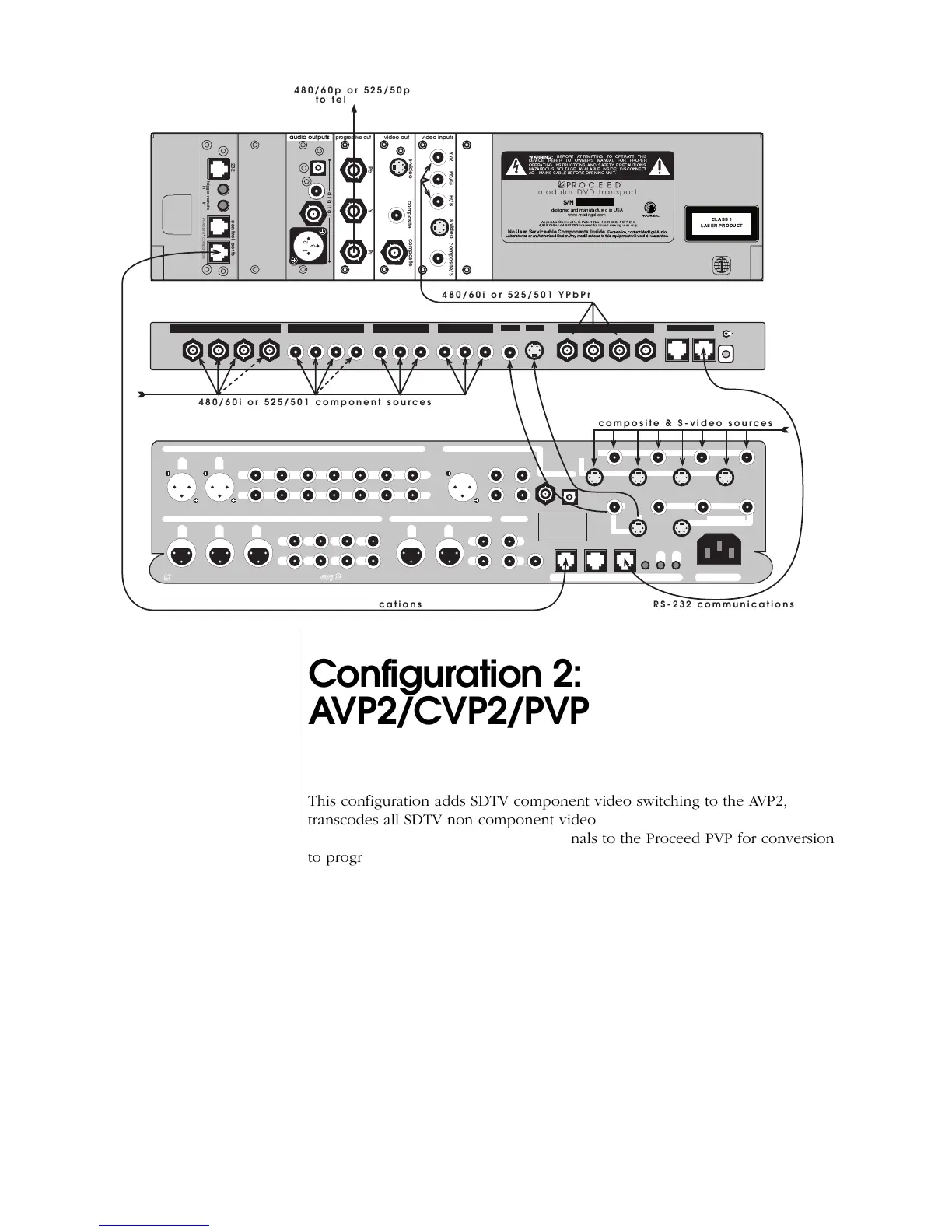
Configuration 2:
AVP2/CVP2/PVP
This configuration adds SDTV component video switching to the AVP2,
transcodes all SDTV non-component video signals to interlaced SDTV compo-
nent video, and routes the resulting signals to the Proceed PVP for conversion
to progressive video.
In this configuration, all video sources must be interlaced (480/60i NTSC or
525/50i PAL). If you have progressive or HD sources, you must use either
Configuration 1 (no PVP) or Configuration 3 (includes a PVP).
This configuration simplifies day-to-day operation of even complex video sys-
tems with a variety of SDTV composite video, S-video and component video
sources by providing a “universal translator” of those various signals to a
single standard. Everything will be displayed as either 480/60p or 525/50p
progressive video, depending on whether the original signal was NTSC- or
PAL-formatted (respectively).
In this way, one can have a single connection to the display device, and enjoy
one-touch selection of any A/V source on the AVP2 (without having to also
select different video inputs on the television).



 To Next Page