7
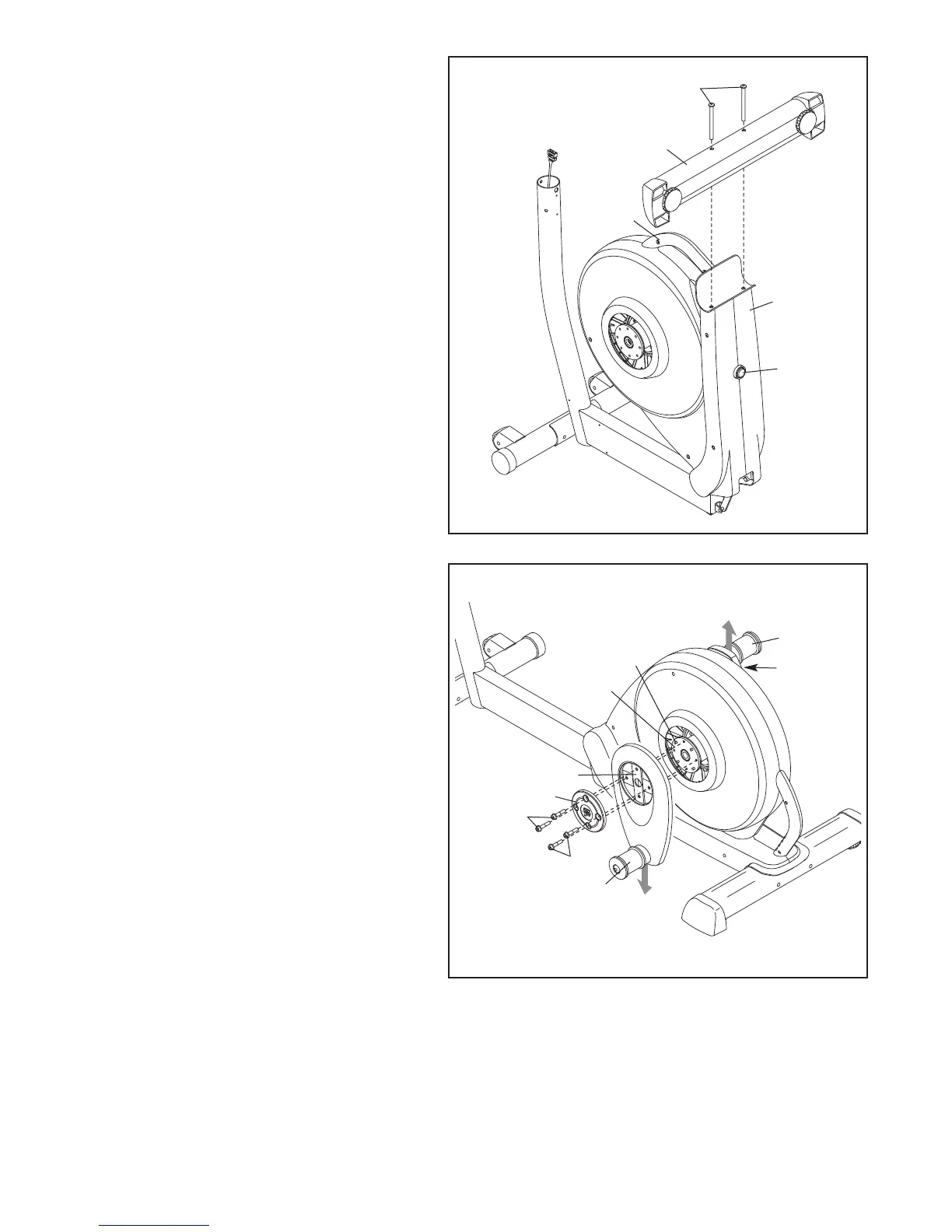
3. Attach the Rear Stabilizer (7) to the Frame
(2) with two M10 x 127mm Button Screws
(83).
Next, hold the handle on the Frame (2),
p
ress the Latch Button (68), and lower the
Frame until the Rear Stabilizer (7) rests on
the floor.
3
83
7
H
andle
2
68
4. Hold a Hub Cover (75) and a Crank Arm
(36) against the Crank (45).
Align the holes in the Hub Cover (75) and
the Crank Arm (36) with the unused holes in
the Crank (45).
Insert four Hub Screws (87) into the Hub
Cover (75) and the Crank Arm (36), and fin-
ger tighten the Hub Screws into the Crank
(45). Tighten one Hub Screw, and then
tighten the Hub Screw across from the
first Hub Screw. Then, tighten the
remaining two Hub Screws.
Repeat this step on the right side of the
elliptical.
Make sure that the Crank Arms (36) are
oriented with the Crank Bushing Sleeves
(43) in the positions shown. Note: There
are no Pulley Screws (98) on the right side.
4
36
45
98
75
87
87
36
43
43


 To Next Page