Using the „Pro-Ject Stream S2“ App
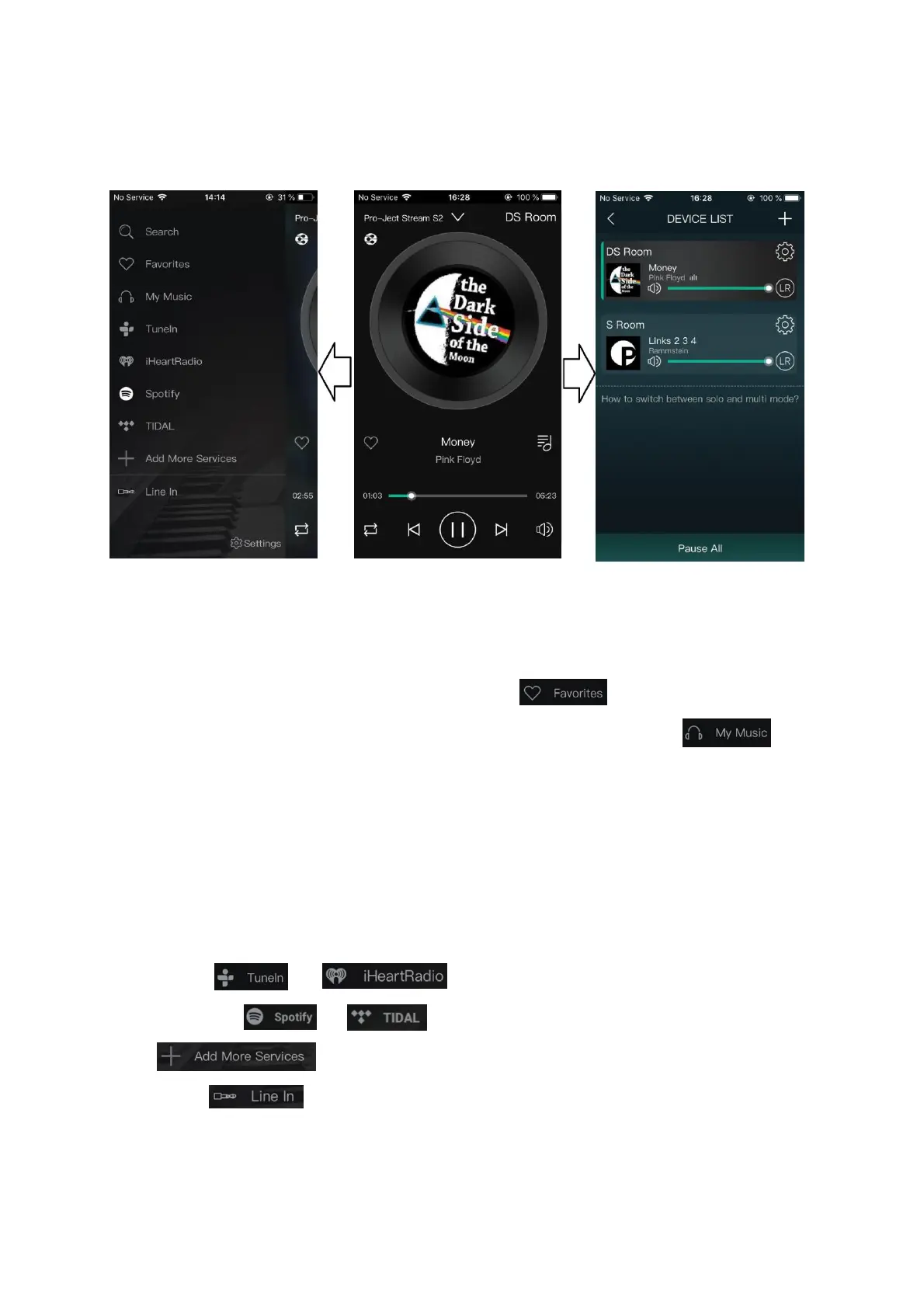
The App is divided into three main pages, which are accessible by swiping to the left or right.
Left-Side Page
Choose your playback or streaming source and add or remove services from your list:
-Music that you added to your favorites will be displayed under Favorites
-Network and Media server, locally stored music on the mobile device and USB sources: Meine Mu
- Phone: access to music stored on your mobile device
- Home Music Share: access to all music in network locations
- My playlists: creating and managing of playlists
- Recently played: list of recently played music
- USB: access to USB storage; only displayed when USB Stick or HDD is connected
-Internet Radio: TuneIn und and iHeartRadio
-Streaming Services: Spotify und Tidal
-Under Weitere Dienste hinzuf you can add or remove different music services to your list
-External Input: Line-In (also available with the push of a button on the front panel)



 To Next Page