V1.0 3,500 LB 12V DC ELECTRIC A-FRAME TRAILER JACK 8787780
Visit www.princessauto.com for more information 7
OPERATION
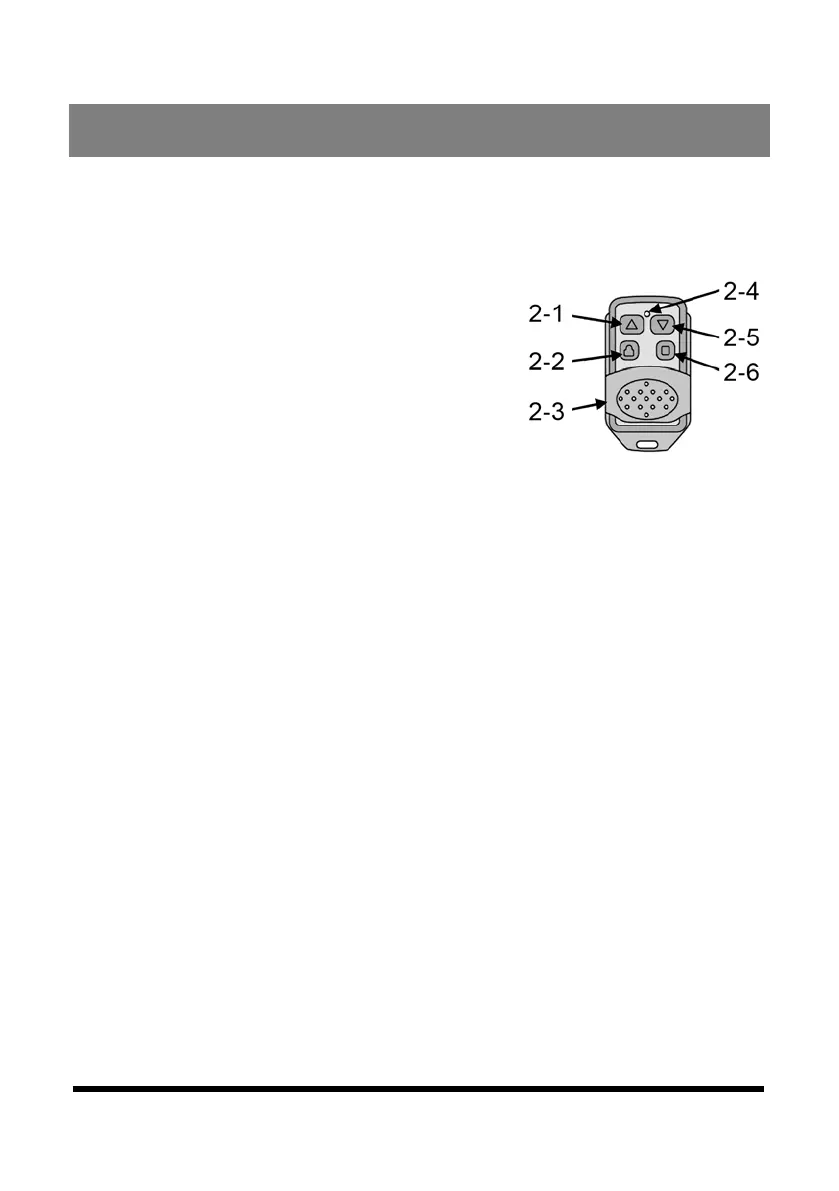
WIRELESS REMOTE CONTROL
1. Slide the cover (Fig. 2-3) down to expose the four
control buttons.
2. Press the ON button (Fig. 2-6) to
activate the remote function. The
indicator LED (Fig. 4-4) will light
up when the remote is active.
3. Press the UP button (Fig. 2-1) to
extend the jack (raise the trailer).
4. Press the DOWN button (Fig. 2-5)
to retract the jack (lower the trailer).
5. Press the OFF/LOCKED button (Fig. 2-2) to shut off the
remote. The indicator LED will become dark.
6. Slide the cover up to prevent accidental operation of the
remote control.
OPERATING THE TRAILER JACK
WARNING! Do not place blocks under the jack’s foot pad.
The jack may slide off the blocks and create a hazard that can
seriously injury yourself or a bystander.
NOTICE! Do not use an extension cord that is less than 10
gauge wire to avoid tripping the circuit breaker.
ELECTRIC MOTOR
1. Park the trailer on a level surface and block the wheels.
Release the trailer hitch locking mechanism and chains.
1.1 Toggle the light switch (#3) on to have the LED light (#13)
illuminate the area when hitching or unhitching the trailer.
2. Extend the drop leg (#23) to the appropriate length and
secure in place with the lock pin (#22).
Fig. 2


 To Next Page