5
5. Operating Instruction
Place the soldering iron or desoldering gun in the holder separately
Then connect the plug to the receptacle on the station and turn clockwise to tighten the plug nut.
Check the power supply to see if it is corresponding to the specification on the type plate and the power
switch is on the “OFF” position
Connect the control unit to the power supply and turn on the power, LCD screen will light up and shuffle
knob become blue.
Long press the shuttle knob of soldering iron /desoldering gun and turn to the desired temperature; short
press again to switch the temperature unit display to ℃ or ℉.
Long press the shuttle knob to the standby mode.
If not use for about 10 minutes, the desoldering station will be automatically transfer into sleeping mode,
and the temperature reduces to 200 ℃. When lift soldering iron/desoldering gun from holder, the rework
station will get back to working mode automatically.
Set the temperature
Long press the shuttle knob and the LCD display will light up. Turn the knob clockwise to increase
the temperature and anticlockwise to lower it.
When its actual temperature reaches the setting, the LCD display will turn from yellow into white.
Long press the shuttle knob for 3 seconds to turn off the iron.
It comes with temperature memory function. When you turn on the iron next time, its temperature
setting will remain at what you set last time.
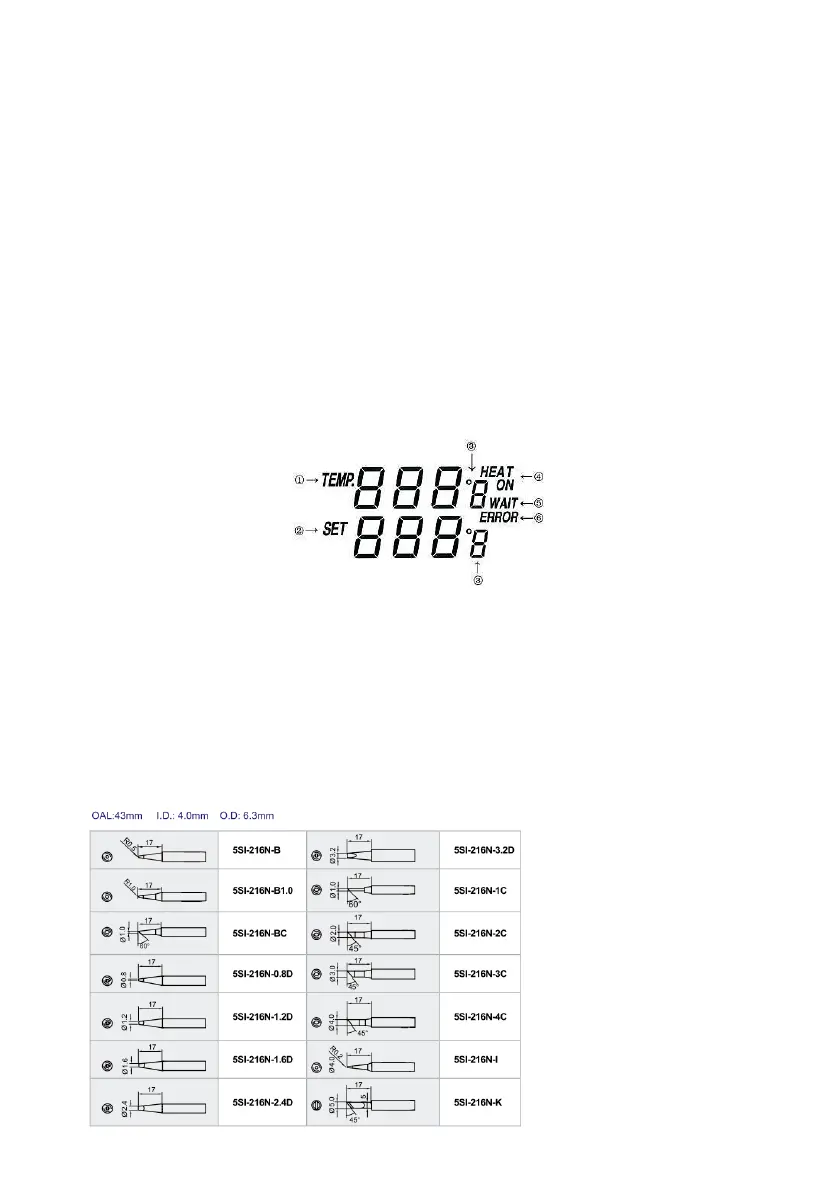
6. Digital display:
①. Actual temperature of the soldering iron/ desoldering gun.
②. Set temperature of the soldering iron/ desoldering gun. It can be adjusted by shuffle knob. After you set
the temperature, the unit will reach to the set temperature quickly.
③. Short press the shuttle knob to change the temperature display in ℃ or ℉.
④. When the actual temperature is lower than the set temperature, "HEAT ON" will be displayed, which
means the unit is heating up.
⑤. When the temperature difference between the actual and set temperature is more than ±10℃ "WAIT"
will be displayed.
⑥. When "---" or "ERROR" is displayed, there may be some problem with the system; either the soldering
iron/ desoldering gun is not correctly connected.
7. Soldering Iron
Replacement soldering iron tips:


 To Next Page
 Loading...