6
Tip temperature
High soldering temperature will degrade the tip. Keep the temperature at the lowest as possible during work.
The tip temperature can recover quickly, which ensures efficient and effective soldering even at low
temperature. It also protects the soldered items from damage by high temperature.
Cleaning
Clean the tip regularly with a cleaning sponge; otherwise, oxides and carbides from solder and flux can form
impurities on the tip. These impurities can result in defective joints or reduce the tip's heat conductivity.
When you use the soldering iron frequently, be sure to loosen the tip and remove all oxides at least once a
week. It can help to maintain the tip's performance.
When not in use
Never leave the soldering iron at a high temperature for too long, as the tip's solder plating will be covered
with oxide, which can greatly reduce the tip's heat conductivity.
After use
Wipe the tip clean and tin it with fresh solder, which can prevent the tip from being oxidized.
Troubleshooting
Warning:
Disconnect the power plug before servicing. Failure to do so may result in electric shock. If the power cord is
damaged, it must be replaced by the manufacturer, its service agent or similarly qualified person in order to
avoid personal injury or damage to the unit.
Check 1. Whether the power cord or plug is connected or not?
→If no, connect it.
Check 2. Whether the fuse is damaged?
→If yes, replace the fuse with 3.15A/250V
Unable to set temperature
Knob damaged or Program fault
→Return dealer for maintenance
Check 1. Whether the iron heater is damaged?
→If yes, replace the iron heater
Check 2. Does the grounding spring touch the iron heater ?
→Reassembly
Check 3. Is the lead of iron heater twisted and inaccessible?
→If yes, replace soldering iron or return to dealer for repair
Refer to: How to determine the fault of heater or cord
Check 1. Is the tip temperature too high?
→If yes, set an appropriate temperature.
Check 2. Is the tip clean?
→If not, refer to Tip maintenance and Use.
Problem 5.
The tip temperature is different
from the set temperature.
Is the tip clean?
→If not, refer to Tip maintenance and Use.
→Or return dealer for maintenance
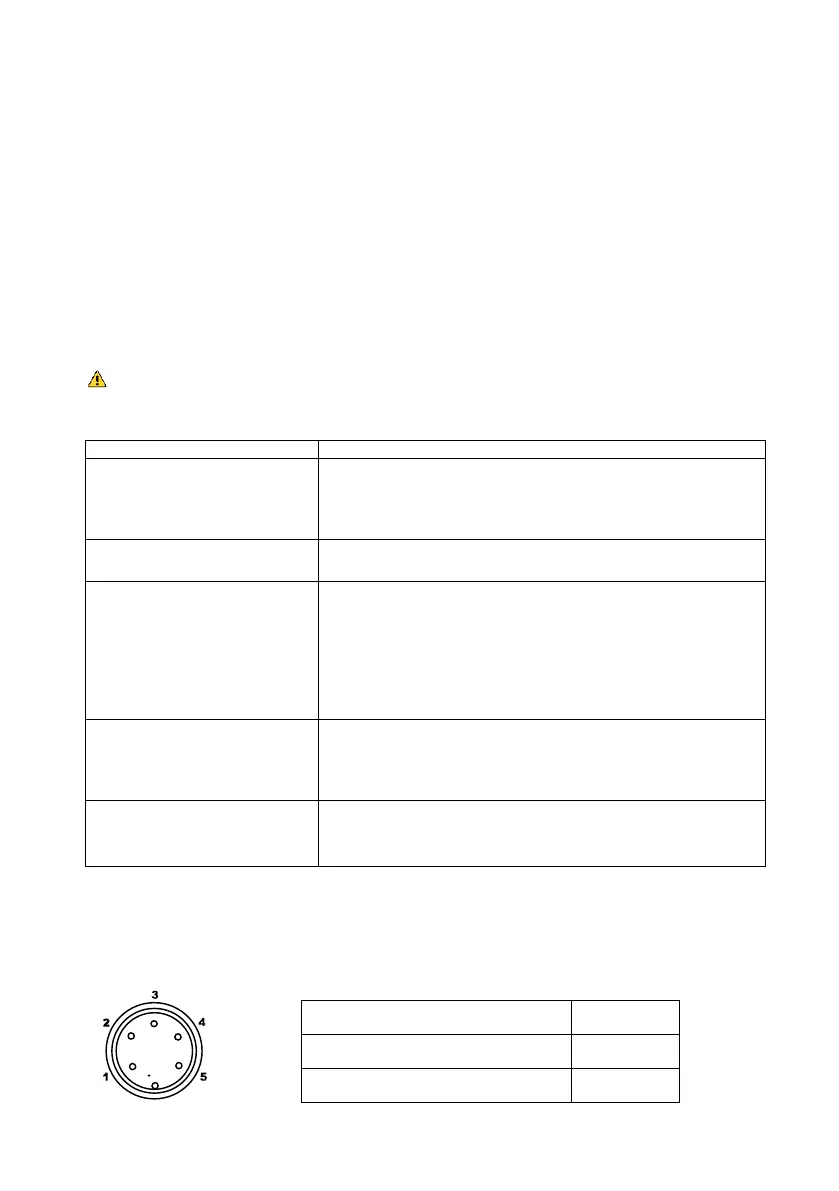
How to determine the fault of heater or cord.
Disconnect the plug and measure the resistance value between the connecting plug pins as follows.
If the values of 'a' and 'b' are far away from the normal values, replace the heater (sensor) and/or cord
assembly (refer to procedures 1 and 2).
If the value of 'c' is more than the normal value, remove the oxidization by lightly rubbing it with sandpaper or
steel wool.
a. Between pins 2&3 (Sensor)
b. Between pins 1& 4 (Heater)
c. Between metal case & Tip


 To Next Page
 Loading...