The PRO-SIGNAL PSG3454 is an HDMI Extender KVM Point to Point system designed to extend HDMI, USB, and audio signals over a single CAT6/6A/7 network cable. This system consists of a transmitter (TX) and a receiver (RX) unit, enabling the extension of signals up to 70 meters. It supports high-definition video resolutions and offers KVM (Keyboard, Video, Mouse) functionality, allowing remote control of a source PC.
Function Description:
The primary function of the PSG3454 is to extend HDMI video, stereo audio, and USB signals from a source device (like a PC) to a remote display and control peripherals (keyboard and mouse) over a long distance using a standard network cable. The transmitter unit connects to the HDMI output and USB port of the source PC, as well as a local display if needed. The receiver unit connects to the remote HDMI display, a keyboard, and a mouse. The KVM feature allows users to control the source PC from the remote location, making it ideal for applications where the PC needs to be kept in a secure or remote location while still being accessible for operation. The system also includes a 3.5mm stereo audio output on the receiver for connecting headphones or an amplifier.
Important Technical Specifications:
- Voltage/Current: DC 5V 1A for both TX and RX units.
- Power Consumption: Less than 2.5W for both TX and RX.
- HDMI Compliance: HDMI 1.3.
- HDCP Compliance: HDCP 1.4.
- Video Bandwidth: 10.2Gbps.
- HDMI Input Resolutions Supported:
- 800x600, 1024x768, 1280x720, 1280x960, 1366x768, 1440x900, 1680x1050, 1920x1080.
- 480i@60Hz, 480p@60Hz, 576i@50Hz, 576p@50Hz.
- 720p@50/60Hz, 1080i@50/60Hz, 1080p@24/25/30/50/60Hz.
- Supported Audio Formats: PCM, LPCM, DTS HD, DTS Audio.
- Input and Output TMDS Signal: 0.7~1.2Vp-p (TMDS).
- Input and Output DDC Signal: 5Vp-p (TTL).
- Transmission Length: Up to 70 meters over CAT6/6A/7 cable.
- Input/Output Cable Length: Less than 8m (AWG24).
- Transfer Method: Over UTP/STP CAT6/6A/7.
- Connector: RJ45.
- Working Temperature: -20~60°C.
- Storage Temperature: -30~70°C.
- Humidity: 0~90%RH (no condensation).
- Dimensions (RX & TX): 80.0(L) x 75.0(W) x 20.0(H)mm.
- Material: Alloy.
- Weight: TX & RX 200g each.
Usage Features:
- Point-to-Point Extension: Extends HDMI and KVM signals directly between a transmitter and a receiver unit.
- KVM Remote Control: Allows a source PC to be controlled remotely using a USB mouse and keyboard connected to the receiver unit.
- Local HDMI Output (Transmitter): The transmitter unit includes an HDMI OUT port, allowing for a local display monitor to be connected directly to the source PC, in addition to the remote display.
- Audio Output (Receiver): A 3.5mm L/R audio output on the receiver allows connection to headphones or an amplifier for remote audio playback. When using this output, it is recommended to switch the audio output to PCM format.
- Plug and Play: The system is designed for ease of use, though proper cable connections are essential.
- LED Indicators: Both units feature KVM indicators (illuminates when a PC is connected) and Power/transmission LED indicators for status monitoring.
- Reset Button: A reset button is available on both units to reset the device if needed.
- CAT Cable Requirement: Adheres to the IEEE-568B standard for network cabling. High-quality CAT6/6A/7 cables with low loss and crosstalk are recommended for optimal performance. The pinout for the recommended cable standard is provided: 1 orange/white, 2 orange, 3 green/white, 4 blue, 5 blue/white, 6 green, 7 brown/white, 8 brown.
- Included Accessories: The package includes the HDMI Extender Transmitter and Receiver units, two 230VAC to 5VDC 1A power adapters, an operation manual, and a USB cable.
Maintenance Features:
- Cleaning: The outside casing of the device can be cleaned with a soft cloth lightly moistened with mild soap and water.
- Avoid Abrasives and Solvents: Do not use any abrasive materials or solvents for cleaning, as these can damage the device.
- ESD Precautions: When installing, it is important to be aware of static electricity, which can damage the device. ESD precautions should be taken during installation.
- Hot-Plugging Caution: Users are advised not to plug or unplug cables while the devices are powered on to prevent potential damage.
- Power Supply: Only use the provided power supply or one of identical specification to ensure proper operation and prevent damage.

 Need help?
 General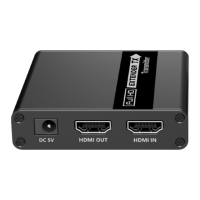

 To Next Page
