8
ver. 1.1
5. Calibration
All devices are factory calibrated. However, due to mechanical shock
or exposure to too high or too low temperatures, the need to recalibrate
the device may occur.
PRO900 Digital Spirit Level calibration
a) Find a horizontal surface. You can check the surface using
the built-in spirit level. If the digital level is not equipped
with a spirit level, use another spirit level for measurement.
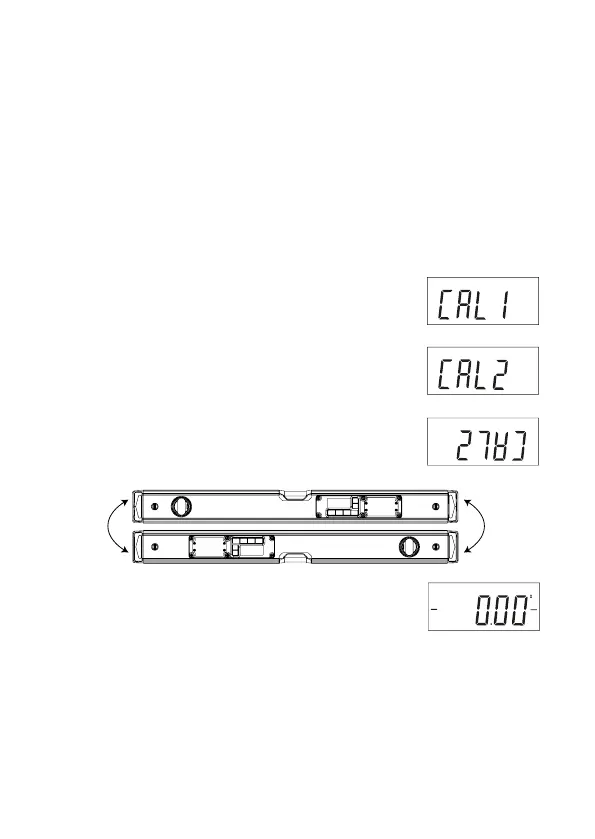
b) Press the „HOLD” (5) button for approx. 3 seconds.
The “CAL1” sign will appear on the screen.
Press the „REF” (8) button.
c) Leave the digital level intact until the screen
shows a „CAL2” indication.
d) Rotate the digital level 180° and place the device
on the very same horizontal surface.
Press the „REF” (8) button.
WARNING! Calibration can be repeated several times. While calibrating
the device, it is important to place the device ideally
in repeatable conditions in horizontal position.
Calibrating the device on an inclined surface may cause
wrong indications.
e) Wait approx. 4 seconds until the screen shows:
Calibration has been finished correctly!
180°180°



 To Next Page