Em.Heat
AutoCool
AutoIAQ
Set At
On LHM
Tech Set
Set Sched
Next
Run Sched
Set Time
Hold
Done
Menu
Prev
HOLD
STAGES
1+2+3
COOL ON
HEAT ON
FAN ON
Thermostat Quick Reference
The low battery indicator is displayed when the AA battery power is low. If the user
fails to replace the battery within 21 days, the screen will only show the low battery
indicator but maintain all functionality. If the user fails to replace the batteries after
an additional 21 days (days 22-42 since rst “low battery” display) the setpoints will
change to 55˚F (Heating) and 85˚F (Cooling). If the user adjusts the setpoint away from
either of these, it will hold for 4 hours then return to either 55˚F or 85˚F. After day 63
the batteries must be replaced immediately to avoid freezing or overheating because
the thermostat will shut the unit o until the batteries are changed.
Important
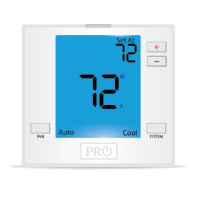
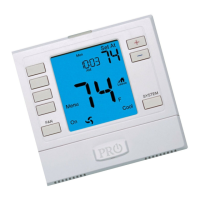
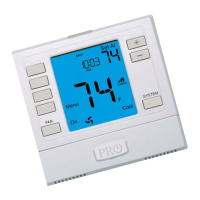
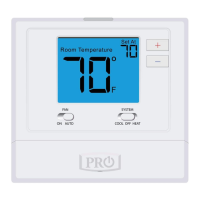
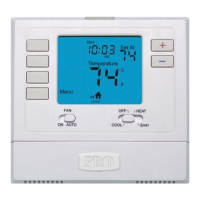
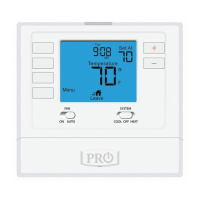
Indicates the current room temperature
Time and day of the week
Setpoint: Displays the selected setpoint temperature.
Hold is displayed when the thermostat program is permanently overridden.
System Operation Indicators:
The COOL ON , HEAT ON or icon will display when the COOL, HEAT, or
(fan) is on. The compressor delay feature is active if these are ashing.
Low Battery Indicator: Replace batteries when this indicator is shown.
Menu Options: Shows dierent options.
Program Time Periods: This thermostat has 4 programmable time periods
per day.
Getting to know your thermostat
Wiring
5
6
9
10
Caution:
Electrical Hazard
All components of the control
system and the thermostat
installation must conform to Class II
circuits per the NEC Code.
Warning:
Wiring
If you are replacing a thermostat,
make note of the terminal
connections on the thermostat that
is being replaced. In some cases
the wiring connections will not be
color coded. For example, the green
wire may not be connected to the G
terminal.
Loosen the terminal block screws.
Insert wires then retighten terminal
block screws.
Place nonammable insulation into
wall opening to prevent drafts.
1.
2.
3.
Failure to disconnect the power
before beginning to install this
product can cause electrical shock
or equipment damage.
System: Indicates current mode of operation.
Terminal
2 Heat 2 Cool
Conventional
System
2 Heat 2 Cool
Heat Pump
System
3 Heat 2 Cool
Heat Pump
System
RC
RH
C
B
O
G
W/E
W2
Transformer power
(cooling)
Transformer power
(heating)
Transformer common
Energized in heating
Energized in cooling
Fan relay
First stage of heat
Second stage of heat
Transformer power
(cooling)
Transformer power
(heating)
Transformer common
Heat pump changeover
valve energized in heating
Fan relay
First stage of
emergency heat
Auxiliary heat relay,
second stage of heat
Heat pump changeover
valve energized in cooling
Transformer power
(cooling)
Transformer power
(heating)
Transformer common
Heat pump changeover
valve energized in heating
Fan relay
First stage of
emergency heat
Auxiliary heat relay,
third stage of heat
Heat pump changeover
valve energized in cooling
Wiring Diagrams
Stages: +1 will appear in the display when second stage of heat or cool is
on. +2 will appear for third stage of heat.
Y
Y2
First stage of cool
Second stage of cool
First stage of heat & cool
Second stage of cool
First stage of heat & cool
Second stage of cool
& second stage of heat
Features
Temporary and Permanent Hold Feature
When cool or heat is turned on, the thermostat will display HOLD
and RUN SCHED on the left of your screen when you press the
or button.
Temporary Hold: At this time if you do nothing, the temperature will
remain at this setpoint temporarily for 4 hours.
Permanent Hold: If you press the HOLD key on the left of your
screen, you will see HOLD appear below the setpoint temperature in
the display. The thermostat will now permanently stay at this
setpoint and can be adjusted using the or keys.
To Return to Running Schedule: Press the RUN SCHED button on
the left of your screen to exit either temporary or permanent hold.
Filter Change Reminder
If your installing contractor has congured the thermostat to remind
you when the air lter needs to be changed, you will see FILT in the
display when your air lter needs to be changed.
Resetting the lter change reminder: When FILT reminder is
displayed, you should change your air lter and reset the reminder
by holding down the second button from the top left side of the
thermostat for 3 seconds.
(If using programming)
1
2
3
7
8
1
2
3
7
8
Globe: Globe is displayed if an energy ecient temperature has been selected.
S1/S2
Remote Sensor Remote Sensor Remote Sensor
Typical 2H/2C System: 2 Transformer
REMOVE JUMPER
RC
RH
Y
C
W/E
G
W2
Y2
C
R
L2
L1(HOT)
C
R
L2
L1(HOT)
COMPRESSOR
RELAY
HEAT RELAY
FAN RELAY
HEAT RELAY 2
COMPRESSOR
RELAY 2
Typical 2H/1C Heat Pump System
RC
RH
Y
C
W/E
G
W2
B
COMPRESSOR
RELAY
FAN RELAY
EMERGENCY
HEAT
C
R
L2
L1(HOT)
O
COOL
CHANGEOVER
VALVE
HEAT
CHANGEOVER
VALVE


 To Next Page
 Loading...