
 Need help?
Do you have a question about the PROCASTER 58A900H and is the answer not in the manual?
Explains symbols and precautions on the product for safety.
Important instructions for safe and secure TV wall mounting.
Lists items included and highlights primary functions.
Explains HDR/HLG and Dolby Vision for improved visual quality.
Guide on attaching stand and VESA mount specifications.
Instructions for connecting the TV antenna or cable.
Overview of Component, HDMI, VGA, Audio, USB, CI, and LAN connections.
Advice on cable types, USB limits, and wall mounting.
Connecting power and switching between on and standby states.
Using the remote control and physical buttons for TV operation.
Detailed description of all buttons on the remote control.
Initial setup screens for welcome, language, and phone setting transfer.
Steps for network connection and signing into your Google account.
Accepting terms and setting location, country, and PIN.
Configuring Chromecast, tuner, and TV operating modes.
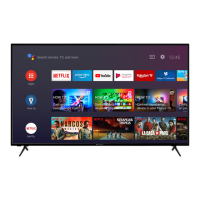
Understanding the Home Screen layout and accessing applications.
Accessing channel management, picture, sound, and power settings.
Configuring subtitle, teletext, and HbbTV features.
Managing recorded programs and setting timers.
Setting up Wi-Fi and Ethernet connections for internet access.
Procedures for channel scanning, sorting, skipping, and editing.
Modifying channel details and configuring cable channel installation.
Managing parental restrictions, blocking content, and changing PIN.
Configuring audio, managing Google accounts, and apps.
Updating software, managing device info, and security settings.
Setting timers and adjusting core picture parameters.
Fine-tuning video processing for noise reduction and image enhancement.
Detailed color tuning and white balance correction for picture accuracy.
Selecting sound presets, equalizer settings, and audio output.
Configuring demo modes, assistant, screen saver, and location services.
Managing usage data, accessibility, and channel list operations.
Browsing program schedules and managing favorite channels.
Connecting the TV to the internet via Ethernet or Wi-Fi.
Steps to connect the TV to a wireless network.
Accessing and playing various media files from connected devices.
Viewing USB media and streaming from mobile devices via DMR.
Recording programs, instant recording, and timeshift functionality.
Formatting USB, managing schedules, and using CEC/ARC.
Casting content from mobile devices to the TV wirelessly.
Mirroring device screens and streaming app content to the TV.
Instructions for updating the TV's firmware via the internet.
Solutions for power, remote, and channel reception issues.
Addressing problems with picture, sound, and input source selection.
Typical display resolutions and frequencies supported via VGA.
Supported signal standards for AV and HDMI connections.
Details on video codecs, resolutions, bit rates, and container formats.
Details on audio codecs, sample rates, bit rates, and container formats.
Detailed list of audio codecs and their specifications.
Supported image file types like JPEG, PNG, BMP, MPO, GIF.
Supported formats for internal and external subtitle files.
Resolutions supported when using a DVI to HDMI converter cable.
Details on broadcasting, reception, and wireless LAN transmitter specifications.
Regulatory restrictions for wireless LAN use in various countries.
Proper disposal methods for electronic waste and batteries in the EU and elsewhere.
Details on licenses for HDMI, Dolby, DTS, Google, Microsoft, and CI Plus.
Key identifiers like product number, model, energy rating, and screen size.
Information on power usage and display resolution.
On mode, standby, off mode, and annual power consumption figures.
Comprehensive details on display resolution and screen size measurements.
 General
| Display Technology | LED |
|---|---|
| Screen Size | 58 inches |
| Smart TV | Yes |
| Operating System | Android TV |
| HDR | HDR10 |
| Refresh Rate | 60 Hz |
| HDMI Ports | 3 |
| USB Ports | 2 |
| Wi-Fi | Yes |
| Bluetooth | Yes |
| Audio Output | 20W |
| Resolution | 3840 x 2160 |
| Weight | 15 kg |






 To Next Page