© 2014 Proceq SA 7
Set the Test Disc Size
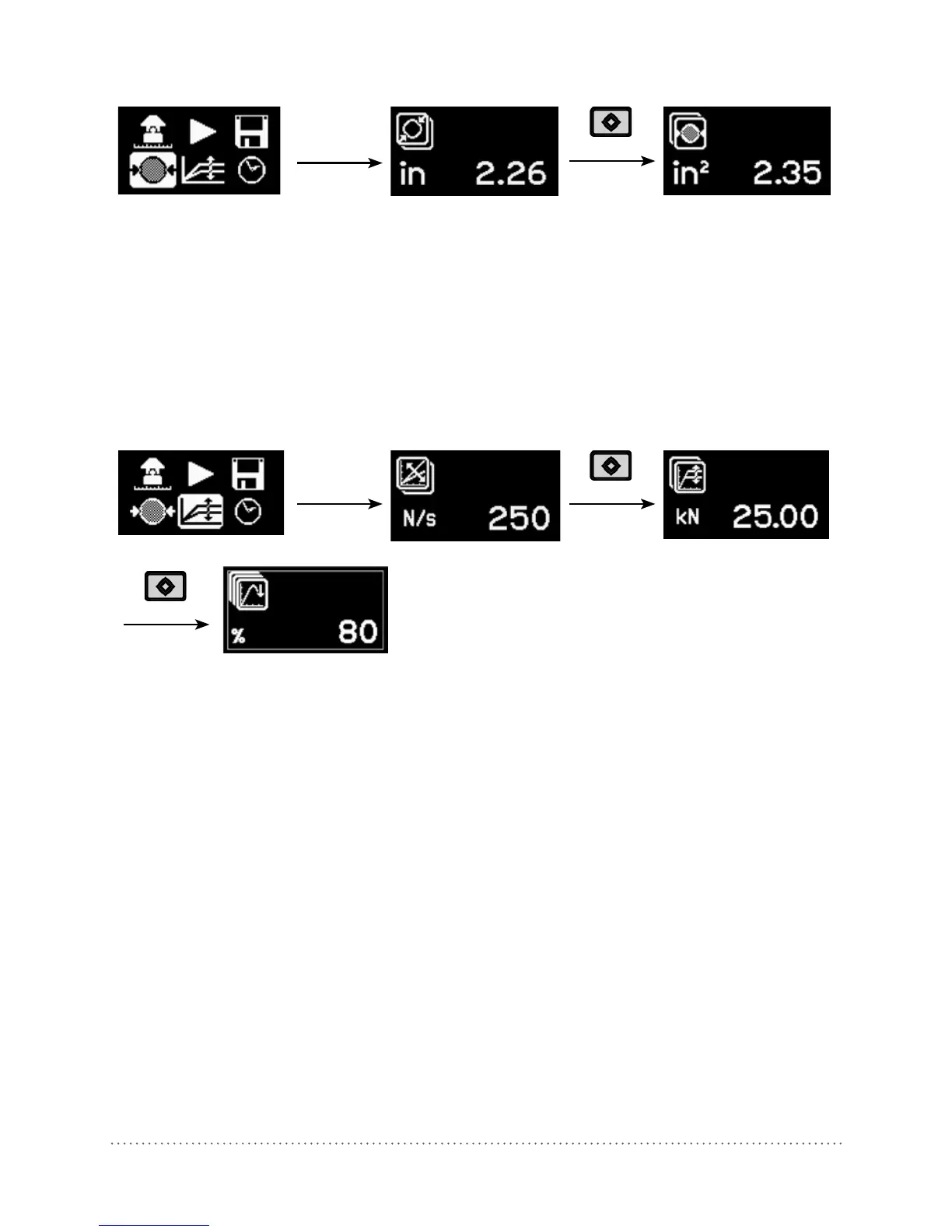
For circular test discs:
• Enter the diameter of the disc.
• Press the center key to complete the action.
For square discs:
• Press the 2nd function key.
• Enter the surface area, e.g. for a 50x50 mm test plate, the surface area is 2500 mm
2
.
(Note the diameter setting will show a theoretically calculated value in this case.)
• Press the center key to complete the action.
Set the Load Parameters
Maximum applied load:
• To set a maximum applied load, press the 2nd function key.
• Enter the maximum load to be applied during the test. The minimum permissible setting for this
parameter is 20 % of the maximum value. If no maximum load is required, this should be set at
the maximum value supported by the instrument, i.e. 6 kN, 16 kN or 25 kN.
• Press the center key to complete the action.
Load rate:
• Set the load rate specified by the standard. If a load rate is not specified, a typical load rate of
100 N/s (22.5 lbf/s) may be selected.
• Press the center key to complete the action.
End of test criteria:
• To set the criteria for test completion, press the 2nd function key again. The default value is 80 %.
This means that the test will be completed when the load has dropped to 80 % of the peak load.
• When testing on softer or elastic materials it is possible that the test disc does not separate
completely from the substrate. Setting this parameter to 0 % will ensure that the instrument
continues pulling until the maximum stroke of 5mm is achieved.



 To Next Page