EasyManua.ls Logo

Profroid SUPERCOLD SCH - Operation and Utilisation

Default Icon
Print Icon
To Next Page IconTo Next Page
To Previous Page IconTo Previous Page
Loading...
35
/
61
1 2 3 4 5 6 7 8 9
def
fan
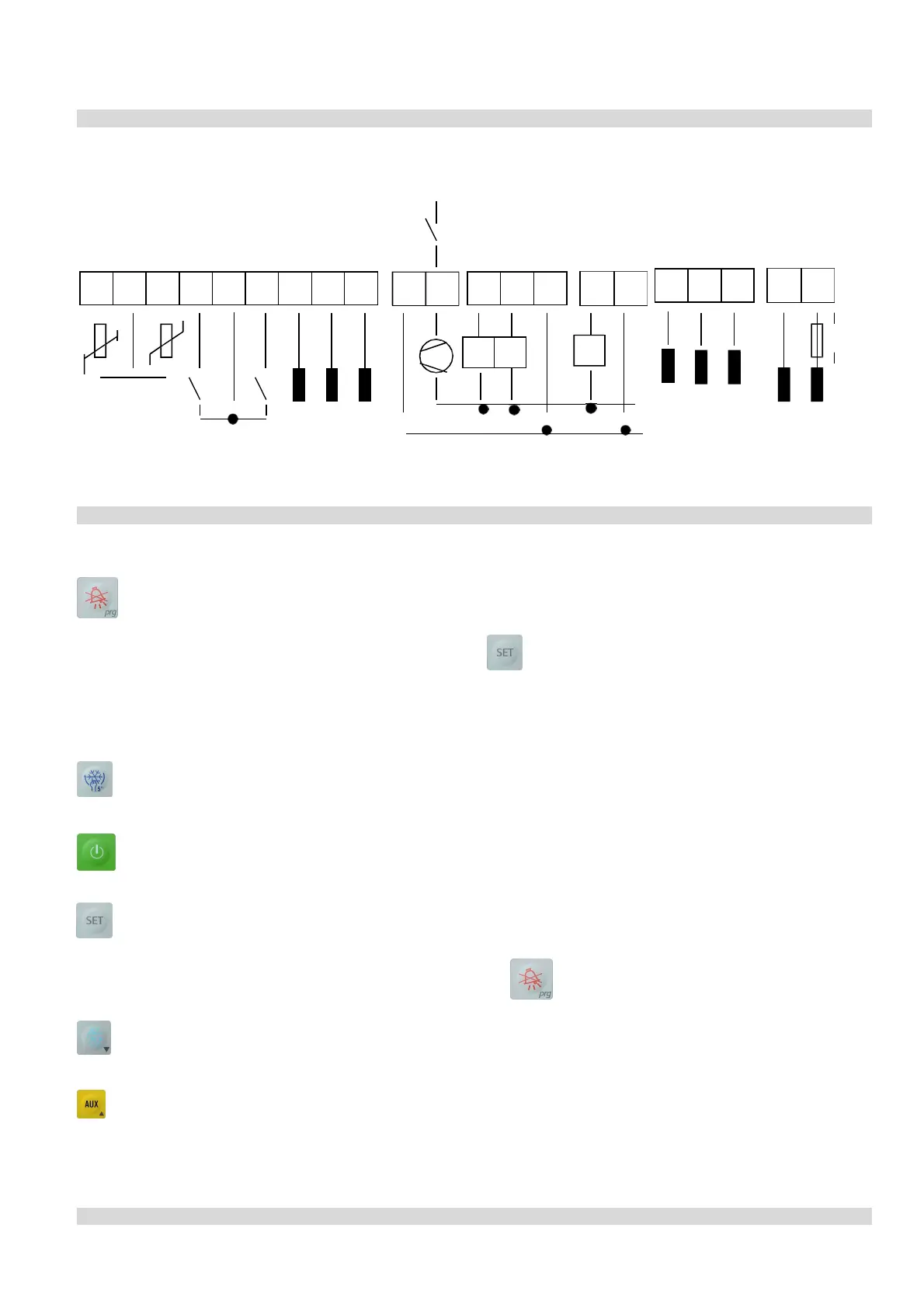
Connections
COMPRESSEUR
COMPRESSOR
DEGIVRAGE
DEFROST
VENTILATION
FAN
AUXILIAIRE (éclair.)
AUX. (light)
ID1 ID2 D+ GND D-
10 11
12 13 14
15 16
17 18 19
20 21
aux
FUSE
500mA
N
ENTREES T.O.R.
F
DIGITAL INPUTS RS-485
ALARM
ALARM
N F
230 VAC
Function
ke
y
s
Some
of
the
keys
are
multi-functional.
-
If
the
installation
is
in
normal
operating
mode,
this
key
deactivates
the
alarm
buzzer
and
the
alarm
relay.
-
If
pressed
more
than
5
seconds
simultaneously
with
the
key,
it
gives
access
to
the
configuration
menu.
(See
“2
nd
LEVEL
parameters”
paragraph).
-
If
pressed
more
than
5
seconds,
it
gives
access
to
the
current
parameters.
-
If
pressed
when
the
PROCOLD
power
is
switched
on,
it
re-initialise
the
values
to
default
values
(see
the
alarm
and
signalisation
paragraph).
-
If
pressed
during
programming,
it
enables
the
memorisation
of
the
parameters
and
end
the
programming
mode.
-
If
pressed
more
than
5
seconds,
it
enables
/
disables
the
continuous
cycle,
or
the
manual
override
of
the
compressor
for
the
pre-determinate
time
(see
«
cc
»
parameter:
continuous
cycle
time).
-
Start
or
stop
the
regulator.
Attention:
when
the
regulator
is
switched
off,
all
the
outputs
are
deactivated,
except
AUX
outputs,
and
the
INDICATOR
LIGHT
OFF
is
blinking.
To
deactivate
this
key,
you
only
need
to
configure
one
of
the
two
digital
inputs
in
ON/OFF
remote
mode.
(See
digital
inputs
configuration
paragraph)
Display
the
set
point
(see
“set
point”
paragraph)
-
In
programming
mode,
this
key
is
used
to
display
the
value
of
the
parameter
selected.
-
If
pressed
more
than
5
seconds
simultaneously
with
the
key
,
it
gives
access
to
the
configuration
menu.
(See
“2
nd
LEVEL
parameters”)
-
Decrease
the
displayed
value
during
configuration
mode.
-
If
pressed
more
than
5
seconds,
it
launches
a
defrost
cycle.
(If
the
operation
conditions
are
favourable)
-
It
activates
/
deactivates
the
AUX
output
which
can
be
used,
for
example,
to
control
the
lighting
in
the
cold
room,
double
speed
fans
on
the
cooler,
etc…
-
Increase
the
displayed
value
during
configuration
mode.
INDICATOR
LIGHT
description

Related product manuals