Procedure – Low voltage testing:
a) Inspect the wiring harnesses and connections for corrosion and proper
fit. Clean if necessary.
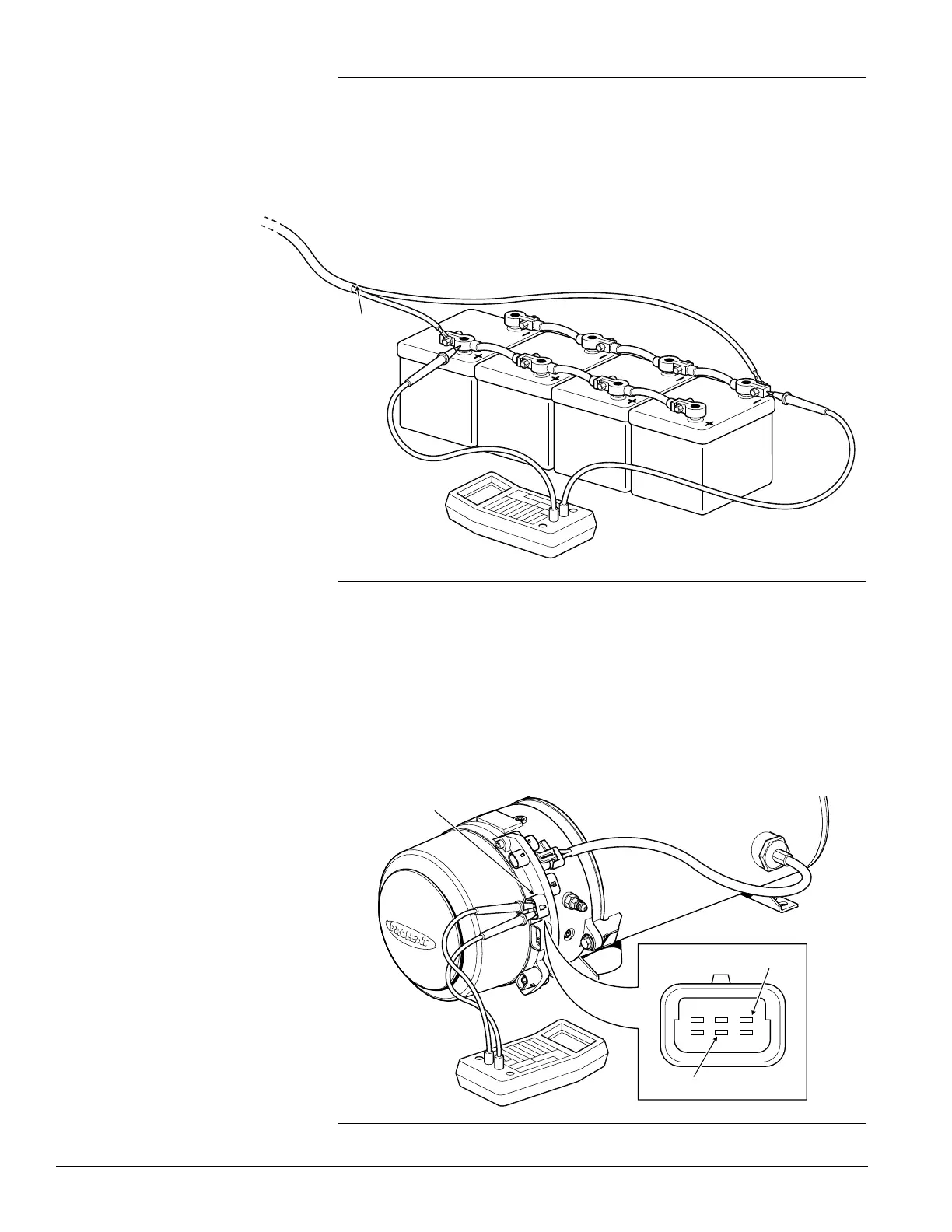
b) Using a multimeter set for voltage, measure across the positive and
negative battery terminals or at the supply source.
If the voltage is below the required voltage, service the batteries and/or
charging system as per OEM supplier recommendations.
If the voltage level is within the operating range, go to item 'c'.
c) Locate and measure across pins D and B in the PCM Data Link
connection. Perform this with the PROHEAT off and then switched on.
If the voltage is within the operating range and a Voltage diagnostic code
is indicated, the PCM is faulty. Go to PCM replacement, page 3-39.
If the voltage falls below the required voltage when the Motor starts,
check the wiring from the supply source to the PROHEAT PCM. Go to
page 3-22.
PROHEAT M-SERIES SERVICE MANUAL
3-28
Figure 3-33: PCM Datalink Connection
PCM DATALINK CONNECTION
F
DE
A
CB
RED (+)
Figure 3-32: Voltage Measurement
TO PROHEAT
BLACK (-)


 To Next Page