OPERATION
Whentheovenisoperational(poweron),thedisplaywillshow“0:00”andabeep
soundwillbeheard.Theclockissetona24Ͳhourcycle.
SettingtheClock
1. Press
,thehourdigitswillflash.
2. Turnthethermostatcontrolknobtosetthecorrecthour.
3. Press
toconfirmthentheminutesdigitswillflash.
4. Turnthethermostatcontrolknobtosetthecorrectminutes.
5. Press
toconfirm.“:”willflashonthedisplay.
INSTALLATION
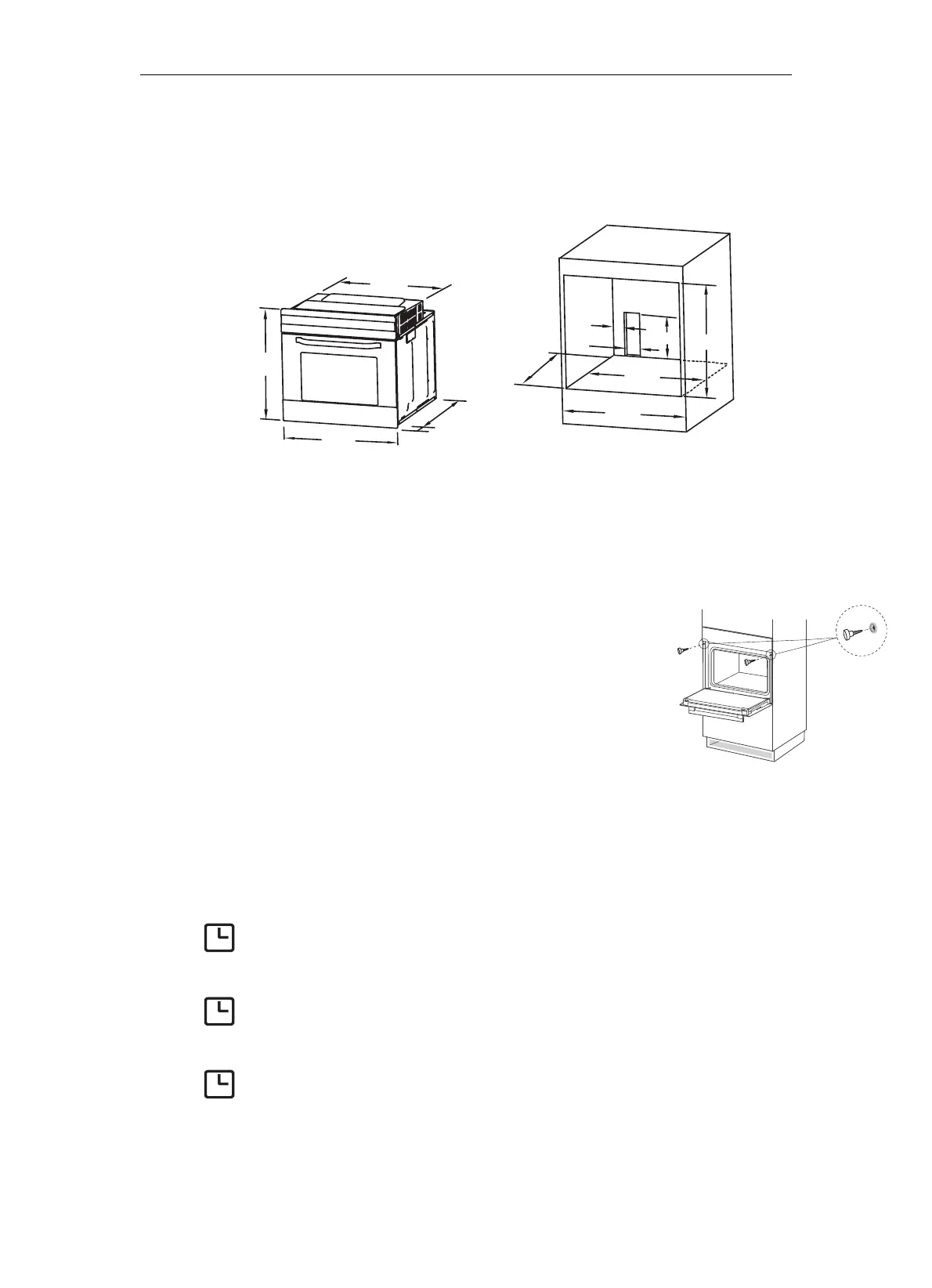
The figures below give the dimensions for installation to the furniture.
555
20
595
595
560
570
min.
560
606
600
80
250
100
The attached dimensions are in mm.
Installation Steps
Please make cabinets based on the data of "Cabinet diagram".
Before installation, please check whether the power socket is
grounded
and the cabinet size meets
the installation require-ments.
Install the machine at the designated location in the kitchen and
install it in an upright cabinet.
Open the furnace door, determine the two installation holes on
the frame, and fix the machine at the installation position with
the screws provided with the product.
1.
2.
3.
4.
Schematic diagram of cabinet fixing


 To Next Page