3. Installation/Instalasi
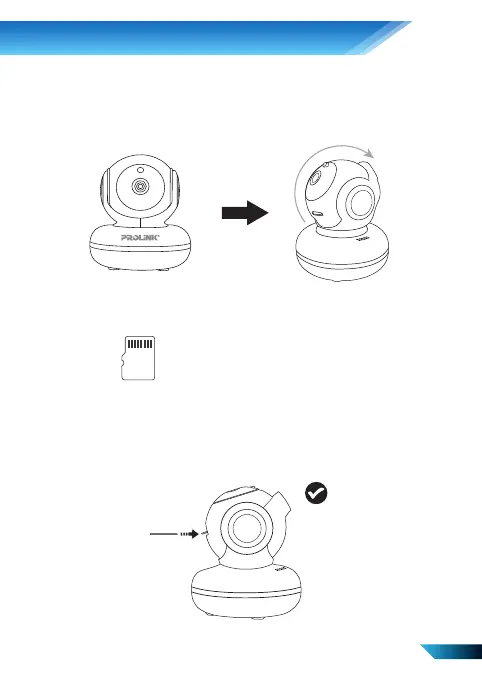
CORRECT WAY OF INSERTING MICROSD CARD
CARA YANG BENAR DALAM MEMASANG KARTU MICROSD
Step 1. Manually tilt the PIC3003WP’s camera lens upwards until the maximum tilt angle.
Langkah 1. Arahkan secara manual lens kamera PIC3003WP ke atas sampai maksimum.
Step 2. Ensure that the MicroSD Card contact pin is facing up.
Langkah 2. Pastikan pin kontak kartu MicroSD menghadap ke atas.
Step 3. Insert the MicroSD Card into the MicroSD Card slot. The MicroSD Card will be secured once
you feel the “click”. To release, gently push the MicroSD Card again for it to bounce back out.
Langkah 3. Masukkan Kartu MicroSD ke dalam slot Kartu MicroSD. Kartu MicroSD akan diamankan
setelah Anda merasakan "klik". Untuk melepaskan, dorong perlahan Kartu MicroSD lagi
agar memantul kembali.
4



 To Next Page