FITTING BATTERIES
ON THE K3 REMOTE
RECEIVER
3 4
FITTING THE BATTERY FOR K3 ALARM FITTING THE BATTERY FOR K3R RECEIVER
2. Using the screwdriver unscrew the two screws on the bottom of alarm
4.Remove the battery and insert new battery and ensure correct polarity
3. Take care removing the Aluminum base,rubber ring,carbon tube
1.Turn off the K3 alarm
5.Re-fit carbon tube,rubber ring,Aluminum base
2. Unscrew the bivvy light cover
3. Take care removeing the rubber ring,carbon tube
4. Remove three batteries and insert new batteries
1.Turn off the K3R receiver
5.Re-fit carbon tube,rubber ring,Aluminum base
3 4
FITTING THE BATTERY FOR K3 ALARM FITTING THE BATTERY FOR K3R RECEIVER
2. Using the screwdriver unscrew the two screws on the bottom of alarm
4.Remove the battery and insert new battery and ensure correct polarity
3. Take care removing the Aluminum base,rubber ring,carbon tube
1.Turn off the K3 alarm
5.Re-fit carbon tube,rubber ring,Aluminum base
2. Unscrew the bivvy light cover
3. Take care removeing the rubber ring,carbon tube
4. Remove three batteries and insert new batteries
1.Turn off the K3R receiver
5.Re-fit carbon tube,rubber ring,Aluminum base
3 4
FITTING THE BATTERY FOR K3 ALARM FITTING THE BATTERY FOR K3R RECEIVER
2. Using the screwdriver unscrew the two screws on the bottom of alarm
4.Remove the battery and insert new battery and ensure correct polarity
3. Take care removing the Aluminum base,rubber ring,carbon tube
1.Turn off the K3 alarm
5.Re-fit carbon tube,rubber ring,Aluminum base
2. Unscrew the bivvy light cover
3. Take care removeing the rubber ring,carbon tube
4. Remove three batteries and insert new batteries
1.Turn off the K3R receiver
5.Re-fit carbon tube,rubber ring,Aluminum base
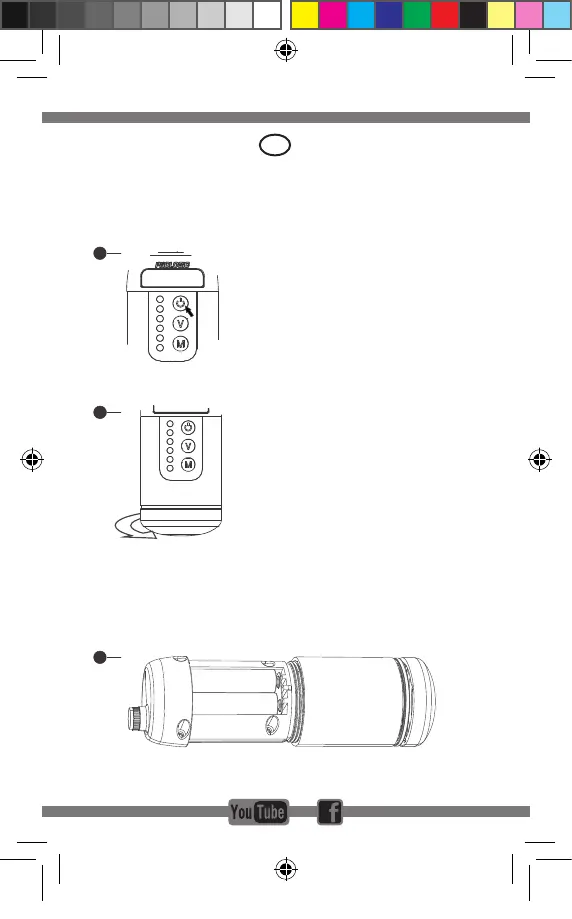
1. Turn off the receiver
2. Unscrew the bivvy light cover
3. Remove carefully the water seal ring and the
carbon jacket
4. Insert new batteries and make sure the polarity is
correct ( always use good quality batteries )
5. Re-tcarbonjacket,watersealringandbivvylight
cover
UK
K3 ALARM
1.Two places for isotope
2.Rubble plate for rod
3.Left button:
Short press:Volume:0(silence) to 3
Long press:Mute 30 seconds
4.Bite Light:
Run=Left+right flash,continue 15 seconds
5.Battery:CR2*1
6.Low power warning(2.4V)
10 minutes warning 3 times ;stop after 1 hrs
7.Range:150M~300M
8.Drop back=right flash,continue 15 seconds
9.Right button:
Short press:sensitivity 1-5
Long press:Power off/on
10.Green,yellow,red,blue,purple,white
11.Carbon shell
12.Small size (Φ32*79mm)
13.Rubber ring on the boby:
Extra increase Green/Yellow/Red/Blue/
Purple/White in a plastic bag
14.TPR case for bite alarm
K3R RECEIVER
1 2
1
4
5
8
9
11
2
3
6
10
7
12
14
13
R1
R2
R3
R4
R5
R6
R7
R8
R9
R10
R1.Multinmedia speaker
R2.Bite lights:
Green,Yellow,Red,Blue,Purple,White
R3.Carbon shell
R4.Battery:3*AAA
R5.Bivvy light
A)Clour:White
B)Mode:Always on,Always off,
Automatic(trigger when continuous bites)
R6.Collapsible antenna
R7.Low power warning(4V)
10 minutes warning 3 times ;stop after 1 hrs
R8.Buttons
A)First button:Long press for power on/off;
Short press for Bivvy light on/off
B)Middle button:Long press for Tone(1-4);
Short press for Volume(0-4)
C)Bottom button:Short press for memory(last
bite light);Long press for register
R9.Sling with buckle
R10.Rubber base (magnet) with Metal plate.
It can fix on the bivvy,also available on Bivvy
table
Battery Type:CR2*1 PCS for Alarm
Battery Type :AAA*3 PCS for Receiver
K3 ALARM
1.Two places for isotope
2.Rubble plate for rod
3.Left button:
Short press:Volume:0(silence) to 3
Long press:Mute 30 seconds
4.Bite Light:
Run=Left+right flash,continue 15 seconds
5.Battery:CR2*1
6.Low power warning(2.4V)
10 minutes warning 3 times ;stop after 1 hrs
7.Range:150M~300M
8.Drop back=right flash,continue 15 seconds
9.Right button:
Short press:sensitivity 1-5
Long press:Power off/on
10.Green,yellow,red,blue,purple,white
11.Carbon shell
12.Small size (Φ32*79mm)
13.Rubber ring on the boby:
Extra increase Green/Yellow/Red/Blue/
Purple/White in a plastic bag
14.TPR case for bite alarm
K3R RECEIVER
1 2
1
4
5
8
9
11
2
3
6
10
7
12
14
13
R1
R2
R3
R4
R5
R6
R7
R8
R9
R10
R1.Multinmedia speaker
R2.Bite lights:
Green,Yellow,Red,Blue,Purple,White
R3.Carbon shell
R4.Battery:3*AAA
R5.Bivvy light
A)Clour:White
B)Mode:Always on,Always off,
Automatic(trigger when continuous bites)
R6.Collapsible antenna
R7.Low power warning(4V)
10 minutes warning 3 times ;stop after 1 hrs
R8.Buttons
A)First button:Long press for power on/off;
Short press for Bivvy light on/off
B)Middle button:Long press for Tone(1-4);
Short press for Volume(0-4)
C)Bottom button:Short press for memory(last
bite light);Long press for register
R9.Sling with buckle
R10.Rubber base (magnet) with Metal plate.
It can fix on the bivvy,also available on Bivvy
table
Battery Type:CR2*1 PCS for Alarm
Battery Type :AAA*3 PCS for Receiver
K3 ALARM
1.Two places for isotope
2.Rubble plate for rod
3.Left button:
Short press:Volume:0(silence) to 3
Long press:Mute 30 seconds
4.Bite Light:
Run=Left+right flash,continue 15 seconds
5.Battery:CR2*1
6.Low power warning(2.4V)
10 minutes warning 3 times ;stop after 1 hrs
7.Range:150M~300M
8.Drop back=right flash,continue 15 seconds
9.Right button:
Short press:sensitivity 1-5
Long press:Power off/on
10.Green,yellow,red,blue,purple,white
11.Carbon shell
12.Small size (Φ32*79mm)
13.Rubber ring on the boby:
Extra increase Green/Yellow/Red/Blue/
Purple/White in a plastic bag
14.TPR case for bite alarm
K3R RECEIVER
1 2
1
4
5
8
9
11
2
3
6
10
7
12
14
13
R1
R2
R3
R4
R5
R6
R7
R8
R9
R10
R1.Multinmedia speaker
R2.Bite lights:
Green,Yellow,Red,Blue,Purple,White
R3.Carbon shell
R4.Battery:3*AAA
R5.Bivvy light
A)Clour:White
B)Mode:Always on,Always off,
Automatic(trigger when continuous bites)
R6.Collapsible antenna
R7.Low power warning(4V)
10 minutes warning 3 times ;stop after 1 hrs
R8.Buttons
A)First button:Long press for power on/off;
Short press for Bivvy light on/off
B)Middle button:Long press for Tone(1-4);
Short press for Volume(0-4)
C)Bottom button:Short press for memory(last
bite light);Long press for register
R9.Sling with buckle
R10.Rubber base (magnet) with Metal plate.
It can fix on the bivvy,also available on Bivvy
table
Battery Type:CR2*1 PCS for Alarm
Battery Type :AAA*3 PCS for Receiver
Manual K3 Receiver.indd 6 19/06/18 12:17


 To Next Page
 Loading...