Appendix A. LED2 Status
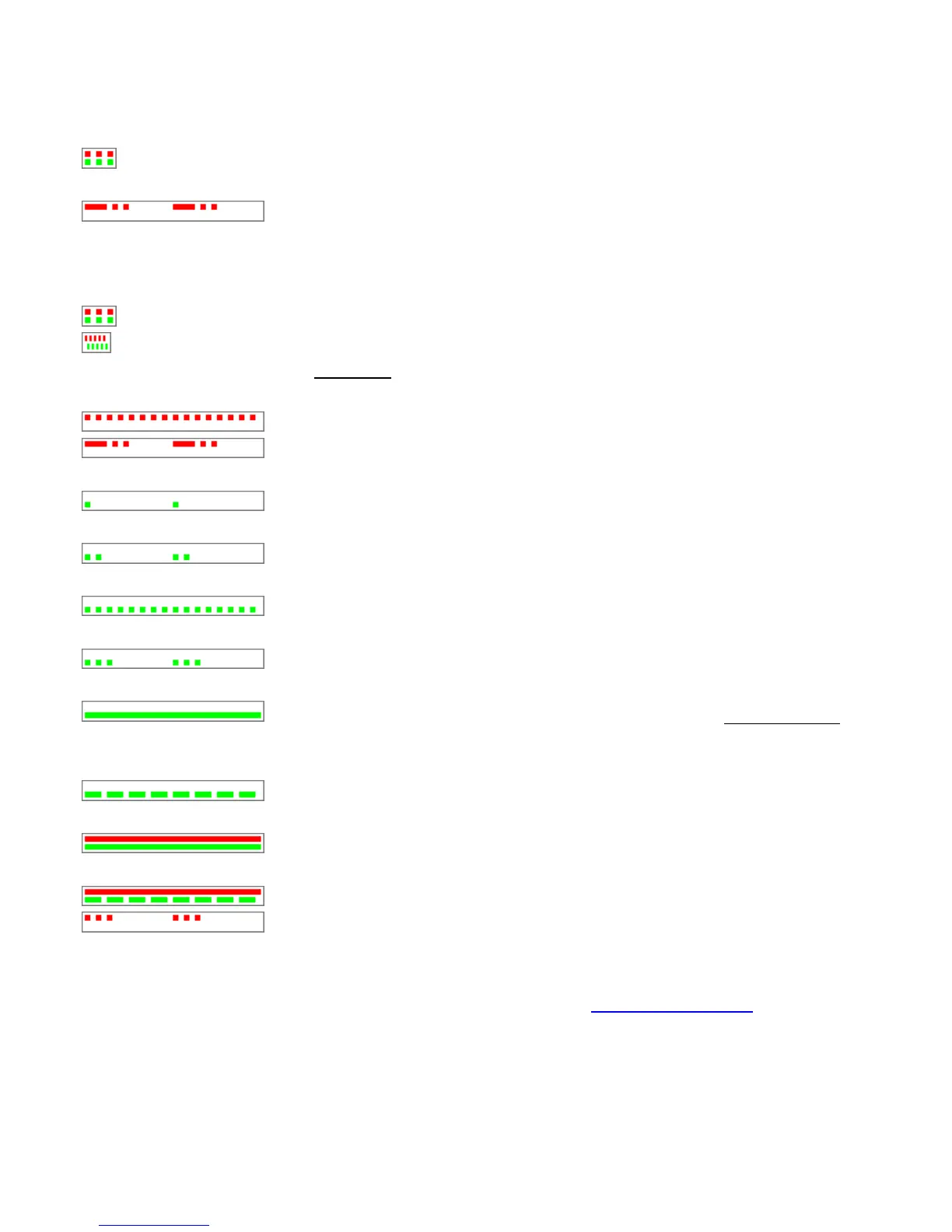
Please see the following illustrations, LED indicates (example),
Represents Green and Red flash 3 times in chorus. As LED2 is dual display for configuration, you
may see orange color flash 3 times visually.
Red LED makes one long blink followed by two short ones
DS aims at the EM module located inside WEC200.
Accordingly, please see the following patterns:
Powerup pattern. This pattern is played once when the DS is switched on.
Buzz pattern. Both LEDs blink fast. this pattern is played when the DS receives the Buzz (B) command. This
is used to identify a particular DS. Please note that this is unrelated 6-E(BUZZER), DS is just receiving the order itself.
(BUZZER).
Error mode.
Ethernet port failure. Indicates that the Ethernet port hardware is malfunctioning and
network communications with the DS is not possible.
IP-address not obtained. Means that the DHCP (DH) setting is 1 (enabled) and the DS has
not yet obtained its IP-address from the DHCP server.
Data connection is closed. This pattern means that no data connection (TCP or UDP) with
any network host is currently established.
Sending ARP. Displayed when the DS is sending ARP requests to find out the MAC-address
of the destination network host with which the DS is about to establish a connection.
TCP connection is being opened. Indicates that TCP connection (either incoming or
outgoing) is being established (i.e. SYN-SYN-ACK exchange is in progress).
Data connection is established (or being closed). Means that data UDP "connection" or
TCP connection is currently established or that TCP connection is being closed (i.e. FIN-ACK-FIN-ACK exchange is in
progress).
Data is being routed. This pattern is played when the data connection is established and the
data is being routed through the DS
Buffer overrun (and no data routing). This pattern is displayed when the data connection is
established and the routing buffer overrun has been detected (within the present data connection).
Buffer overrun + data routing. Data routing and overrun can be displayed at the same time.
TCP connection reset by the network host. Means that the TCP connection has been reset
(using RST packet) by the network host (not by the DS itself).
Above list shows frequent status, any details please visit Tibbo at http://www.tibbo.com


 To Next Page