EasyManua.ls Logo

Promaster SystemPro Professional - User Manual

Promaster SystemPro Professional
3 pages
Print Icon
To Next Page IconTo Next Page
Loading...
Wireless Remote Shutter Release
Please read these operating instructions carefully before using the PROMASTER
SystemPRO Professional Wireless Remote Shutter Release.
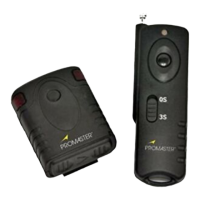
Package Contains:
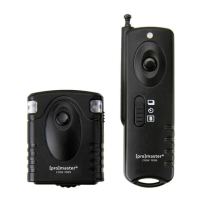
Transmitter x1
Receiver x1
CR-2 battery x1
23A battery x1
Connecting cord x1
English Instruction x1
Transmitter
Receiver
CR-2 Lithium battery
23A battery
Connecting cord
Hot Shoe Converter
(For SONY/ MINOLTA model only)
Parts of Transmitter and Receiver.
1 - Battery Cover
2 - Power Switch
3 - Shutter Button
4 - Status LED
5 - Remote Socket
Question and Answer IconNeed help?

Do you have a question about the Promaster SystemPro Professional and is the answer not in the manual?

Summary

Parts of Transmitter and Receiver

Replaces batteries

Setting the Channel Code

Features

Receiver Features

Details battery type, operating temperature, weight, and dimensions of the receiver unit.

Transmitter Features

Details battery type, operating temperature, weight, and dimensions of the transmitter unit.

Operating Instructions

Instant Release Mode

Set mode switch to 0S for immediate picture capture upon pressing the shutter button.

Delayed Release Mode

Set mode switch to 3S for a 3-second delay before capturing the picture.

Bulb Mode

Set mode switch to 0S; press and hold for 5s to lock shutter open for BULB.

Promaster SystemPro Professional Specifications

General IconGeneral
BrandPromaster
ModelSystemPro Professional
CategoryCamera Accessories
LanguageEnglish

Related product manuals