a. Operating a TV
When operating a TV monitor or TV/DVD combo, please note that picture tubes have a degaussing coil, which uses a
high initial surge of power to light up the screen from a “cold start”. If the TV does not start up on the first try, switch the
TV on every 2-3 seconds until the screen comes on. Some screens may take 2-5 tries before starting.
b. Operating with an extension cord
We recommend that you use an extension cord no longer that 100 ft. between the AC output and AC appliance. A
longer cord may result in reduced output.
c. Extended operating with an external battery.
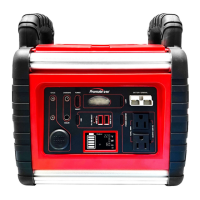
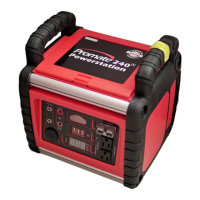
You can extend the Powerstation operating time by connecting it to a larger external battery. For example, an external 60
Ah battery gives approximately 2.5 times the operating time of the Powerstation’s internal battery.
Ensure correct polarity connection of the red positive (+) clip of the cables to the red positive (+) terminal of the external
battery by connecting the black negative (-) clip of the cables to the black negative (-) terminal of the external battery.
Then, insert the other end of External Battery Connection Terminal to the Powerstation for supplemental power.
CAUTION
Do not recharge Powerstation while it is connected to an external battery.
USB PORT
NOTE: Prior to connecting the accessory, make sure that the USB port On / Off power switch is in the OFF
position. Accessory Connection (iPad, iPhone…, etc.)
1. Connect the USB interface cable (provided with the accessory) into the accessory and the Portable Powerstation USB
port.
2. Press the USB Port On/Off switch of the unit to the ON position. Turn on the accessory for operation.
3. Press USB Port switch to OFF position when not in use.
NOTE: To avoid the built-in battery from being completely depleted from slow discharging in a period of time and if
the Powerstation has not been recharged immediately, the battery will be damaged and cannot be recharged again.
12V DC JACK
The Powerstation is equipped with 2 x 12V DC jack and can be used to operate 12V DC devices (maximum total 1 Amp).
Periodically check battery voltage status “VDC” during operation and discontinue use immediately, if battery condition falls to 11V.
Recharge unit as soon as possible and before further use.
12V DC jack is protected by an internal circuit breaker to prevent damage to the unit in case the device has a short circuit or
exceeds 1 AMP. If circuit breaker is tripped, disconnect the device and have it checked. Circuit breaker will automatically reset once
it’s cools down. (approx. 15-20 minutes).


 To Next Page