Please read all safety instructions and warnings thoroughly before using this product. Improper use
of this product may result in damage to this or attached products.
1. Do not disassemble the device or attempt to fix it.
2. Do not attempt to replace any part of this product. Remote control battery is replaceable.
3. Do not crush, puncture or dispose of in fire.
4. Do not store or use the device in a high temperature environment, including intense sunlight or heat.
5. Avoid excessive drops, bumps, abrasions and impacts.
6. If there is any reason to believe that there is internal damage to the device, discontinue use immediately.
7. If you find that the device is too hot, is emitting an odor, or is deformed, punctured or exhibits any
suspicious or abnormal behavior, discontinue use immediately and contact our customer service.
Precautions:
SmarTune is compatible with all Bluetooth enabled devices.
2
Compatibility:
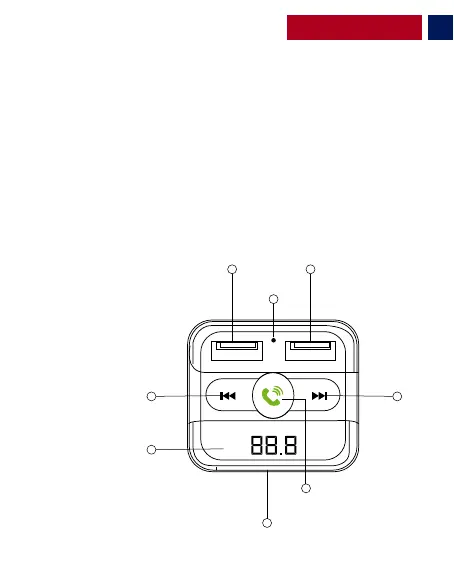
Appearance & Interface Description:
1. USB1 Port
2.MIC
3. USB2 Port
4. Next Track/ Volume “+” Button
5. Multi-Function Knob
6. MicroSD Card Slot
7. LCD Display
8. Previous Track/ Volume “- “ Button
English
1
8
7
4
2
3
5
6


 To Next Page