Operation Instructions:
4
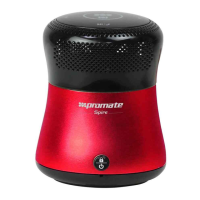
• Plug the USB Charging cable into the Base portion of Spire.
• Plug the other end of the USB cable into a wall power socket or computer USB
port.
• The red indicator on Spire will begin blinking.
• When the battery is fully charged, the red indicator will turn off and the blue
indicator will turn on. It takes approximately 5 hours to fully charge Spire.
Note: Before using Spire for the first time charge it fully. The red light indicator will
flash when the battery is low. At this time, please charge Spire.
1. Charging Spire
• Press and hold the Power Switch to turn on Spire.
• Press and hold the Power Switch again to turn off Spire.
2. Power on/off Spire
• Press the locking button once to turn off all touch controls, blinking LED Lights
and Shake to shuffle features.
3. Locking/Unlocking the Touch Control
You are required to pair Spire with your mobile phone once before using it.
• Press the mode button once to go into pairing mode.
• Activate Bluetooth® on your mobile phone.
• Set your phone to discover ‘Spire’.
• If your phone asks for a passkey or PIN code, confirm with ‘0000’ (4 zeroes).
When the phone and Spire are paired and connected, you will hear a prompt
tone.
Note: If Spire is not in pairing mode, your mobile phone won’t find it. Please set
Spire into Bluetooth® pairing mode before searching for Spire. If no pairing is
possible for a period of time (approximately 2 minutes), Spire will automatically turn
off.
4. Pairing Spire (Using Bluetooth®)


 To Next Page