English
1. Switching TrueBlue On/Off
• To turn on TrueBlue, press and hold the Multi-function Button on both earpieces for about 3
seconds until the Blue LED starts flashing.
• To turn off TrueBlue manually, press and hold the Multi-function Button on both earpieces for
about 4 seconds.
• The earpieces turn off automatically when placed in the charging box.
2. Pairing TrueBlue
• Before connecting TrueBlue to your device, make sure that TrueBlue is in pairing mode.
• To enter pairing mode, press and hold the Multi-function Button on both earpieces for 8
seconds, until Red and Blue LED start flashing alternatively.
• Place both earpieces close to each other and wait for a few seconds for the earpieces to pair
with each other.
• The earpieces are in pairing mode when the red and blue LED of the left earpiece flash
alternatively, and the blue LED of the right earpiece starts flashing.
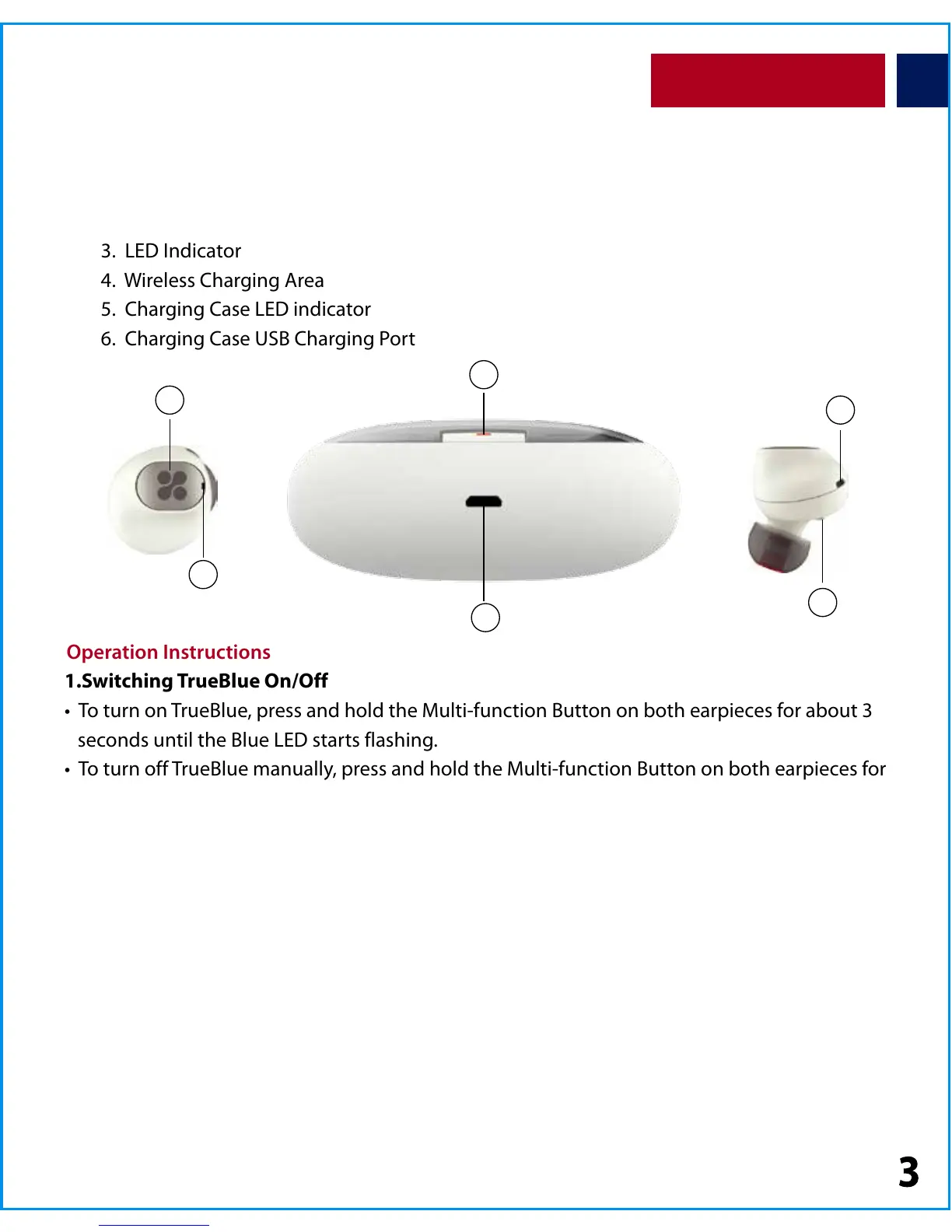
Appearance & Interface Description
Operation Instructions
1. Multi-function Button
2. Mic
3. LED Indicator
4. Wireless Charging Area
5. Charging Case LED indicator
6. Charging Case USB Charging Port
2
1
5
6
4
3


 To Next Page