EasyManua.ls Logo

Propellerhead ReCycle - Window Overview; Waveform Display Explained

Propellerhead ReCycle
92 pages
Print Icon
To Next Page IconTo Next Page
To Previous Page IconTo Previous Page
Loading...
THE RECYCLE WINDOW
42
Window Overview
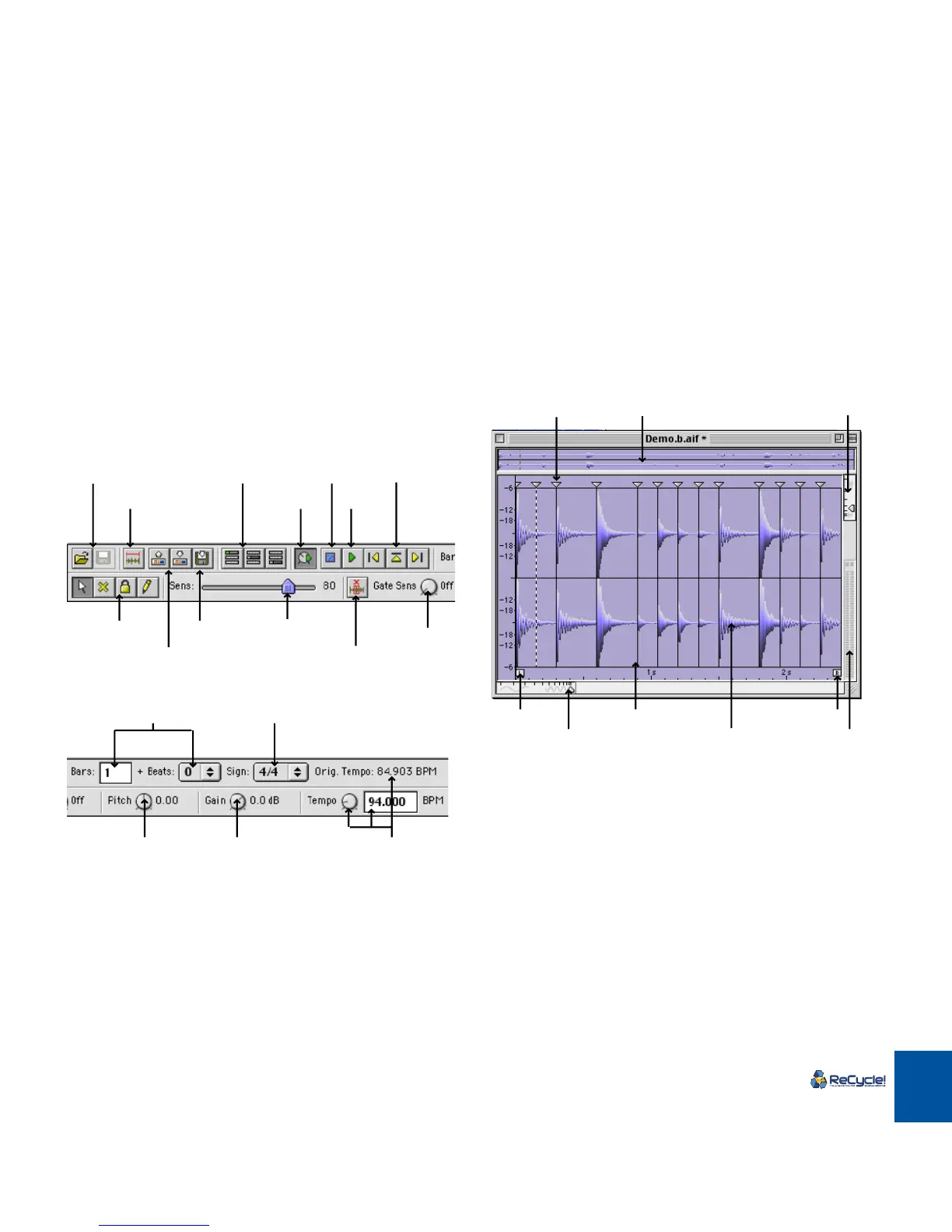
Tool Bar
The left half of the Toolbar contains the following items:
The right half of the Toolbar contains the following items:
Waveform Display
Transmit as one Sample
Transmit/Receive
Slice Audition buttonsEffect buttons
Preview toggle
Sensitivity slider
Stop
Play
Tools
Open/Save
Silence Selected
Gate
Sensitivity
Export Sound
Length settings
Preview Tempo setting
and Original Tempo
Preview Pitch Processing Gain
Time Signature
Left Locator
Horizontal Magnification
Slice Marker
Waveform
Thumbnail overview
Right Locator
Level meter
Vertical Magnification
Slice Marker Handle

Table of Contents

Related product manuals