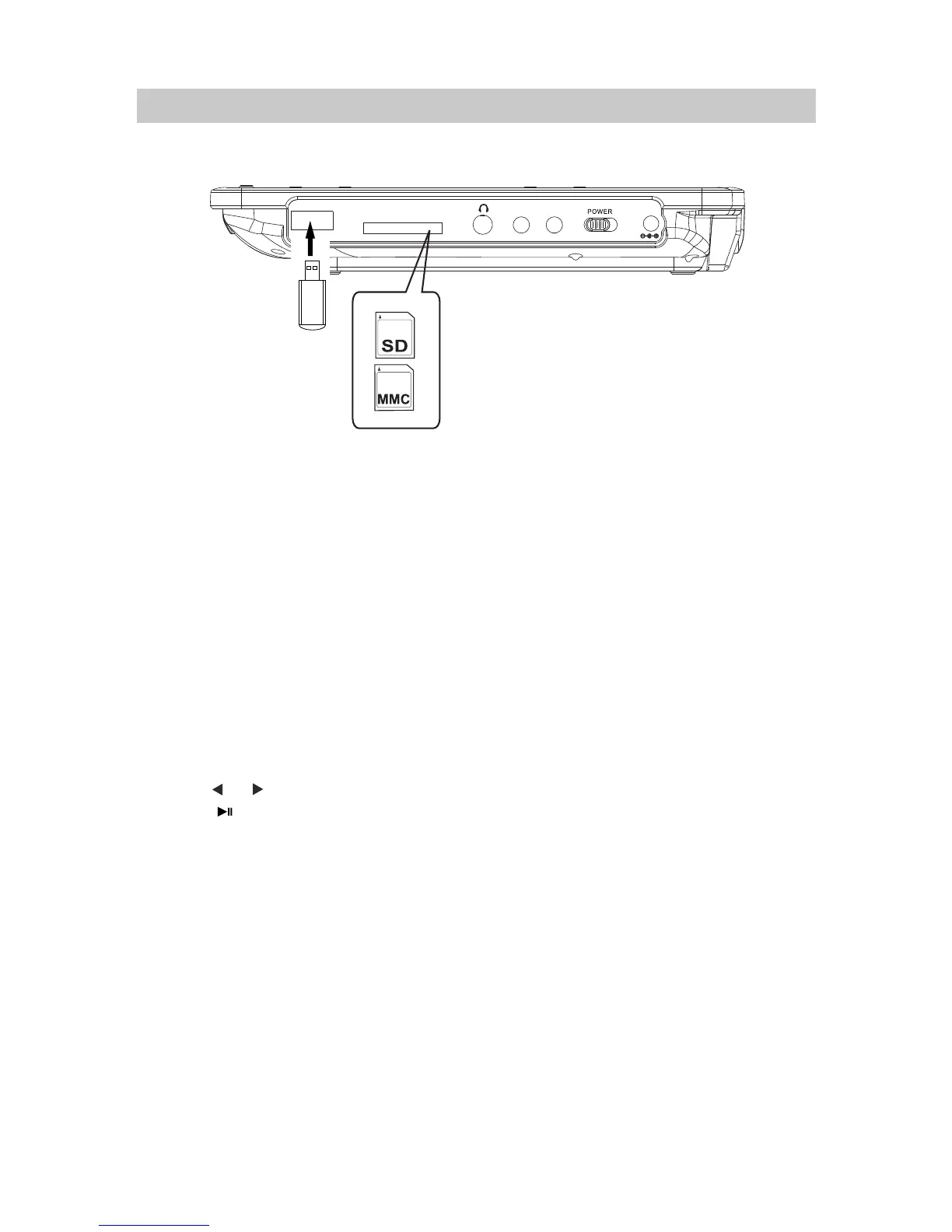
1. Insert the USB Device or SD/MMC memory card into the USB port /card slot as the gure below.
NB: The unit supported to playback:
~ MP3; WMA (Music le)
~ JPG (Pictures)
Make sure correct les were saved in the USB device or memory cards.
USB or SD/MMC CARD PLAYBACK
~ MPEG2; AVI; VOB (Video les up to 640 x 480 pixels)
3. During playback:
~ Press the or Button repeatedly to skip tracks.
~ Press the Play/Pause Button to pause. Press again to resume.
4. When finished, press the STOP Button to stop. Press the POWER Button
to power off (Standby) the unit.
NB: For saving battery power. If long period of time will not use, power off
the unit by slide the POWER ON/OFF Switch to OFF position.
ǿŻŻ
Ŷ
ǿŻŻ
~ Press the or Button repeatedly to select and set the fast searching speed.
Using the supplied earphone to listen privately.
16
2. In Power ON mode, press the USB/CARD Button, the "DVD, CARD, USB" selection window
will pop up on the screen. Using the Direction Buttons to select and highlight the desired
source then press the ENTER Button to confirm. Press the ENTER Button again, the
Folder/File list will appear,
using the Direction button to select the desire File then press the
ENTER Button to start playback.
ON
OFF
DC IN
AV-IN
AV-OUT
SD/MMC
USB



 To Next Page