7
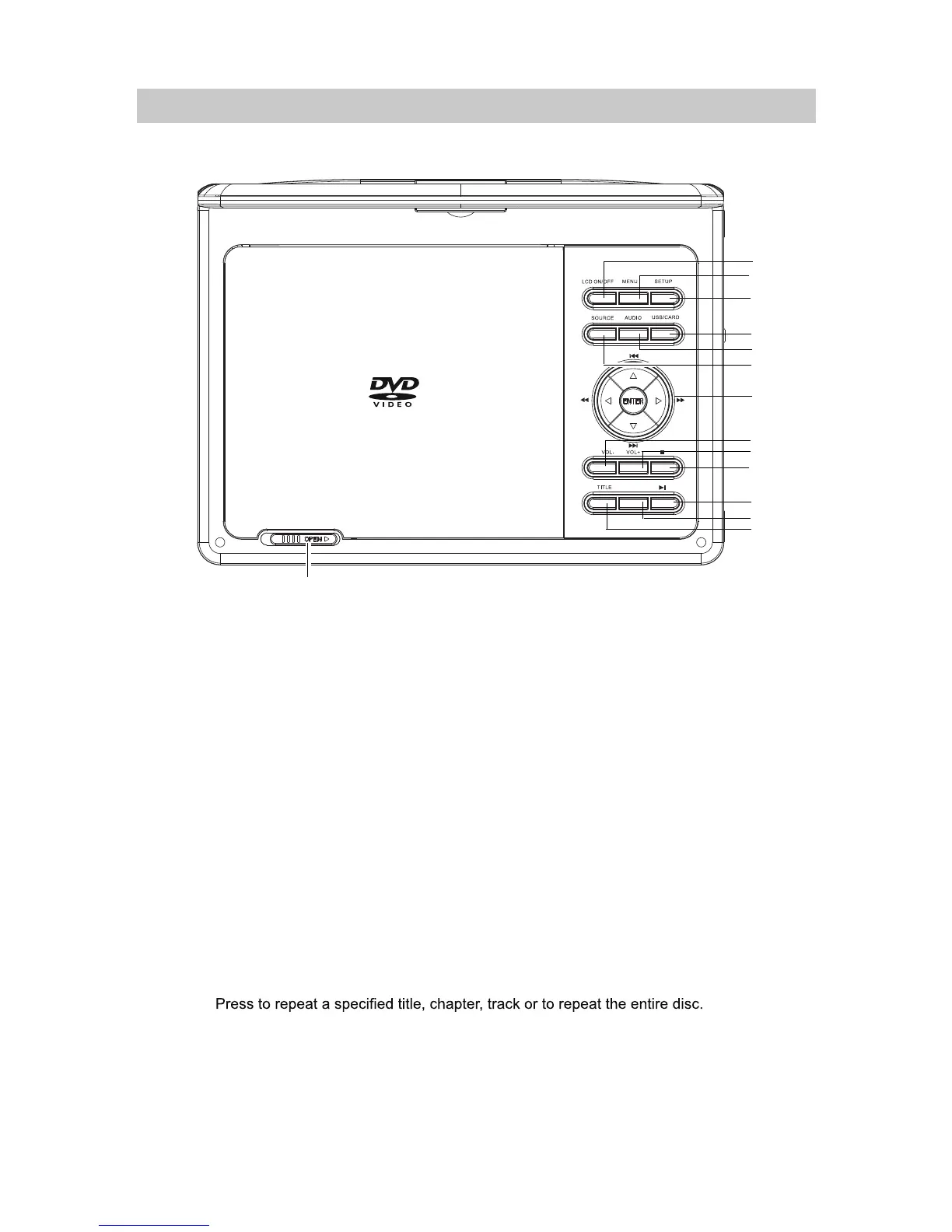
1. LCD ON/OFF:
6. SOURCE: Press to enter to AV IN mode; press again to resume normal mode.
3. SETUP:
4. USB/CARD: When USB device and/or SD Card was inserted, press repeatedly to select the
playback source as desired.
Press to decrease volume level.
: Press to increase volume level.
11.
Play/Pause:
Press to stop.
LOCATION OF CONTROLS
2. MENU:
10.
Stop:
9.
+
8.
VOL (Volume) -:
VOL (Volume)
12.
7.
Press to turn on or turn off (Saving the battery power while music playback)
the screen.
Press to return to disc's menu page. (Function depends on the disc recording).
Press to enter to DVD system setup menu and press again to exit.
14.
OPEN:
Press to start playback or pause.
Slide to right to open the disc door.
REPEAT
13. TITLE:
Press to return to disc's title page. (Function depends on the disc recording).
5. AUDIO:
Press repeatedly to select the audio channels. (Function depends on the disc recording).
Up / Previous button
ENTER : Press to confirm the operations.
Left / Fast rewind button
Right / Fast forward button
Down / Nex t button
REPEAT:
1
2
3
4
5
6
7
8
9
10
11
12
13
14



 To Next Page