5
GUIDE DE R F R ENCE DES COMMANDES
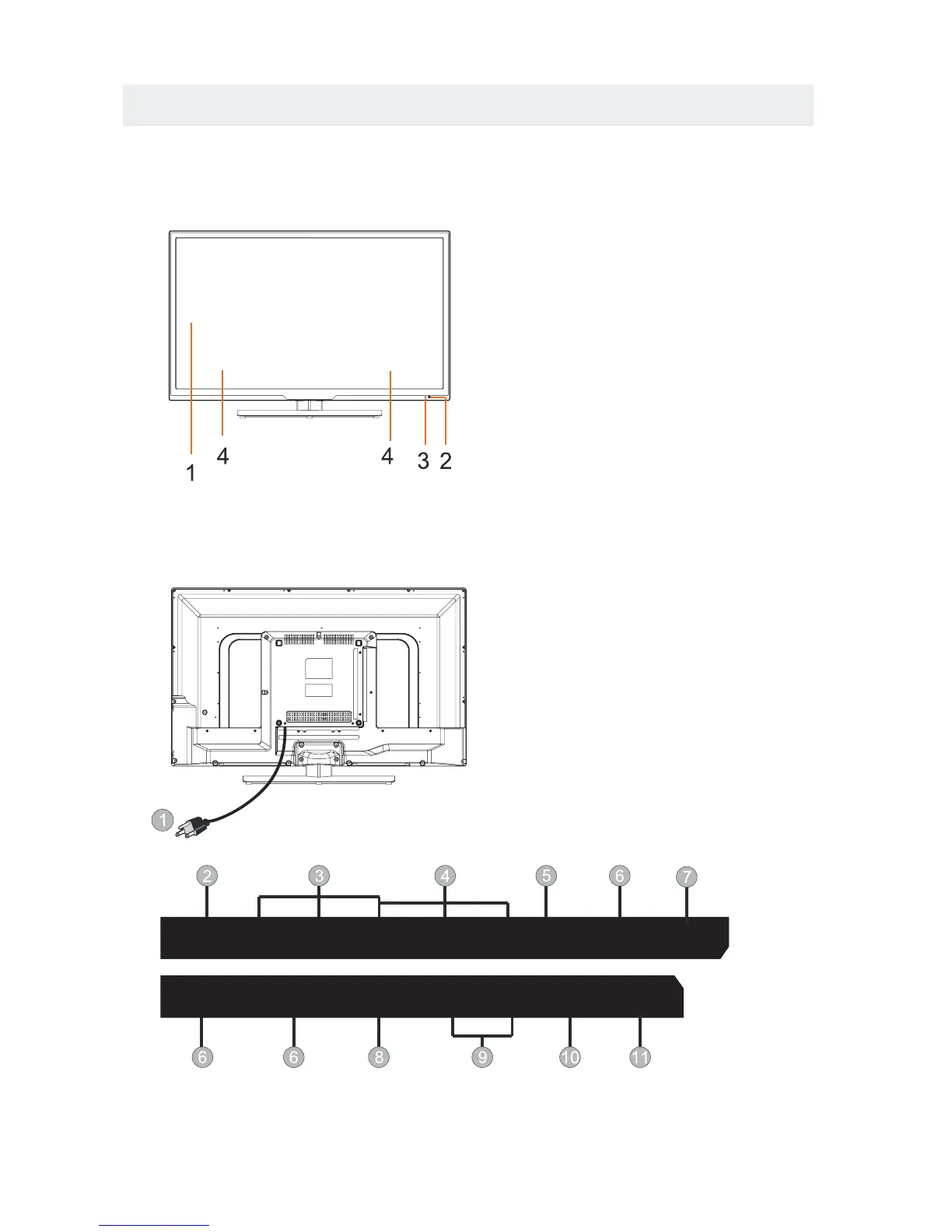
VUE DE DEVANT
1. rân couleurà C.L.
2.Câpteur de t l c ommânde
Ne bloquez pâs l'âcc s c e câpteur
sinon lâ t l c ommânde ne
fonctionne pâs.
3.Indicâteur STANDBY
Indique si l'âppâreil est EN CIRCUIT
ou en mode de VEILLE (hors circuit).
Voyant allumé : L'appareil est en
standby.
Voyant éteint : L'appareil est allumé.
4. Hâut-pârleurs
VUE ARRIERE
Head
phone
L
R
Y(VIDEO)
Pb
Pr
PC
Audio
HDMI1
VGA
HDMI2
HDMI3
RF Coax
L
R
-AUDIO OUT-
Service
Port
1.Le cordon d'alimentation
2. Headphone
3.Prise d'entr e AV
4.Prise d'entr e COMPONENT IN
5.Prise d'entr e â udio PC
6.Prise d'entr e HDMI
7.Prise d'entr e PC IN VGA
8. TV ANTENNA
9.AUDIO OUT
10.Coax OUT
11.Service Port















 To Next Page