15
any Channel, first go back to Home
Menu and select Settings. Press TUNE button to choose
Parental Lock.
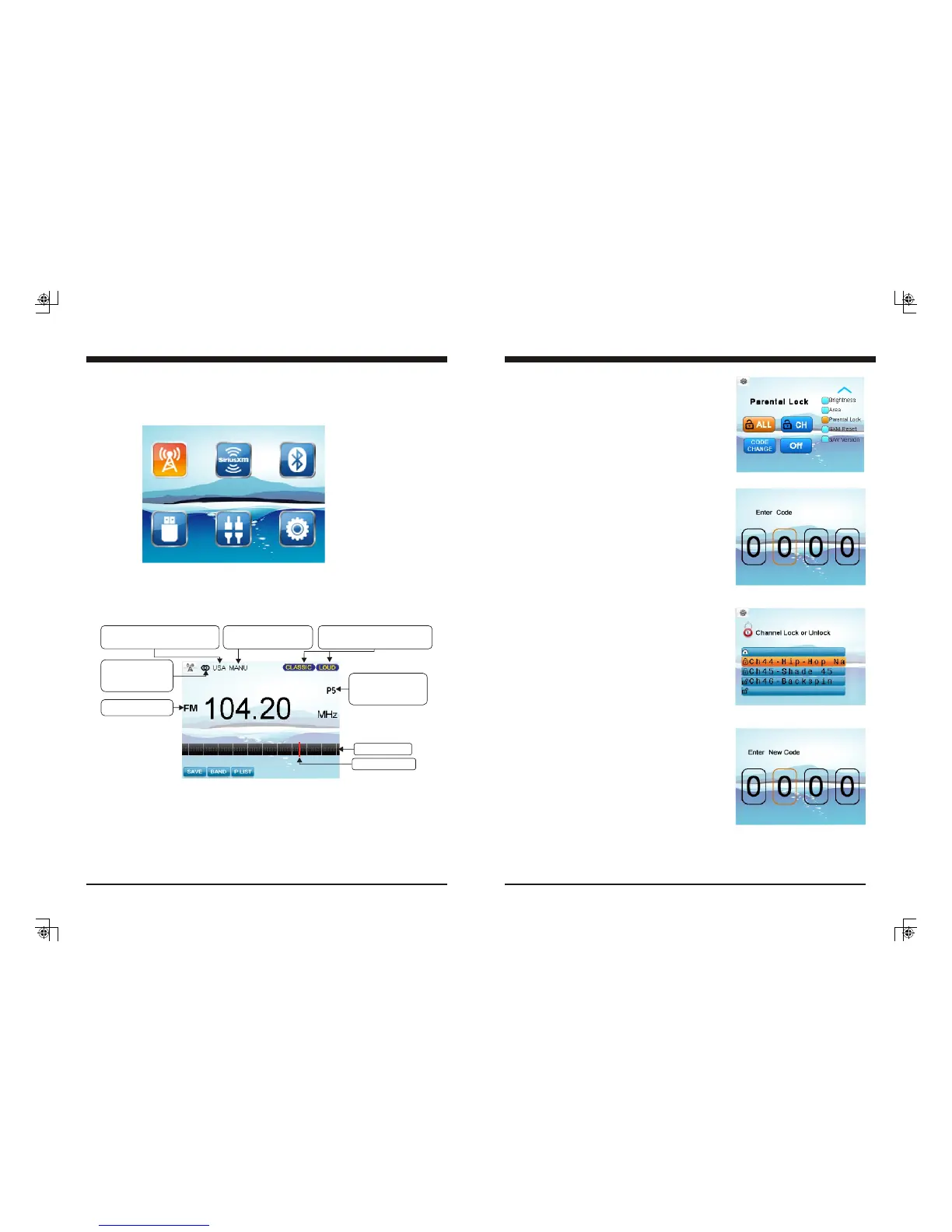
- Parental Lock On / Off
Press VOL UP/DN button to move highlight to Off,
then press ENTER, it will prompt for passcode, input
four digits with VOL button and after each input press
ENTER button to jump to next input. After four digit
input, it will indicate “Lock is ON”.
With Parental Lock On selected, all the locked
channels are temporarily unlocked which will let you
listen to the locked channels without inputting the
passcode again.
Note: Once you leave SiriusXM mode or power off
the unit, it will revert to Parental Lock Off.
- To Unlock all channels
Press VOL UP/DN button to move highlight to ALL,
then press ENTER, it will prompt for passcode, input
four digits with VOL button and after each input press
ENTER button to jump to next input. After four digit
input, press ENTER button to unlock all channels.
- To Lock/Unlock channels one by one
Press VOL UP/DN button to move highlight to CH,
then press ENTER, it will prompt for passcode,
input four digit passcode, press ENTER button. It
will display the Channel list, press TUNE UP/DN
button and press MENU at the desired channel.
Note: if the selected channel was locked, then
pressing MENU button will unlock it; and if
the selected channel was unlocked, pressing
MENU button will lock it.
If you want to change your code, first go back to
Home Menu and select Settings. Press TUNE UP
button to choose Parental Lock. Press VOL button to
choose CODE CHANGE. It will prompt for current
11. Channel Parental Lock
The Parental Control feature allows you to limit access
to any SiriusXM channels, including those with mature
content. When enabled, the Parental Control feature
requires you to enter a passcode to tune to the locked
channels.
To Lock / Unlock
12. SiriusXM Parental Lock Code Change
passcode, then new code, and one more prompt for new code confirmation.
Use VOL button for code input, and press ENTER button after each input.
If a wrong digit is inputted, press TUNE DN button to move to previous digit input.
Note: Factory default passcode was 0000.
SiriusXM Section Operation
10
Radio Section Operation
1. To Select Radio mode
At Home Menu, press TUNE Up/Down button to move the highlight to Radio source, then
press ENTER button to go into the Radio mode.
2. Radio Screen Description
Note: highlight movement indicated by the icon background change to two tone orange.
Only shows when
the station is a
Stereo Channel.
Displays EUR or USA to indicate
the Area selected in the Settings.
Displays FM, AM.
Only displays when
the station is a preset
station.
Frequency Bar
Frequency Mark
SAVE: To save current frequency into P.List
BAND: To select FM, AM
P.LIST: Global Preset List
Only displays when EQ / LOUD
ON was selected in the Settings.
Only displays in Manual
Tune status.



 To Next Page
 Loading...