注:切边后的 成 品 尺 寸 一 定 为 145x210mm
对折 基 准线
对折 基 准线
20
1. Connect
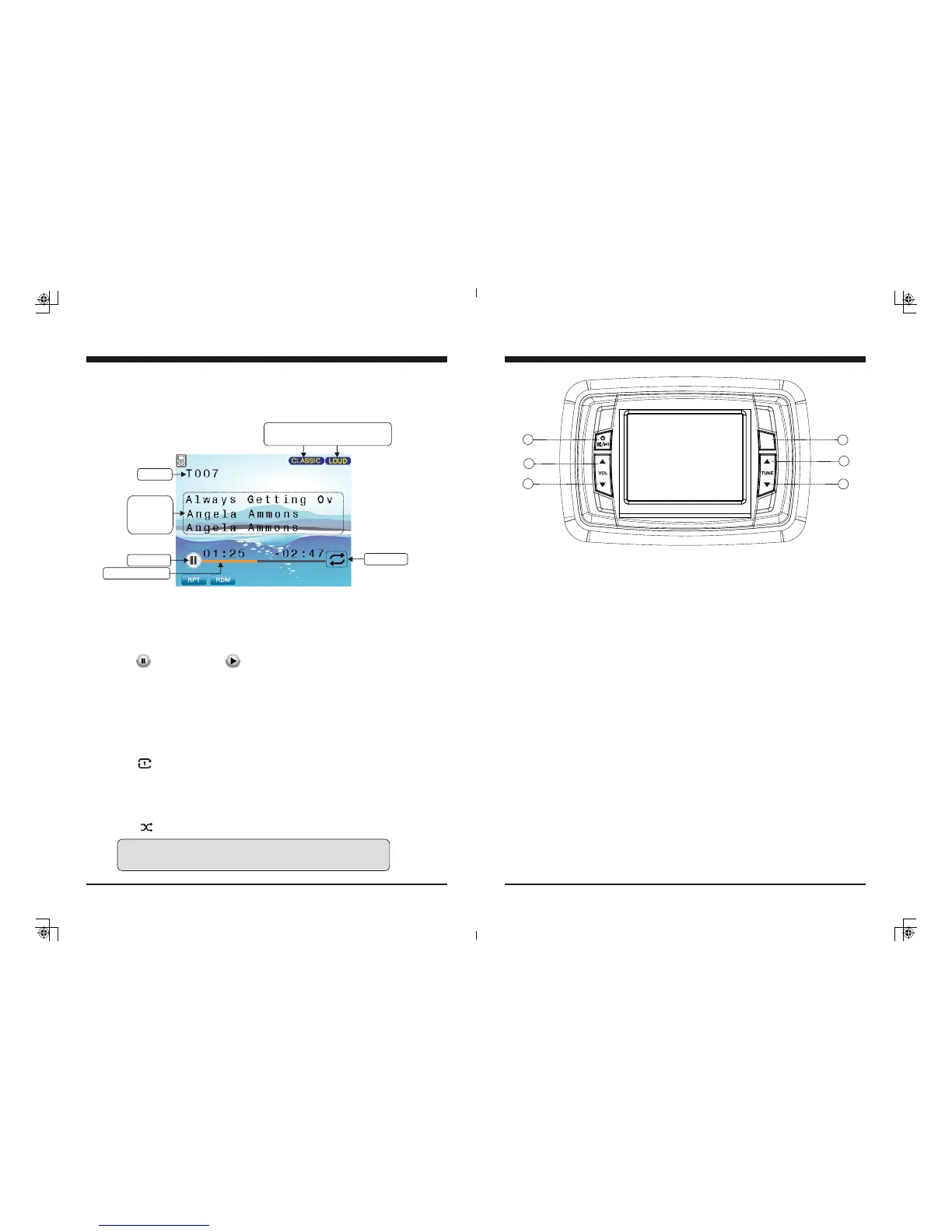
Connect an iPod/iPhone to the USB socket, it will read the files automatically. The track
information displays on the screen once playback starts.
2. Play/Pause Play
While iPod/iPhone playing, simply press the PAUSE button to pause the playback, and
press it again to resume playback.
3. Track Up/Down
While iPod/iPhone playing, simply press TUNE Up or Down button to select the next or
previous track.
3. Track Repeat play
While iPod/iPhone playing, simply press MENU button to activate navigation, it will
highlight at RPT, then press MENU button to toggle select Track Repeat or RPT OFF.
(Note: Refers to play current track repeatedly.)
4. Random play
While iPod/iPhone playing, simply press MENU button to activate navigation, then press
TUNE Down button to move highlight to RDM, then press MENU button to toggle
select Track Random or RDM OFF.
(Note: Refers to play all the tracks in a random sequence.)
iPod/iPhone Operation
Only display when EQ / LOUD ON
was selected in the Settings.
ID3 tag:
Song name
Artist
Album
Play/Pause
RPT: Track Repeat play
RDM: Track Random play
Track No.
Track elapse time
Play mode
Note: refers to PLAY; refers to PAUSE.
Note: Please make sure the iPod/iPhone cable is connected correctly.
And it is recommended to use the original cable for connection.
5
General Function of Buttons
MENU
ENTER
1
5
3
2
6
4
1. POWER, MUTE, PAUSE button
- With unit off, press to power the unit on.
- With the unit on, press and hold for over 2s to power the unit off.
- In Radio, SiriusXM, AUX mode, press to MUTE sound output,
press again to resume sound output.
- In USB, BT Music mode, press to PAUSE playback, press again
to resume playback.
2. MENU, ENTER button
- In any status, press and hold for 2s to navigate to home display.
- In source playing status, quick press to activate the bottom navigation function.
(Note: Bottom navigation function is disabled after 5s without operation.)
- In any selection status, press ENTER to confirm selection.
3. VOLUME Up button
- Simply press it to increase volume level.
4. VOLUME Down button
- Simply press it to decrease volume level.
5. Tune Up button
- In playing status, press to select the next station, channel, or track.
- In bottom navigation mode, press to move highlight upward/over.
6. Tune Down button
- In playing status, press to select the previous station, channel, or track.
- In bottom navigation mode, press to move highlight downward/over.


 To Next Page
 Loading...