Operating Your Appliance
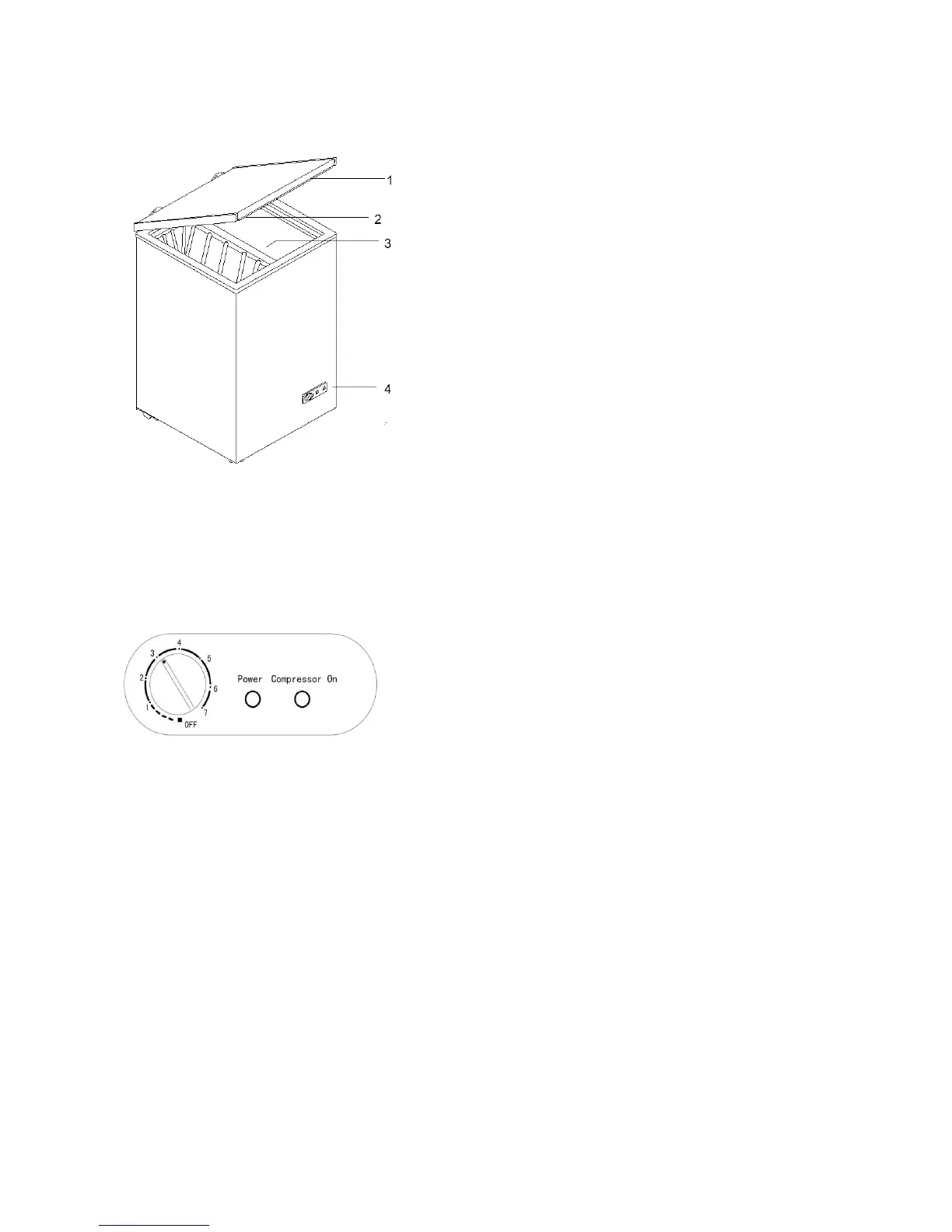
Parts of the Appliance
1. Lid
2. Seal
3. Basket (If Supplied)
4. Control Panel
The function of the panel:
Your refrigerator has one control for regulating the
temperature. The temperature control is located on
the lower right hand corner.
The first time you turn the unit on, turn the
temperature control knob in a clockwise direction to
the maximum setting "7" and run for at least 2 hours
before putting frozen foods inside. This will ensure
the cabinet is thoroughly chilled before food is put in.
The range of the temperature control is from position "1" the warmest to "7" the coldest.
Adjust the temperature control to the setting that best suits your needs. The setting of “4”
should be correct for home or office refrigerator use.
To turn the refrigerator off, turn the temperature control to "OFF".
Green light: Power on
Red light: Compressor On
NOTE:
Turning the temperature control to "OFF" position stops the cooling cycle but does not shut
off the power to the refrigerator.
If the unit is unplugged, lost power, or turned off; you must wait 3 to 5 minutes before
restarting the unit. If you attempt to restart before this time delay, the refrigerator will not start.
Large amounts of food will lower the cooling efficiency of the appliance.
If you choose to change the thermostat setting, adjust thermostat control by one numerical
increment at a time. Allow several hours for temperature to stabilize between adjustments.
4



 To Next Page