'.
OPERATING
~
--
nnnn"..
Current
-UUUUU
·
Source
.....
idci
:
8gg9
"@
'
\~
II
3-5.
ACuA
ACmA
ACA
AC+OCuA, AC+OCmA AC+OCA
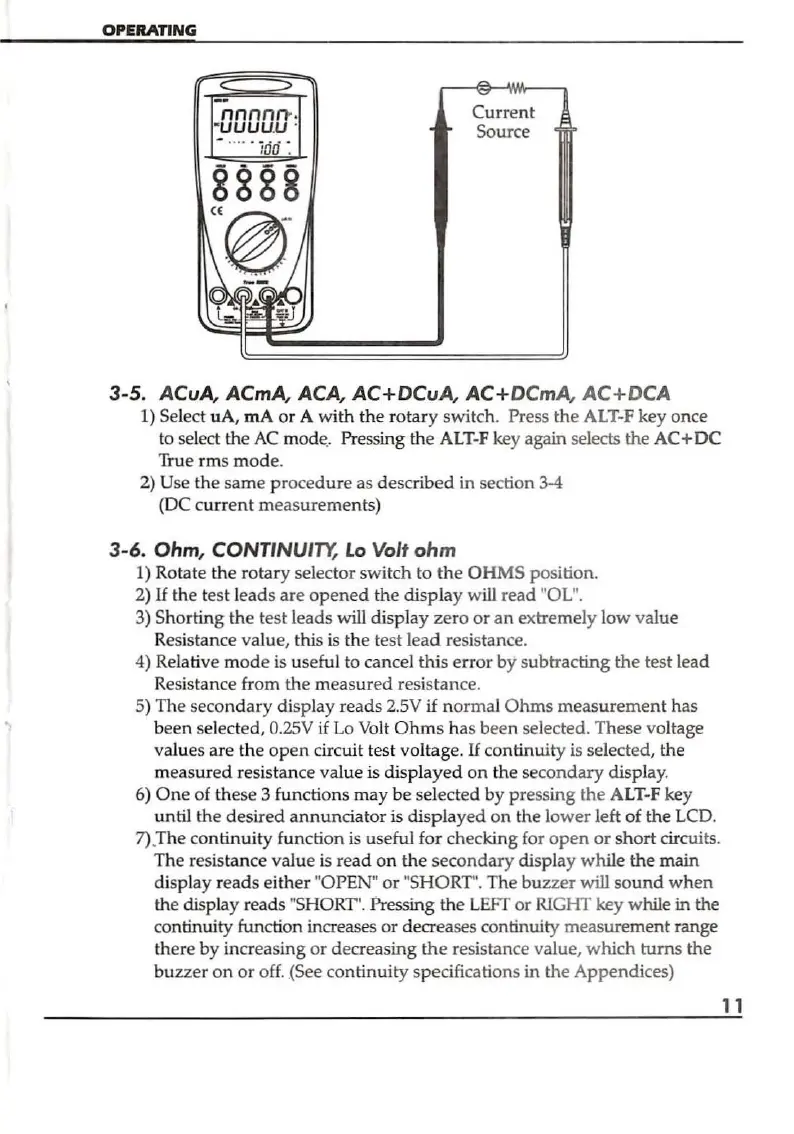
1) Select uA, rnA
or
A with the
rotar
y switch. Press
the
ALT-F key once
to select the
AC
m
ode
.. Pressing
th
e
ALT-F
key again selects the
AC+DC
True
rm
s
mod
e.
2) Use
th
e same
pr
oce
dure
as described
in
section 3-4
(DC c
ur
rent
m
eas
ureme
nts)
3-6.
Ohm, CONTINUI
TY,
Lo
Vol'
ohm
1) Rotate
th
e
rotary
selector switch to
the
OHMS position.
2)
If
the test l
eads
are
opened
th
e display w
ill
read "OL".
3) Shorting the test leads will
disp
l
ay
zero
or
an extremely low val
ue
Re
sistance value, this
is
th
e test
lead
resistance.
4) Relative
mod
e is
us
eful to cancel this error by subtracting
the
test lead
Resistance from
the
m
easured
resis
tan
ce.
S) The seco
nd
ary display reads 2.5V
if
normal O
hms
measurement
has
been selected,
O.2SV
if
Lo
Volt
Ohms
has been selected. These voltage
values are
th
e
open
circuit test voltag
e.
If
continuity is selected, the
measured
resistance
va
lue
is displa
ye
d
on
the
secondary
display.
6)
One
of
th
ese 3 functions
may
be sel
ected
by
pr
essing
the
ALT-F key
until the desired a
nnunciator
is displayed
on
the l
ower
left
of
the LCD.
7)
.
The
continuity function is useful for check
ing
for
open
or
short
circuits.
The
resistance value
is
read
on
the
secondary
dispJ
ay
whil
e the main
display reads
either
"OPEN"
or
"S
HORT
".
The
buzzer
will
sound
when
th
e displ
ay
reads "SHORT'. Pressing
th
e
LEFT
or
RlGHT key while in the
co
ntinuity function increases
or
decreases continuity measure
ment
range
there by increasing or decreasing
the
resistance value,
which
turns
the
bu
zzer
on
or
off .
.(
See continuity specifications in the Appendices)
11


 To Next Page