SPECIAL FUNCTION
DESCRIPTION
E1
SPECIAL FUNCTION DESCRIPTION
1B
5-
I.
AUTO OFF
This Feat
ure
is
used
for conservi
ng
batter
y po
wer
.
When
the
meter
is le
ft
on for more
th
an 15
minute
s with
out
pre
ssing keys
or
rotating
th
e rotary
sw
itch the
meter
will s
hut
off (go
in
to Auto p
owe
r off status). The
meter
can be restarted by pressing the ENTER key or
turning
the rotary switch
to
the
off
po
sition
and
then
back
to
its original position. This feature
can
be
disabled by selecting the Auto off annunciator from the
menu
and
then
press the e
nt
er
Key.
The Annunciator will djsappear from the LCD. This
is
the continuous use mode; the meter
win
opera
te
until the battery
is
drained.
5-2
.
lOW
BATTERY
INDICATION
A Battery symbol
app
ears on the
di
splay
when
the
battery voltage falls
below
6±lV
to the Battery symbol
warns
th
e user to replace
the
current
battery with a new one.
5-3
.
BAR
GRAPH
DI
S
PLAY
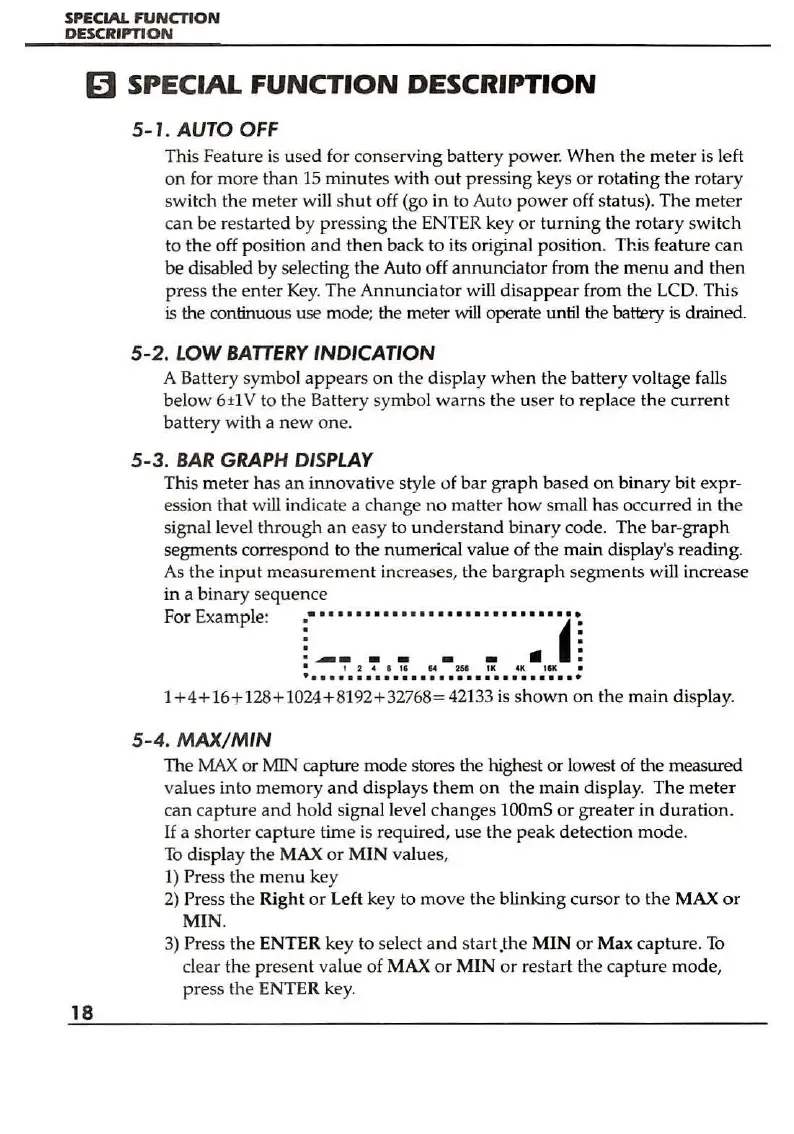
This
meter
ha
s
an
inn
ovative style of bar
graph
based
on
binary
bit expr-
ession that w
ill
ind
icate a cha
nge
no matter h
ow
small has occurred in
the
signal l
eve
l
through
an
easy to
und
ers
tand
binary
code.
The
bar
-gr
aph
segments correspond to
the
numerical value of
the
main display's reading.
As the
input
measurement
increases,
the
bargraph
seg
ment
s will increase
in a
binary
sequ
ence
For Example:
:-
..........................
~
1
.
__
- - - -
II
I:
• 1
24'1114
251
u:
....
1111
•
•
••.
...•......•...............•
1
+4+
16+ 128+ 1024
+8
192
+3
2768= 42133
is
shown
on
the main
display
.
5-4.
MAX/MIN
The
MAX
or MIN capture mode stores the highest or lowest of the measured
valu
es
into
memory
and
displays
them
on
th
e main display.
The
meter
can
cap
tur
e
and
hold signal le
ve
l c
hange
s
lOOmS
or
greater
in
duration.
If
a
sho
rter
cap
tu
re time is required, use
th
e peak detection
mode.
To
display the MAX
or
MIN
values,
1)
Press
th
e m
en
u key
2)
Press the
Right
or
Left key to
move
the
blinking cursor to
the
MAX
or
MIN
.
3)
Press
the
ENTER key to select
and
start.the
MIN
or
Max capture.
To
clear the
pr
ese
nt
value
of
MAX
or
MIN
or restart
th
e
capture
mode
,
press the ENTER key.


 To Next Page