m
MAINTENANCE
6-
J. GENERAL
1)
Do
not
use abrasives
or
solvents. Periodically wipe the case
with
a
damp
cloth
and
detergent.
2)
Calibrate the
meter
once a
year
to maintain the accuracy specified
in
the
attached electrical specification sheet.
3)
For replacement parts list, refer to the attached list.
(Appendices #7-10)
&
6-2.
BATTERY REPlACEMENT
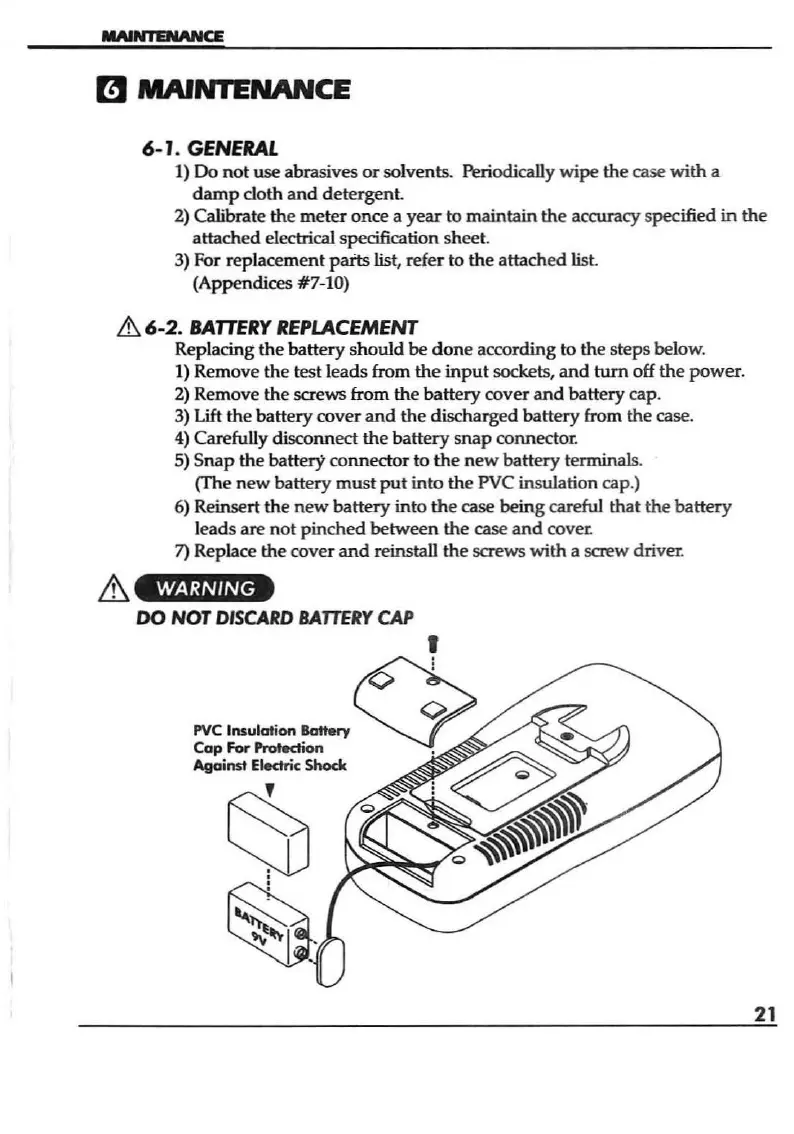
Replacing the
batt
ery
should
be
don
e according to the steps below.
1)
Remove the t
est
leads from
the
input
sockets,
and
turn
off
the
puwer.
2)
Remove the screws from the battery cover
and
battery cap.
3)
Lift
the
battery cover
and
the discharged battery from the case.
4)
Carefully disconnect
the
battery
snap
connecto<
5)
Snap
the battery connector to
the
new
battery terminals.
(The n
ew
batt
ery
must
put
into the PVC insulation cap.)
6) Reinsert the
new
battery into
the
case being careful
that
the
battery
l
eads
are
not
pinched
between
the
case
and
cover.
7) Replace the cover
and
reinstall the screws
with
a screw driver.
WARNING
DO
NOT
DISCARD
BATTERY
CAP
21


 To Next Page