OPERATING
~
OPERATING
3- 1.
POWER
ON
/ OFF
When
not
used
for very long time
(a
few months, etc),
it
would
be better
to shut off the unit with the function selector switch instead of depending
on
th
e auto
power
off, which
draws
about 70uA of battery consumption,
or
about S months of battery lifetime with commo
nl
y
used
types of
9Y
ca
rborv'zin
c batteries.
When the power switch
is
turned
on,
all the segments
on
the
LCD
display
will
appear
(see
Fig
1
on
page 36)and the
bui
lt in buzzer in the meter will
so
und
for 1 second and then normal operation
will
be
started and measur-
ements
may
be
now
be obtained according to what the rotary function
selec
tor
switch has been set to.
3-2.
DCmV
and
DCV
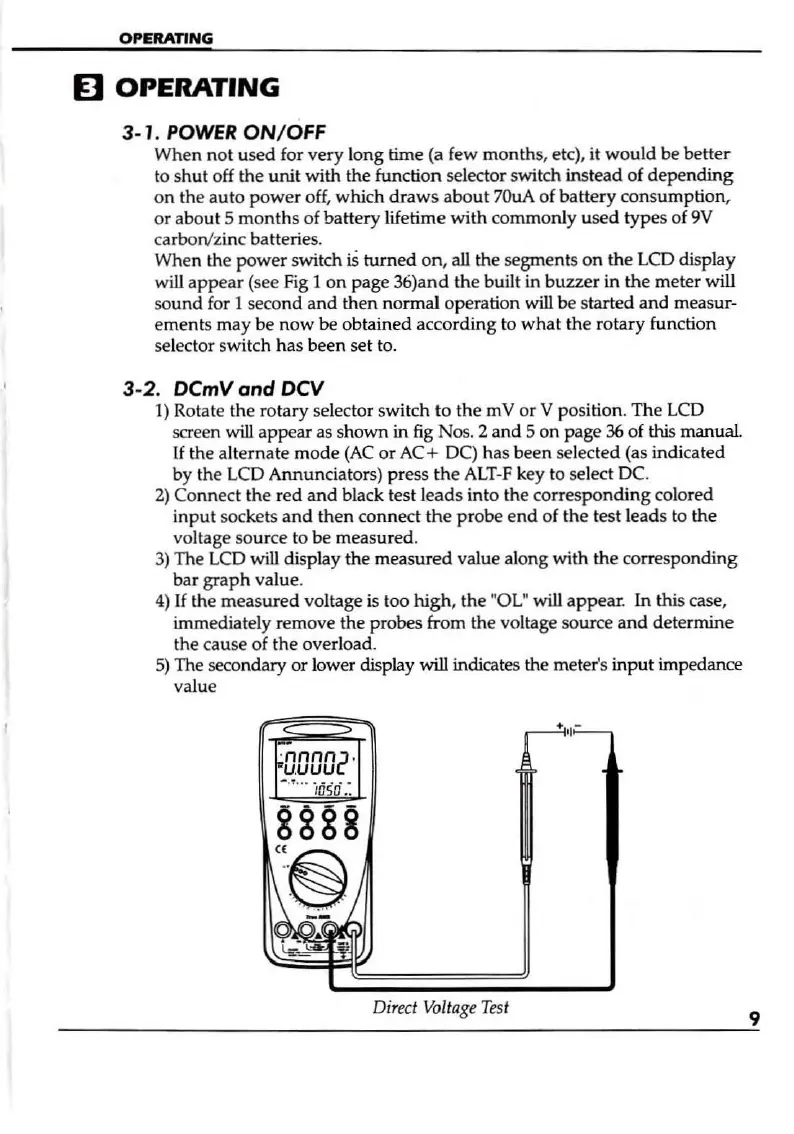
1)
Rotate the rotary selector switch
to
the
mY
or Y position. The
LCD
screen
wiU
appear
as
shown in
fig
Nos. 2 and S on page
36
of
this
manu
al.
If
the alternate
mode
(AC
or
AC+ DC) has been select
ed
(as indicated
by the LCD Annunciators) press
th
e
ALT-F
key to select DC.
2)
Co
nne
ct the red and black test leads into the corresponding colored
input sockets and then connect
the
probe e
nd
of the test leads
to
the
vo
ltage
so
urce to be measured.
3)
The
LCD
will display the measured value along with the corresponding
bar
graph
value.
4)
If
the measured voltage
is
too
high
, the "OL" will appear. In this case,
immediately remove the probes from the voltage source and determine
the
ca
us
e
of
the
ove
rload,
S)
The secondary or lower display
will
indicates the meter's input impedance
value
-
.-----"<""--
'
nnnn2
'
uuuu
-
.
~
.. -
'/liso
.:
8888
(jJ1
iT
~
c,;:,.:,;;o
~"
Dire
ct
Voltage
Test
9


 To Next Page