C5
The reason for disabling the buzzer and email alerts
is because this is a learning stage. The sensor will trip
multiple times but they are not valid alarms and you
don’t want the buzzer to go off/ notifications be sent
during this time.
Let this configuration run for few hours. After that,
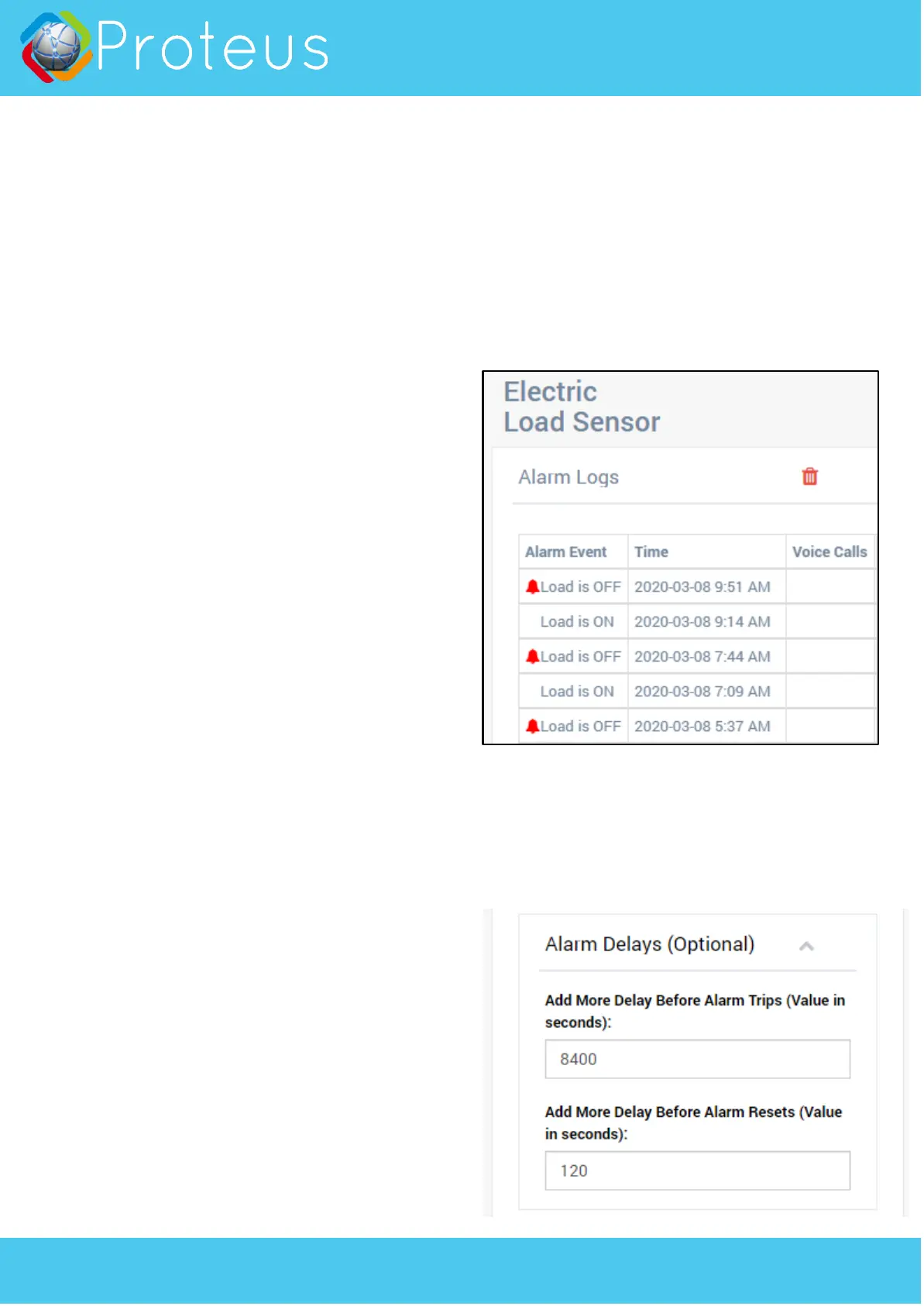
login to the sensor cloud (proteushub.com), and
click on “Alarms” for your sensor.
Look at two consecutive “Load is ON” events. In this
case they are at 7:09 AM and 9:14 AM. This gives a
cycle time of 125 minutes. Check with a few more
consecutive events. You will likely find that they are
not always the same but never the less within a
reasonably close range. Say 120 min, 129 mins, etc.
Sample Configuration 2
In this example, we will setup Proteus C5 to monitor
a normally ON electric load. Eg: Main Electric Motor.
C5 can be used to know when the sump pump turns
off, and on. To achieve this,
1. Set Load normal state to “Normally ON”
2. Set schedule to ON Always.
3. Leave Alarm Delay to 0. Save settings.
To test this setup, simply turn the motor off. The
light on the clamp on module will turn off. In few
seconds, the base unit will start beeping. Alarm
notifications will be sent. After you the motor back
on, the alarm should reset.
Sample Configuration 3
In this example, we will setup Proteus C5 to monitor
a cycling electric load. Eg: Refrigerator. Note that
unlike Normally ON loads, even though the
refrigerator remains cooled, the compressor which is
the electric load, goes ON and OFF based on the
temperature inside, just like a thermostat in your
home. This means that even if the compressor
(electric load) is off, the refrigerator may be working
normally and you don’t need an alert just because
the compressor turned off. The compressor is going
to turn back on when the temperature inside the
refrigerator falls and the cycle continues. You want
to ignore these cycles and want to be alerted if the
compressor remains OFF when it should be turning
ON.
The Learning Stage
The settings, as well as the cycle frequency of each
refrigerator (or similar cycling electric loads) differs
from one another. So, we need to find out how
often the load (compressor in this case) turns on,
and how long it remains off before turning off. To
find this out,
1. Set Load normal state to “Normally ON”
2. Set schedule to ON Always.
3. Leave Alarm Delay to 0.
4. Uncheck “Enable Buzzer”.
5. Uncheck “Email me/ Text me”. Save settings.



 To Next Page
 Loading...