USER MANUAL
PROTEX FINGERPRINT
WALL SAFE
Model: FW-1814Z
REV. 06.12
We recommend hiring a contractor or a handyman to install
the safe in your home or office.
Installation Steps:
1. Locate an interior wall that you would know for sure that there are no pipes
running inside. Make sure there is no bathroom or a shower on the other
side of that wall.
2. Using a Stud Finder, locate a good location between two wall studs at approx.
the height of your eyes.
3. Using a level and a measuring tape, draw a rectangular of 18” high x 14” wide.
(to make sure, measure the size of the back of the safe and make the rectangular
about a ¼” larger to have some play).
4. Using a hand held drywall saw, cut the dry wall according to the marking.
DO NOT USE AN ELECTRIC SAW.
5. Remove the drywall cutout and make sure there are no interference
inside the wall to install the safe
6. Insert the safe into the wall and install to the wall studs from the inside
of the safe using the lag bolts provided. It is recommended to drill pilot holes
for bolts.
Installation:
page 4
page 1
P
P R O T E X
S A F E C O .
Make sure safe is in an upright position. (not laying down).
1. Install the 4 AA batteries in the power override box and plug it
in below the fingerprint reader in the left hole. This will give the
lock power to open the safe so you can install the batteries inside
the safe.
2. Press the wake-up button and place your finger on the glass scanner
until the LED turns green followed by a long beep.
3. The safe door will slowly spring open
NOTE: The safe will open with any finger if no fingerprint is enrolled.
Step 1. – Opening the safe.
(continue next page)
If the internal batteries of the safe die, you can always give power to
the lock from the outside by using the included battery override box.
1. Slide the battery box cover and install 4 AA batteries
2. Plug in the jack in the power override hole in the scanner
3. Now open the safe as you would by using your fingerprint
NEVER LOCK THE POWER OVERRIDE BOX INSIDE THE SAFE.
Using the Power override battery box:
Power Override Box
Install 4 AA batteries in the black battery box located in the
back of the door, inside the safe.

 Need help?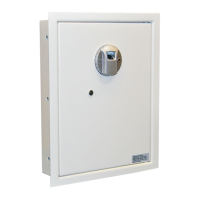

 To Next Page
 General